How to Activate and Manage Your T-Mobile Netflix on Us Benefit Without the Billing Headaches
As of August 2026, T-Mobile's Netflix on Us benefit provides a value of approximately $107 to $120 annually . Most qualifying plans (Go5G, Magenta) now default to the Netflix Standard with Ads tier. To activate, you must use the T-Life app (Manage > See plans > Manage add-ons). If you are an existing Netflix user, you can link your account to preserve your watch history without canceling your current subscription.
For many wireless customers, the "Netflix on Us" benefit is a primary reason for choosing T-Mobile. However, navigating the activation process and understanding the nuances of different plan tiers can be surprisingly complex. In recent months, users have reported specific technical hurdles, such as UI bugs in the T-Life app and unexpected billing loops that can result in double charges if not handled correctly.
This guide provides a deep dive into the 2026 landscape of T-Mobile streaming perks. We will explore which plans qualify, how to navigate the activation portal, and—most importantly—how to avoid common pricing traps that could cost you an extra $150 per year in unnecessary add-on fees. Whether you are a new subscriber or a long-time customer looking to upgrade to 4K streaming, the following sections will help you maximize the value of your cellular plan.
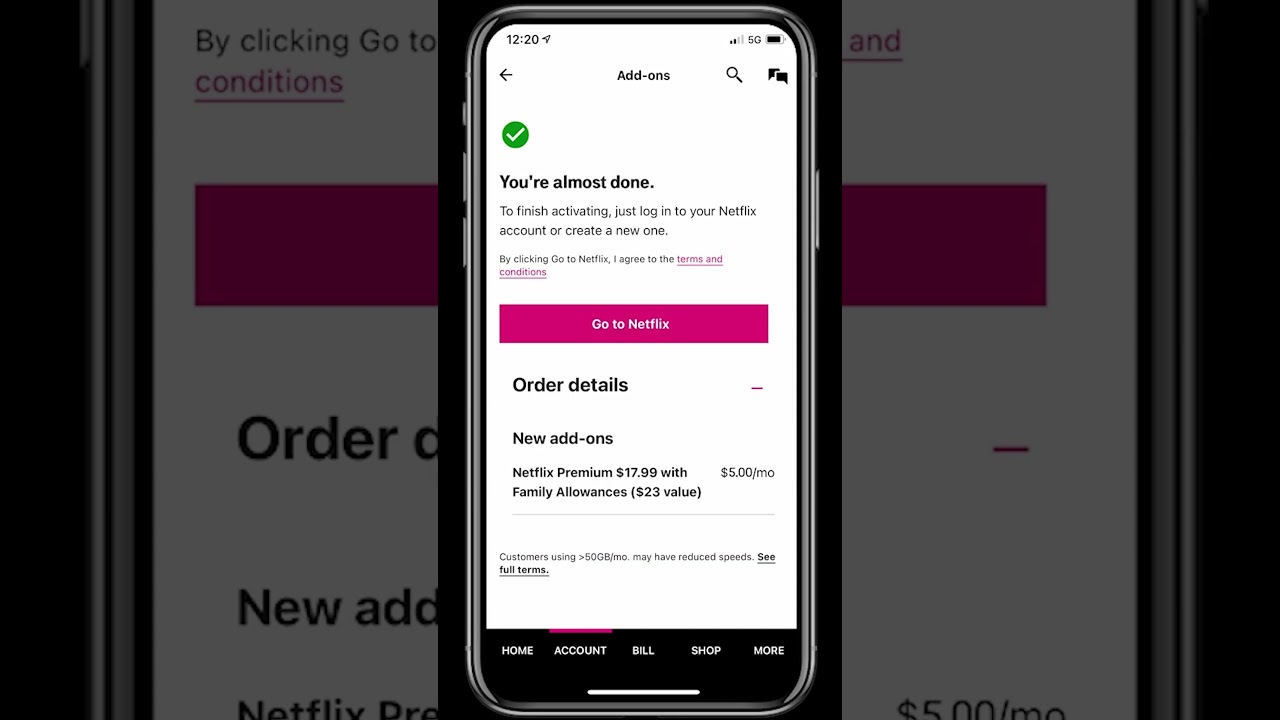
Image source: YouTube
Which T-Mobile Plans Include a Free Netflix Subscription?
Not every T-Mobile plan is eligible for the Netflix benefit. The company has structured its offerings to reward customers on its higher-tier "unlimited" plans. As of the current 2026 service terms, eligibility is primarily determined by your plan family and the number of active lines on your account.
According to official T-Mobile documentation , the following plans typically include the benefit:
- Go5G Next & Go5G Plus: These top-tier plans include Netflix Standard with Ads for single lines and often provide credits toward higher tiers for family plans.
- Go5G & Magenta: Generally require at least two qualifying lines to unlock the Netflix benefit.
- Magenta MAX: A legacy favorite that continues to offer robust streaming credits.
- Discounted Tiers: Eligibility extends to the 55+, Military, and First Responder versions of the plans listed above.
Conversely, several popular plans are excluded from this perk. If you are on T-Mobile Essentials , a Prepaid plan, or a Mobile Internet-only plan (like LineLink or DIGITS), you will not see the Netflix option in your add-ons. For these users, the cost of adding Netflix is paid entirely out-of-pocket, though T-Mobile occasionally offers short-term promotional trials for these customers via the T-Life app.
T-Mobile Netflix Plan Comparison Matrix
| T-Mobile Plan | Included Netflix Tier | Screens | Resolution |
|---|---|---|---|
| Go5G Next (2+ Lines) | Standard with Ads | 2 | 1080p (HD) |
| Go5G Plus (2+ Lines) | Standard with Ads | 2 | 1080p (HD) |
| Magenta MAX | Standard with Ads* | 2 | 1080p (HD) |
| Go5G / Magenta (1 Line) | Not Included | - | - |
*Note: Some legacy Magenta MAX accounts may still hold credits for the Basic (No Ads) tier, but new activations almost exclusively default to the Ad-supported version.
How to Activate Netflix on Us Using the T-Life App
The activation process has shifted away from the traditional T-Mobile website toward the T-Life app (formerly known as T-Mobile Tuesdays). This transition is designed to consolidate all "Magenta Status" perks into a single interface, but it has introduced some technical friction for users on older devices.
To begin activation, follow these steps as outlined by T-Mobile Support :
- Log in as the Primary Account Holder: Only the main account holder has the authority to modify plan add-ons. If you are a secondary user, the Netflix option will likely be hidden.
- Navigate to the Manage Tab: Open the T-Life app and select the "Manage" icon at the bottom of the screen.
- Select "Manage Data and Add-ons": Look for the section labeled "Plans and Add-ons" and tap into your specific line details.
- Find the Netflix Section: Scroll through the list of available services until you see "Netflix on Us." Select the checkbox for the tier included in your plan.
- Complete the Handshake: After selecting the benefit, T-Mobile will redirect you to a Netflix login page. This is the "handshake" that links your cellular billing to your streaming account.
A frequent complaint in community forums like Reddit involves a UI layout bug where the "Continue" or "Agree" button disappears on smaller smartphone screens. Users often report that the app appears "frozen" after they select the Netflix checkbox. The Fix: You must manually scroll past the "Lines" or "Terms" section, which often requires a forceful swipe upward. The button is frequently hidden just below the fold of the screen, and the app does not always provide a scrollbar indicator.
How to Link Your Existing Netflix Account Without Losing Your Watch History
One of the most common fears for new T-Mobile customers is the loss of their Netflix profiles, "My List" selections, and viewing progress. Fortunately, you do not need to cancel your existing Netflix subscription before linking it to T-Mobile. In fact, canceling beforehand can sometimes complicate the billing migration.
When you reach the Netflix redirect page during activation, simply sign in with your existing Netflix credentials . Netflix will recognize the account and present a message stating that your billing is now being managed by T-Mobile. According to Netflix Help , any remaining balance on your account (from a gift card or a partially used month) will be held in credit and applied if you ever leave T-Mobile or downgrade to a plan that doesn't include the benefit.
If you are currently paying Netflix through a third party, such as Apple (iTunes) or Google Play, you must cancel that specific billing relationship first. T-Mobile cannot "take over" a bill that is already being managed by another tech giant's app store. Once the third-party subscription expires, you can then follow the T-Mobile activation steps to link the account.
What You Should Know About the Netflix Standard with Ads Tier
In recent years, the "Standard with Ads" tier has become the baseline for T-Mobile's benefit. While this tier offers 1080p resolution and allows for two simultaneous streams, it comes with limitations that go beyond just the presence of commercials.
The "Locked Content" Reality
A significant point of frustration for users is that the Ad-supported tier does not include the full Netflix library. Due to licensing restrictions, certain movies and TV shows are unavailable on this plan. Users have noted that titles like Dumb Money or specific Sony-distributed films may show a "lock" icon. To watch these titles, you are required to upgrade to an Ad-Free tier, which will incur an additional monthly charge on your T-Mobile bill.
Technical Specifications
- Resolution: Full HD (1080p). This is a significant improvement over the old "Basic" tier which was limited to 720p.
- Concurrent Streams: Two devices can watch at the same time.
- Downloads: Most titles can be downloaded for offline viewing, though some restrictions apply to ad-supported content.
How Much Does It Cost to Upgrade to Netflix Premium on T-Mobile?
If you own a 4K television or have a large household, the "Standard with Ads" tier may feel insufficient. T-Mobile allows users to upgrade to the Netflix Standard (Ad-Free) or Netflix Premium (4K) tiers by paying the difference in price. This is known as the "Pay the Difference" model.
T-Mobile essentially applies a credit to your account (usually $8.99, the value of the Ads tier) and bills the remainder to your cellular statement. As of mid-2026, the upgrade costs typically break down as follows:
| Upgrade Tier | Retail Price | T-Mobile Credit | Your Monthly Cost |
|---|---|---|---|
| Standard (Ad-Free) | ~$15.49 | -$8.99 | ~$6.50 |
| Premium (4K + HDR) | ~$22.99 | -$8.99 | ~$14.00 |
Note: Prices are subject to Netflix's periodic rate adjustments. T-Mobile will notify you via text message if your "Pay the Difference" amount changes due to a Netflix price hike.
Why You Should Avoid the T-Mobile Extra Member Add-on Trap
With Netflix's crackdown on password sharing, many users are looking for ways to add family members who live outside their primary household. T-Mobile offers an "Additional Netflix Account" add-on, but this is often a pricing trap that can lead to significantly higher costs.
In many account dashboards, T-Mobile lists an "Extra Netflix Line" for approximately $25 per month . This effectively creates a second, entirely separate Netflix account. However, Netflix offers a native "Extra Member" feature for roughly $7.99 to $9.99 per month (depending on the region and tier).
If you need to share your account with someone outside your home, do not add the $25 line through T-Mobile. Instead, log into your Netflix account directly on the web and add an "Extra Member" slot. You will pay Netflix the ~$9 directly via credit card, while T-Mobile continues to cover your primary subscription. This saves you roughly $15 per month ($180/year) compared to the T-Mobile add-on option.
How to Fix Common T-Mobile Netflix Activation and Billing Errors
Even with a qualifying plan, the "handshake" between T-Mobile and Netflix can fail, leading to a "Billing Loop." This occurs when Netflix asks for a credit card payment despite the T-Mobile benefit being active in the T-Life app.
The "Recover Account" Loophole
If you find yourself stuck in a loop where Netflix doesn't recognize your T-Mobile benefit, the standard advice to "log out and log back in" rarely works. Instead, use the Recover Your Account link hidden within the T-Mobile web dashboard. Navigate to Account > Profile Settings > Shared Add-ons > Netflix . Often, there is a small text link that says "Having trouble? Resync your account." Clicking this forces a fresh signal to Netflix, which usually clears the billing error within minutes.
Confirming Your Status
To ensure you aren't being double-billed, always check your Netflix Account page. Under the "Membership and Billing" section, it should explicitly state: "Billed through T-Mobile." If you see a credit card number or "Billed through Apple," the link is not active, and you are paying twice for the same service.
Image source: YouTube
Frequently Asked Questions
- Can I get Netflix on T-Mobile Essentials?
- No, the Essentials plan is a budget-friendly tier that excludes most "Experience Beyond" perks, including Netflix on Us. To get the benefit, you would need to migrate to a Go5G or Magenta tier, which may increase your monthly service cost.
- How many screens can I watch at once?
- This depends on the tier included in your plan. The standard "Netflix on Us" benefit (Standard with Ads) allows for two simultaneous streams. If you upgrade to the Premium tier through T-Mobile, you can watch on up to four screens at once in 4K resolution.
- Why am I still being charged by Netflix on my credit card?
- This usually happens if the "handshake" process wasn't completed or if you have a legacy billing method (like iTunes) that takes precedence. You must ensure your Netflix account settings show "Billed through T-Mobile." If it doesn't, use the "Recover Account" link in your T-Mobile dashboard to re-link the services.
- Does T-Mobile Netflix include Hulu or Disney+?
- Netflix on Us is a standalone benefit. While T-Mobile does offer Hulu (With Ads) and Apple TV+ on specific plans like Go5G Next, these are separate add-ons that must be activated individually through the T-Life app.
- What happens to my Netflix account if I cancel T-Mobile?
- Your Netflix account will not be deleted. Instead, Netflix will attempt to bill the backup payment method you have on file. If no backup method exists, the account will be put on hold until you provide a new form of payment.
The Bottom Line on Maximizing Your T-Mobile Streaming Benefits
T-Mobile's Netflix benefit remains a top-tier perk in the wireless industry, providing significant annual savings for families and heavy streamers. To ensure you are getting the most value, keep these key takeaways in mind:
- Verify your plan eligibility before attempting activation; single-line Go5G plans usually do not qualify.
- Use the T-Life app for activation, but be prepared to scroll aggressively to find the "Hidden Continue Button."
- Link your existing email to Netflix during the handshake to keep your profiles and watch history intact.
- Audit your bill for the "Extra Member" trap; paying Netflix directly for additional users is much cheaper than the T-Mobile add-on.
- Check for locked content on the Ads tier; if your favorite show is unavailable, the $6.50 upgrade to Ad-Free is often worth the cost.
- Use the "Recover Account" link in the T-Mobile dashboard if you encounter a billing loop or double charges.
Take a moment today to log into your T-Life app and confirm your Netflix status to ensure you aren't leaving money on the table.

How to Get and Activate Your T-Mobile Hulu On Us Benefit
Learn how to activate your T-Mobile Hulu benefit, fix common billing errors, and check eligibility for Go5G and legacy plans in 2026.


How to Get the AT&T Free Trial and Test the Network for 30 Days
Test the AT&T network with 100GB of 5G data for 30 days. Learn about eSIM setup, Android support, and how to avoid fees on Fiber trials.


How to Watch Free Movies and Live TV on Pluto TV Without a Subscription
Is Pluto TV free? Stream 100s of live channels and 1000s of movies legally without fees. Learn about hidden features and troubleshooting tips.