What Is YouTube TV and How Does It Work as a Cable Replacement?
YouTube TV is a subscription-based streaming service that provides live local and cable channels over the internet. Unlike standard YouTube, it functions as a full cable replacement with 100+ channels, including ABC, CBS, FOX, and NBC. As of 2026, it costs $82.99/month and features an unlimited cloud DVR, making it a top-tier choice for cord-cutters who want a familiar TV experience without long-term contracts or bulky equipment.
What Exactly Is YouTube TV?
YouTube TV is what the industry calls a "vMVPD" (virtual Multichannel Video Programming Distributor). In simpler terms, it is a service that delivers the same live television feeds you would get from Comcast or Spectrum, but it transmits them via your high-speed internet connection rather than a coaxial cable or satellite dish. Owned and operated by Google, it has grown to become the largest live TV streaming service in the United States, recently surpassing 10 million subscribers according to market data .
The core value proposition of YouTube TV lies in its simplicity. There are no annual contracts, no hidden "broadcast recovery fees," and no physical set-top boxes to rent. You simply download an app on your smart TV or streaming stick, sign in with your Google account, and start watching. It covers over 98% of U.S. households, ensuring that almost every user has access to their specific local news and weather stations.
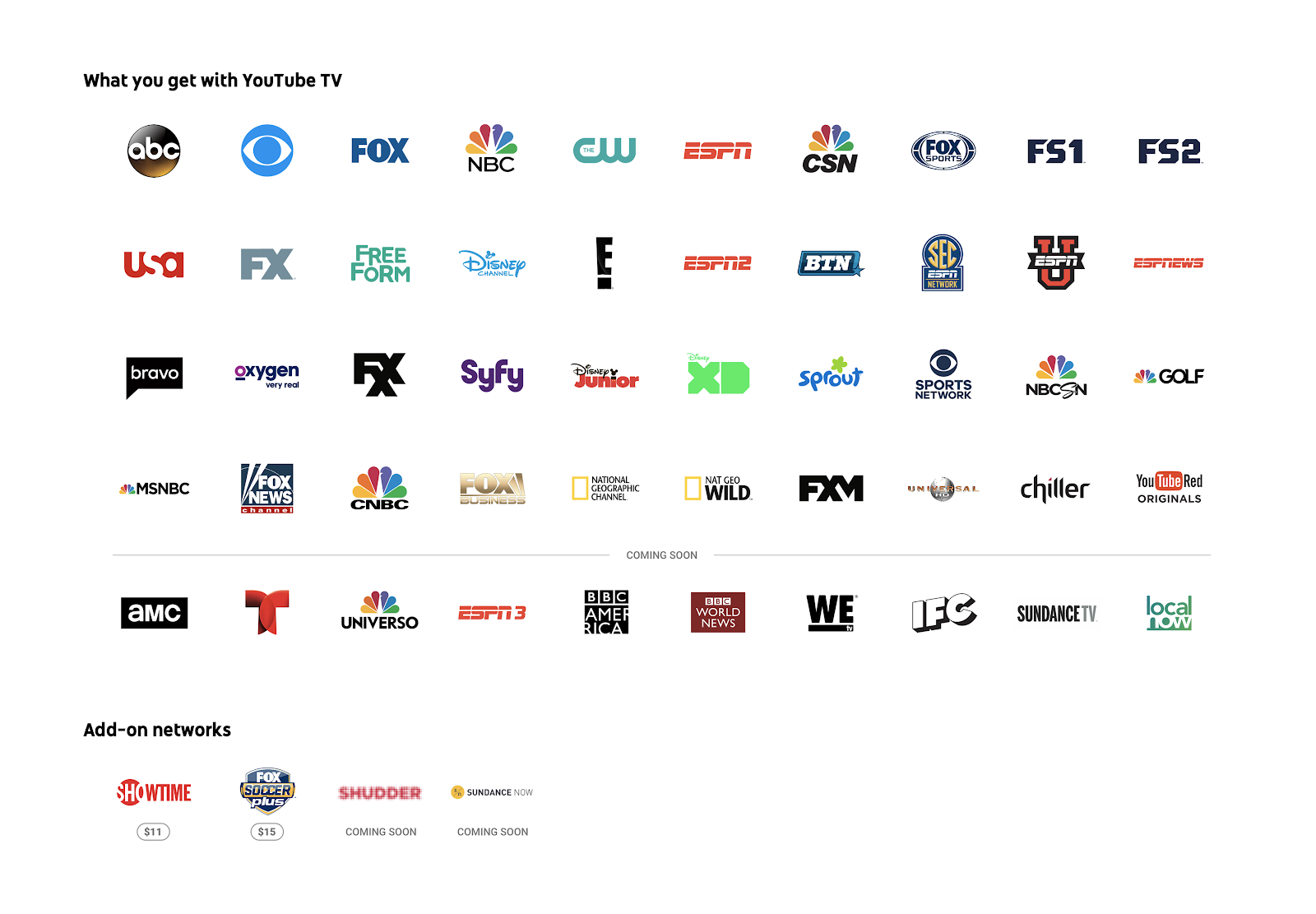
Image source: YouTube Blog
While it shares the "YouTube" branding, it is a distinct product from the video-sharing platform we all know. It is designed for lean-back viewing—watching the Super Bowl, catching the nightly news, or recording a full season of a sitcom. It bridges the gap between traditional linear television and the modern era of on-demand streaming.
YouTube TV vs. YouTube Premium — What Is the Difference?
One of the most frequent points of confusion for new users is the distinction between YouTube TV and YouTube Premium. Despite the similar names, they are separate subscriptions that serve entirely different purposes. Subscribing to one does not automatically grant you access to the other.
Key Differences at a Glance
| Feature | YouTube TV | YouTube Premium |
|---|---|---|
| Primary Content | Live Broadcast & Cable Channels | Ad-free standard YouTube videos |
| Local Channels | Yes (ABC, CBS, NBC, FOX) | No |
| DVR/Downloads | Unlimited Cloud DVR | Offline video downloads |
| Music Included | No | Yes (YouTube Music Premium) |
| Typical Use Case | Replacing Cable TV | Enhancing the YouTube experience |
If your goal is to watch live sports or the local news, YouTube TV is the service you need. If you are tired of seeing ads before watching a DIY tutorial or a music video on the standard YouTube site, YouTube Premium is the correct choice. Many power users choose to subscribe to both, but Google currently offers very few bundled discounts for the pair.
How Much Does YouTube TV Cost Each Month?
As of late 2026, the pricing structure for YouTube TV has stabilized following several years of industry-wide increases. The service is positioned as a premium cable alternative, and its pricing reflects the rising costs of sports and broadcast rights.
- Base Plan: $82.99 per month. This includes 100+ channels and the unlimited DVR.
- Introductory Offer: New subscribers often receive a discounted rate of $67.99 per month for the first three months of service.
- Sports Plus Plan: A specialized $64.99/month option exists for those who prioritize sports networks but do not require the full entertainment and news lineup.
The "Pause" Strategy: If you only watch TV for a specific season (like NFL or NBA), you can pause your subscription for up to 6 months in the settings. This stops all billing immediately but—crucially—preserves your entire DVR library and settings until you resume. This is a significant advantage over competitors who often wipe your data if you cancel.
Optional Add-ons and Bundles
Beyond the base plan, users can customize their experience with several high-value add-ons. The 4K Plus package ($9.99/mo) is particularly popular, as it enables 4K streaming for supported events and, perhaps more importantly, allows for unlimited simultaneous streams on your home Wi-Fi network. For movie buffs, the Entertainment Plus bundle ($29.99/mo) combines Max, Paramount+ with SHOWTIME, and STARZ into a single monthly bill, often saving a few dollars compared to individual subscriptions.
Which Channels Are Included in the Base Plan?
The channel lineup is widely considered one of the strongest in the streaming industry because it balances local essentials with national cable staples. According to the official channel list , the service provides a comprehensive mix of genres.
Local and News Coverage
YouTube TV stands out for its near-universal coverage of local affiliates. In almost every U.S. market, you will receive ABC, CBS, FOX, and NBC. This is supplemented by national news powerhouses like CNN, MSNBC, FOX News, and BBC World News. For those in major metropolitan areas, you may also receive local "sub-channels" like MeTV or Comet.
Sports and Entertainment
Sports fans are well-served with the inclusion of ESPN, ESPN2, FS1, FS2, and the NFL Network. The service also includes the "Big Three" of tournament basketball: TNT, TBS, and TruTV. On the entertainment side, staples like HGTV, Food Network, Disney Channel, AMC, and Bravo are all included in the standard $82.99 package.
Image source: PCMag
One notable limitation involves Regional Sports Networks (RSNs). While YouTube TV carries some, it lacks many of the Bally Sports or NBC Sports regional feeds found on competitors like Fubo or DirecTV Stream. If watching your local MLB or NHL team is your primary requirement, you should verify your specific zip code on the YouTube TV site before committing.
How to Use the Unlimited Cloud DVR Like a Pro
The Cloud DVR is arguably the most significant advancement YouTube TV offers over traditional cable. Unlike a physical DVR box that has a limited hard drive, YouTube TV provides unlimited storage . You can record every single NFL game, every episode of a 20-season show, and every nightly news broadcast simultaneously without ever running out of space.
The 9-Month Rule
While storage is unlimited, it is not permanent. Each recording is kept for exactly 9 months from the date it was recorded. If a show re-airs within that window, the timer resets for that specific episode. This is a generous window compared to the 30-day or 90-day limits often seen in the industry.
The VOD vs. DVR Ad Hack: When you go to your "Library" to watch a show, you might see two versions: "DVR" and "VOD" (Video on Demand). The VOD version is provided by the network and usually has forced, unskippable commercials. The DVR version is your personal recording. Always select "Choose Version" and pick the DVR copy to ensure you can fast-forward through commercials.
Individual Profiles for the Whole Family
A single YouTube TV subscription allows for up to 6 individual profiles. Each family member gets their own private DVR library. If you record "Grey's Anatomy" and your spouse records "SportsCenter," your libraries will remain separate, and your recommendations will not be cluttered by each other's viewing habits. This is a top-tier feature for large households.
Power-User Tips for Navigating the Interface
While the interface is intuitive, there are several hidden shortcuts and customization options that many users overlook. These tips can significantly improve your daily viewing experience.
The "Last Channel" Shortcut
One of the most common complaints from cable converts is the lack of a "Previous" button on streaming remotes. YouTube TV has a hidden fix for this: Long-press the "Select" or "OK" button on your remote while watching live TV. This will automatically toggle you back to the last channel you were viewing. It is an essential trick for sports fans jumping between two games.
Customizing Your Live Guide
The default channel order can feel cluttered. To fix this, do not use the TV app; instead, open a web browser on your computer or phone and go to your YouTube TV settings. Under the "Live Guide" section, you can "Sort & Hide" channels. You can move your favorites to the top and completely hide channels you never watch (like shopping networks). These changes will automatically sync to your Firestick, Roku, or Smart TV.
Finding the Hidden Clock
For years, users have requested a permanent clock on the screen. While there isn't one in the corner of every show, you can quickly see the current time by pressing "Down" twice on your remote while watching a program. This brings up the secondary menu where the current time is displayed in the top left corner of the overlay.
Which Devices Can You Use to Watch YouTube TV?
YouTube TV is compatible with virtually every modern screen. According to Google's support documentation , the service supports the following hardware:
- Streaming Sticks: Amazon Fire TV Stick (all models), Roku (Express, Stick, Ultra), and Apple TV 4K.
- Smart TVs: Native apps for Samsung (2016+), LG (2016+), Vizio SmartCast, and any TV running Android TV or Google TV (Sony, Hisense, TCL).
- Gaming Consoles: PlayStation 5, PlayStation 4, Xbox Series X/S, and Xbox One.
- Mobile & Web: iOS and Android smartphones/tablets, and any modern web browser at tv.youtube.com.
Image source: Mashable
It is important to note the simultaneous stream limit . By default, you can watch on 3 different devices at the same time. If you try to start a 4th stream, one of the others will be cut off. As mentioned earlier, the 4K Plus add-on removes this limit for devices connected to your home network, which is a significant benefit for large families.
Common Problems and How to Fix Them
No service is perfect, and YouTube TV users occasionally run into technical hurdles. Most of these are related to location settings or internet bandwidth rather than the service itself.
The Zip Code Trap
Because YouTube TV provides local channels, it needs to know exactly where you are. If you live near a county border, your TV might occasionally think you are in a different market, giving you the wrong local news. To fix this, go to Settings > Area > Current Playback Area on your TV. It will ask you to verify your location using your smartphone's GPS. This usually resolves the issue instantly.
License and Playback Errors
Users on older Sony Bravia TVs or certain Roku models sometimes encounter a "Trouble with License" error. This is often caused by a handshake issue between the app and the device's digital rights management (DRM) software. The most effective fix is to perform a "System Restart" from your device's settings menu rather than just turning the TV off and on.
Internet Speed Requirements
To avoid buffering, you need a stable connection. Google recommends the following speeds:
- 3 Mbps: Minimum for standard definition.
- 13 Mbps: Recommended for a single reliable HD stream.
- 25 Mbps: Required for 4K streaming or multiple simultaneous HD streams.
Is YouTube TV Actually Better Than Cable?
Deciding whether to switch depends on your specific viewing habits. For most users, the lack of hidden fees and the flexibility of the DVR make it a superior choice, but there are trade-offs to consider.
| Feature | YouTube TV | Hulu + Live TV | Fubo |
|---|---|---|---|
| Base Price | $82.99 | $81.99 | $79.99+ |
| DVR Storage | Unlimited (9 months) | Unlimited | 1,000 hours |
| Sports Focus | High (NFL Ticket) | Moderate (ESPN+) | Exceptional (RSNs) |
| Ad-Free VOD | No | Yes (with bundle) | No |
YouTube TV ranks among the top options for those who want the most "cable-like" experience. Its interface is faster and more responsive than Hulu's, and its DVR system is more user-friendly than Fubo's. However, if you are a die-hard fan of a local baseball team that only airs on a specific Regional Sports Network, Fubo might be a more appropriate choice despite its storage limits.
Frequently Asked Questions
Yes, YouTube TV is fully supported on all modern Amazon Fire TV devices. You can find the app by searching for "YouTube TV" in the Amazon Appstore. Once downloaded, you will be prompted to sign in via a web code on your phone or computer. The Firestick version of the app is highly optimized and supports features like Multiview and the custom live guide.
Yes, YouTube TV provides local affiliates for ABC, CBS, FOX, and NBC in over 98% of U.S. television markets. It also carries other local staples like PBS, The CW, and Telemundo in many areas. You can verify exactly which local stations are available in your area by entering your zip code on the YouTube TV welcome page before you sign up for a trial.
YouTube TV allows for a "Family Group" of up to 6 people, but Google's terms of service require that all members live in the same household. The service uses your "Home Area" zip code to enforce this. Family members must occasionally connect to the home Wi-Fi network to keep their access active. If a user is away from the home network for more than 90 days, their access may be restricted until they return.
Google almost always offers a free trial for new subscribers. The length of the trial typically ranges from 7 to 14 days, though special promotions occasionally extend this to 21 days. Be aware that you must provide a payment method upfront, and you will be automatically charged the full monthly rate once the trial period ends unless you cancel beforehand.
Yes, YouTube TV is the exclusive home of NFL Sunday Ticket. While it is not included in the base $82.99/month subscription, it is integrated directly into the YouTube TV interface as an optional add-on. This allows you to watch every out-of-market Sunday afternoon game and use features like Multiview to watch four games at once on a single screen.
The Bottom Line
YouTube TV has established itself as a premier cable alternative by focusing on reliability, a massive DVR, and a clean user interface. If you are looking to save money while keeping your local channels and sports, it is a strong contender for your primary TV service.
- Base Price: Expect to pay $82.99/month for the full experience.
- DVR Advantage: Take advantage of the unlimited storage, but remember the 9-month expiration.
- Channel Strength: You get all major locals and top sports networks like ESPN and NFL Network.
- Device Flexibility: Works on Firestick, Roku, Apple TV, and most Smart TVs.
- Pro Tip: Use a web browser to customize your channel guide for a much cleaner TV experience.
- Family Sharing: Share with up to 5 other household members, each with their own DVR.
To get started, check your local channel availability on the official website and sign up for a free trial to test your internet connection's stability.
-
Topic: YouTube TV - Watch & DVR Live Sports, Shows & Newshttps://tv.youtube.com/welcome/
-
Topic: Can someone explain YTTV to me in simple termshttps://www.reddit.com/r/youtubetv/comments/1nooc1t/can_someone_explain_yttv_to_me_in_simple_terms/
-
Topic: What is YouTube TV?https://support.google.com/youtubetv/answer/7069119?hl=en

How to Use YT Studio to Manage and Grow Your YouTube Channel
Manage your channel, fix login errors, and use advanced analytics to grow on YouTube desktop and mobile in 2026.


How to Search YouTube Search to Find Exactly What You Are Looking For
Master YouTube search with advanced operators, filters, and tools to bypass the algorithm and find exactly what you need on any device.

How to Watch Free Movies and Live TV on Pluto TV Without a Subscription
Is Pluto TV free? Stream 100s of live channels and 1000s of movies legally without fees. Learn about hidden features and troubleshooting tips.