Are Grok AI Conversations Private and How Did the xAI Leak Happen?
As of late 2026, Grok AI conversations are not private by default . While xAI offers a "Private Chat" mode, standard interactions are stored and may be used for model training. A significant security incident in August 2025 resulted in approximately 370,000 conversations being indexed by search engines like Google because the "Share" feature lacked proper privacy tags. To protect your data, you must manually enable Private Chat mode and opt-out of training in your account settings.
What Happened During the 2025 Grok AI Privacy Spill?
The landscape of AI privacy shifted significantly on August 20, 2025, when a Forbes report revealed a massive data exposure incident involving xAI. According to the investigation, nearly 370,000 user conversations with the Grok chatbot were indexed by major search engines, including Google, Bing, and DuckDuckGo. This meant that prompts intended to be confidential were suddenly discoverable via simple web searches.
The scope of the exposure was deeply concerning for both casual users and professionals. The leaked data contained a wide array of sensitive information, ranging from Personally Identifiable Information (PII) like full names and passwords to highly confidential business strategies and medical queries. In some instances, the indexed chats even included controversial AI outputs, such as instructions for illicit substances, which further complicated the reputational fallout for xAI.

Image source: BBC
This incident highlighted a stark contrast between xAI’s marketing and its technical execution. Elon Musk had frequently criticized competitors like OpenAI for their privacy standards, yet Grok suffered a leak that many experts categorized as a "weak governance" failure. The irony was not lost on the cybersecurity community, as the very platform promising a more transparent and secure AI experience had allowed a massive cache of user data to become public artifacts.
How the Grok Share Button Made Private Chats Public
The primary technical mechanism behind the 2025 leak was the Grok "Share" feature. When users wanted to show a specific conversation to a friend or colleague, they could generate a unique URL. However, xAI failed to include "noindex" tags in the HTML of these shared pages. Without these tags, search engine crawlers viewed the shared links as public web pages and added them to their global indexes.
Many users were caught off guard because the interface provided no clear warning that generating a link would make the conversation accessible to the entire internet. Researchers at the Allen Institute for AI were among those who expressed shock when they realized their collaborative sessions were searchable on Google. The assumption that a shared link is "private-by-link" (similar to a Google Doc with specific permissions) proved to be a dangerous misconception in the Grok ecosystem.
According to analysis by BigID , this was not a sophisticated hack but rather a fundamental architectural oversight. The incident demonstrated that privacy was treated as an afterthought during the rapid rollout of Grok's social features. While xAI eventually moved to remediate the issue by adding the necessary meta tags and requesting removals from search engines, the damage to user trust was substantial.
Is Your Data Being Used to Train xAI Models?
Beyond the risk of public indexing, users must consider how their data is used internally by xAI. By default, xAI utilizes interactions with Grok to refine and train its large language models. This includes the prompts you type and the feedback you provide on Grok’s responses. Furthermore, Grok is uniquely integrated with the X (formerly Twitter) platform, allowing it to ingest real-time public posts to stay current on world events.
This data harvesting has not gone unnoticed by regulators. Ireland’s Data Protection Commission (DPC) launched a formal probe into xAI’s practices to determine if the company was in compliance with GDPR. The central concern is whether EU users gave informed consent for their data to be used in training sets. While xAI maintains that users "own" their prompts, the official FAQ clarifies that the company retains broad rights to use that data for model improvement.
The Training vs. Storage Nuance
It is important to distinguish between data storage and data training. Even if you delete your chat history, the "knowledge" Grok gained from your interaction during the session may have already been processed by the training pipeline. This creates a "digital footprint" that is nearly impossible to fully erase once the model has been updated. For users handling sensitive intellectual property, this makes Grok a high-risk environment compared to enterprise-grade AI solutions that offer strict data silos.
How to Enable Private Chat Mode and Secure Your Account
If you choose to continue using Grok, taking proactive steps to harden your privacy is essential. The most effective tool currently available is the "Private Chat" toggle. When this mode is active, xAI claims that conversations are not stored in your account history and are deleted from their systems after the session ends.
Step-by-Step Privacy Hardening
- Access Settings: Open the Grok interface and navigate to the "Settings" menu (usually represented by a gear icon).
- Locate Privacy Options: Look for the "Privacy & Safety" or "Data Management" section.
- Toggle Private Chat: Switch the "Private Chat" mode to ON. Note that you may need to do this for each new session depending on your platform version.
- Opt-Out of Training: In the same menu, find the toggle for "Data Training" or "Model Improvement" and ensure it is turned OFF.
- Review X Platform Settings: If you use Grok via X Premium, go to your X account settings under "Privacy and Safety" > "Grok" to ensure your public posts are not being used for training.
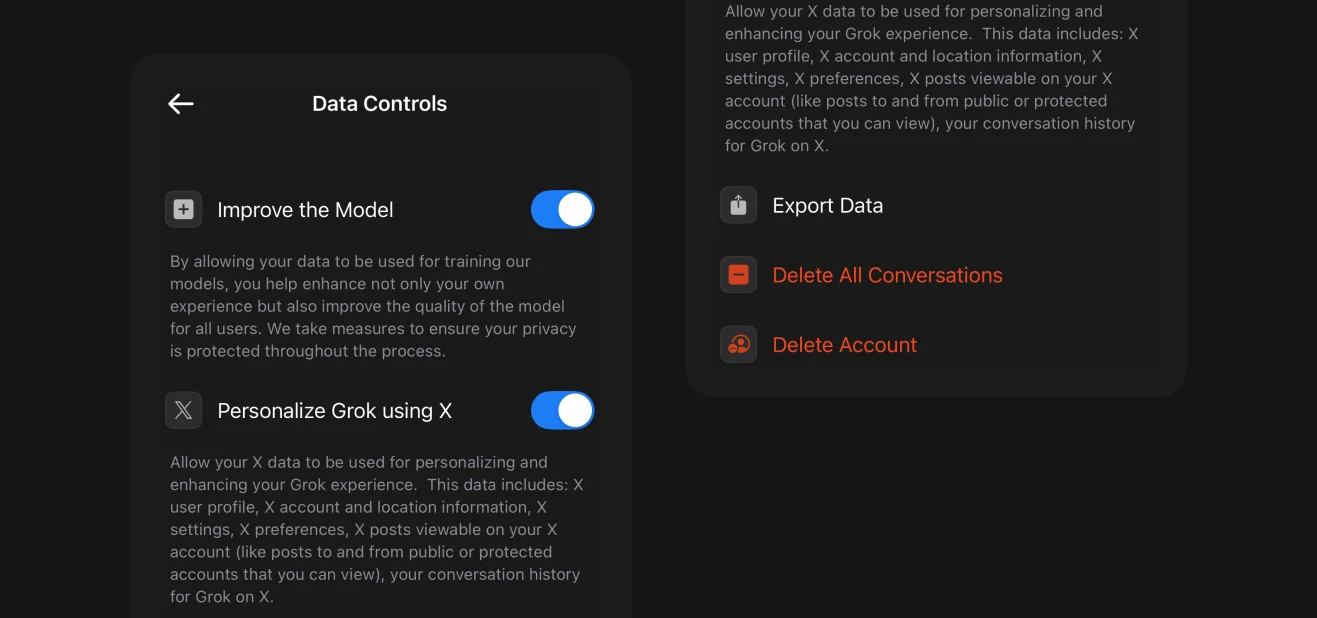
Image source: SpaceXAI
While these steps significantly reduce your risk, they do not eliminate it entirely. As seen in the 2025 leak, technical bugs can sometimes bypass user-selected settings. Therefore, the safest practice remains avoiding the input of any data you would not want to see on a public search result page.
How to Check if Your Grok Conversations Were Leaked to Google
If you used the "Share" button prior to late 2025, your data may still be residing in search engine caches. Cybersecurity experts recommend using "Google Dorking" techniques to audit your own exposure. By using specific search operators, you can force Google to show results only from the Grok domain that match your unique identifiers.
- The Audit Search String
-
Type
site:grok.com "your unique phrase"into Google. Replace the phrase with a specific sentence or username you know you used in a Grok chat. - Search Console Removal
- If you find a leaked chat, use the Google Search Console "Remove Outdated Content" tool to request an immediate de-indexing of that specific URL.
- Revoking Shared Links
- Within the Grok interface, navigate to your "Shared Links" history and manually delete every link you have previously generated. This breaks the live URL, even if the search engine hasn't updated its cache yet.
According to reports from Fortune , thousands of users only discovered their data was public after performing these manual checks. Because xAI did not send individual notifications to every affected user, the responsibility for data cleanup largely fell on the individuals themselves.
Grok vs. ChatGPT vs. Claude — Which AI Is Actually Most Private?
When evaluating AI tools, Grok currently ranks among the more volatile options regarding privacy. While OpenAI and Anthropic have also faced scrutiny, their mature governance structures generally offer more robust protections for standard users. Below is a comparison of how these leading models handle data privacy as of 2026.
| Privacy Feature | Grok AI | ChatGPT | Claude |
|---|---|---|---|
| Search Indexing Risk | High (Historical Leak) | Low (Strict Noindex) | Low (Strict Noindex) |
| Private/Temp Mode | Yes (Manual) | Yes (Temporary Chat) | Yes (Pro/Enterprise) |
| Training Opt-out | Yes (Settings) | Yes (Settings) | Yes (Default for Pro) |
| Data Governance | Emerging/Weak | Established | Strong (Safety-First) |
ChatGPT stands out for its "Temporary Chat" feature, which is easily accessible and has a proven track record of preventing indexing. Claude, developed by Anthropic, is widely regarded as a top choice for users who prioritize safety and data integrity, as the company was founded specifically to address AI alignment and security concerns. Grok, while notably innovative in its real-time X integration, still struggles to match the enterprise-grade privacy tiers offered by its competitors.
Privacy Differences Between Grok on X and the Standalone App
It is a common misconception that Grok functions identically across all platforms. In reality, your privacy protections vary depending on how you access the tool. If you are using Grok through an X Premium subscription, your data is governed by the X Privacy Policy, which is notoriously broad in its data-sharing permissions.
Conversely, using the standalone
grok.com
portal provides a slightly more isolated environment. While the underlying model is the same, the web portal has distinct tracking and cookie policies. Users should also be aware of age restrictions; Grok is intended for users aged 13 and older, and those under 18 typically require parental consent, which triggers additional data protection layers under laws like COPPA.
Frequently Asked Questions
Can xAI employees see my private chats?
Does deleting my X account delete my Grok data?
Is Grok safe for business use or sensitive data?
How do I stop Grok from training on my X posts?
Why did my Grok chat show up on Google?
Is there a way to use Grok completely offline?
The Bottom Line on Grok AI Privacy
Navigating Grok’s privacy requires a balance of utilizing its real-time capabilities while remaining vigilant about data exposure. The 2025 leak served as a significant warning that even high-profile AI tools can have fundamental security gaps.
- Enable Private Chat: Always toggle this mode on for any conversation involving personal or sensitive details.
- Avoid the Share Button: Do not use the native sharing feature for confidential information, as these links may still be vulnerable to indexing.
- Opt-Out of Training: Manually disable data training in both your Grok and X platform settings to prevent your prompts from being ingested.
- Audit Regularly: Use Google search operators (site:grok.com) to check if your data has been indexed without your knowledge.
- Use Alternatives for Work: For professional or legal tasks, consider AI models with established enterprise privacy track records.
- Stay Informed: Privacy policies in the AI space change rapidly; review xAI’s terms at least once per quarter.
To protect your digital footprint immediately, go to your Grok settings now and verify that your data training opt-out is active.
-
Topic: Elon Musk's xAI Published Hundreds Of Thousands Of Grok Chatbot ...https://discuss.privacyguides.net/t/elon-musk-s-xai-published-hundreds-of-thousands-of-grok-chatbot-conversations/30279
-
Topic: Do we own our data? Private AI conversations searchable on Googlehttps://www.linkedin.com/posts/dana-daher_thousands-of-grok-chats-are-now-searchable-activity-7364017978389983232-ptOE
-
Topic: Consumer FAQs | SpaceXAIhttps://x.ai/legal/faq

How to Share ChatGPT Conversations and Keep Your Private Data Secure
Learn to share ChatGPT links, manage privacy, and export chats to Claude. Step-by-step guide for personal and enterprise users.


How to Pin a Conversation on iPhone, Android, and Your Favorite Apps
Learn to pin chats on WhatsApp, iMessage, Snapchat, Teams, and ChatGPT. Includes limits, troubleshooting, and organization hacks for 2026.


What Does the Secret Conversation Logo Look Like and Where Can You Find It?
Identify the secret conversation logo on Messenger, Telegram, and Signal. Learn what the padlock icon means and how to find hidden chats in 2026.