
How to Find and Activate Your Windows 10 Product Key
To find your Windows 10 product key on a working PC, open
PowerShell as Administrator
and run:
(Get-CimInstance -ClassName SoftwareLicensingService).OA3xOriginalProductKey
. If your PC was pre-installed with Windows, the key is likely embedded in the motherboard firmware. For retail copies, your activation is often a
Digital License
linked to your Microsoft Account, meaning you don't need a physical 25-character key to reinstall.
Navigating the complexities of Windows activation can feel overwhelming, especially as Microsoft shifts away from traditional alphanumeric codes toward cloud-based entitlements. Whether you are performing a clean installation, upgrading your hardware, or simply trying to remove the "Activate Windows" watermark, understanding how a Windows 10 product key functions is essential for maintaining a licensed and supported system.
In this guide, we will explore the technical nuances of activation, from extracting keys using modern PowerShell commands to troubleshooting the common pitfalls of hardware migrations. As of 2026, the landscape of Windows licensing has matured, making it easier to manage your software provided you know where to look and which tools to use.
What Is a Windows 10 Product Key and How Does It Work?
A Windows 10 product key is a specific 25-character alphanumeric code used to verify that your copy of Windows is genuine. The format follows a strict pattern:
XXXXX-XXXXX-XXXXX-XXXXX-XXXXX
. This code acts as a certificate of authenticity, signaling to Microsoft's activation servers that the software has been purchased and is being used according to the licensing terms.
It is important to distinguish between activation and validation . According to Microsoft Support , activation helps verify that your copy of Windows is genuine and hasn’t been used on more devices than the Microsoft Software License Terms allow. Validation, on the other hand, is an ongoing process that ensures the system files haven't been tampered with or corrupted by malware.
When you enter a key, Windows generates a unique "hardware hash"—a digital fingerprint of your PC's components (primarily the motherboard). This hash is sent to Microsoft. If the key is valid, the server records the link between that key and your hardware. This is why you can often reinstall Windows on the same machine without re-entering the key; the servers recognize your hardware hash and auto-activate the system.
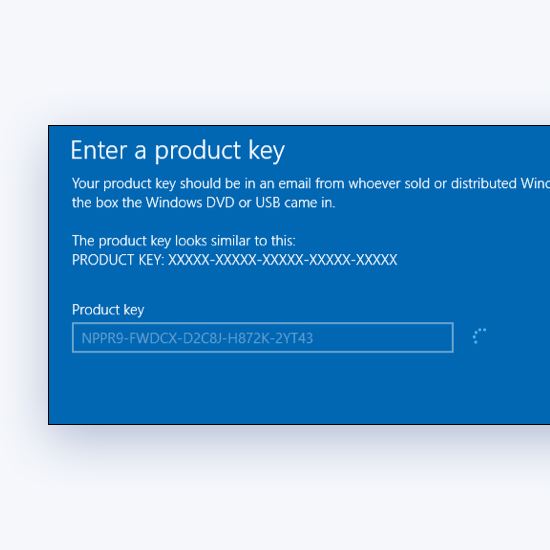
Image source: SoftwareKeep
How to Find Your Windows 10 Product Key on a Working PC
If you need to recover a key from a machine that is already running, you have several options. The method you choose depends on whether the key was provided by the manufacturer (OEM) or purchased separately (Retail).
Use PowerShell to Extract the Key from Firmware
For most modern laptops and pre-built desktops, the product key is stored in the UEFI/BIOS firmware. This is known as an OEM (Original Equipment Manufacturer) key. While older guides often suggest using the
wmic
command, that tool has been deprecated in recent Windows builds. Instead, PowerShell offers a more reliable method.
- Right-click the Start button and select Windows PowerShell (Admin) .
-
Copy and paste the following command:
(Get-CimInstance -ClassName SoftwareLicensingService).OA3xOriginalProductKey - Press Enter. If a key is embedded in your motherboard, it will appear immediately below the command.
If the command returns a blank line, it typically means your computer does not have an OEM key embedded in the firmware. This is common for custom-built PCs or machines that were upgraded from a digital license.
Locate the Key in the Windows Registry
If the PowerShell command fails, the key might be stored in the Windows Registry. This is often the case for retail keys entered manually. However, be aware that if you are using a digital license, the registry may only show a generic placeholder key.
To find it, navigate to:
HKEY_LOCAL_MACHINE\SOFTWARE\Microsoft\Windows NT\CurrentVersion\SoftwareProtectionPlatform
. Look for the entry named
BackupProductKeyDefault
. This string often contains the original key used to activate the machine before it was converted to a digital license.
Find the Key on Physical Labels and COA Stickers
For devices manufactured before 2015, look for a Certificate of Authenticity (COA) sticker. On laptops, this is usually on the bottom casing or hidden under the battery compartment. On desktops, it is typically on the side or rear panel. Modern devices rarely have these stickers, as the keys are now digitally injected into the hardware at the factory.
Why You Might Not Actually Need a Physical Product Key
In recent years, Microsoft has moved toward a system called Digital Entitlement (or Digital License). This method links your Windows activation to your hardware and your Microsoft Account, effectively eliminating the need to memorize or store a 25-character string.
Understanding the Digital License Entitlement
When you upgrade from Windows 7 or 8 to Windows 10, or when you buy a license through the Microsoft Store, you are granted a digital license. This license is stored on Microsoft's servers. When you reinstall Windows, you can simply skip the "Enter Product Key" screen. Once the installation is complete and you sign in to your Microsoft Account, Windows will check the servers, recognize your hardware, and activate automatically.
How to Check if Your Windows Is Already Digitally Linked
It is highly recommended to ensure your license is linked to your account before making any hardware changes. To check this:
- Go to Settings > Update & Security > Activation .
- Look at the "Status" field.
- If it says "Windows is activated with a digital license linked to your Microsoft account," you are fully protected. You can move this license to a new PC (if it's a Retail version) simply by signing in.
| Feature | Digital License | Product Key |
|---|---|---|
| Storage Location | Microsoft Cloud / Hardware ID | Physical Sticker / Email / Firmware |
| Transferability | Easy via Microsoft Account | Manual entry on new device |
| Recovery Method | Sign in to MS Account | Find original code |
| Best For | Modern PCs & Upgrades | Offline installs & Custom builds |
List of Generic Windows 10 Product Keys for Installation
Generic keys are provided by Microsoft to allow users to install specific editions of Windows 10 without entering a unique, purchased key during the setup process. These are exceptionally useful if you are troubleshooting or performing a clean install and want to choose your edition (Home vs. Pro) before activating later.
-
Home:
YTMG3-N6DKC-DKB77-7M9GH-8HVX7 -
Pro:
VK7JG-NPHTM-C97JM-9MPGT-3V66T -
Home Single Language:
BT79Q-G7N6G-PGBYW-4YWX6-6F4BT -
Education:
NW6C2-QMPVW-D7KKK-3GKT6-VCFB2 -
Enterprise:
XGVPP-NMH47-7TTHJ-W3FW7-8HV2C
According to community documentation on TenForums , these keys are standard across all installations and are often the keys found by "key finder" software if the user has already activated via a digital license.
Can You Still Use Windows 7 or 8 Keys to Activate Windows 10?
For nearly a decade, one of the most popular ways to get Windows 10 was by using an old Windows 7 or 8.1 key. However, the landscape changed significantly in late 2023 and early 2024. Microsoft officially closed the "free upgrade" path for older keys on new installations.
The Current Status: If you have a PC that was previously activated with Windows 10 using a Windows 7 key, that machine retains its digital license. You can reinstall Windows 10 as many times as you like on that specific hardware. However, if you try to use a "fresh" Windows 7 key on a brand-new 2026 PC build, the activation servers will likely reject it. Reports from the Microsoft Tech Community suggest that while some legacy keys still work due to server lag, the official policy is that this loophole is closed.
Buying a Windows 10 Key: Retail vs. OEM vs. Grey Market
When purchasing a new key, you will encounter three primary types of licenses. Choosing the right one depends on your budget and how long you plan to keep your current hardware.
The Difference Between Retail and OEM Licenses
Retail Licenses are what you buy directly from Microsoft or major retailers like Best Buy. They are more expensive (typically $139 for Home, $199 for Pro) but offer the most flexibility. A retail license can be transferred from one computer to another, provided it is removed from the old one first. It also includes full technical support from Microsoft.
OEM Licenses are intended for system builders. They are significantly cheaper but are permanently tied to the first motherboard they are activated on. If your motherboard dies, the license technically dies with it. These are the keys found in pre-built machines from Dell, HP, or Lenovo.
The Risks of $5 Grey Market Keys
Websites like eBay or various "key reseller" platforms often sell Windows 10 keys for under $10. While these keys may work initially, they carry significant risks. Many of these are Volume Licenses (KMS) intended for large organizations. If the organization's contract ends or Microsoft detects the key is being resold to individuals, the key can be revoked, leaving you with an unactivated system months after purchase.
Volume Licensing and KMS Keys for Organizations
For businesses, Microsoft uses Key Management Service (KMS) or Multiple Activation Keys (MAK). These require a local server to "check in" and maintain activation. If you see an error saying "Your organization's activation service could not be reached," it usually means a volume key was incorrectly applied to a personal computer. You can find more technical details on these keys at Microsoft Learn .
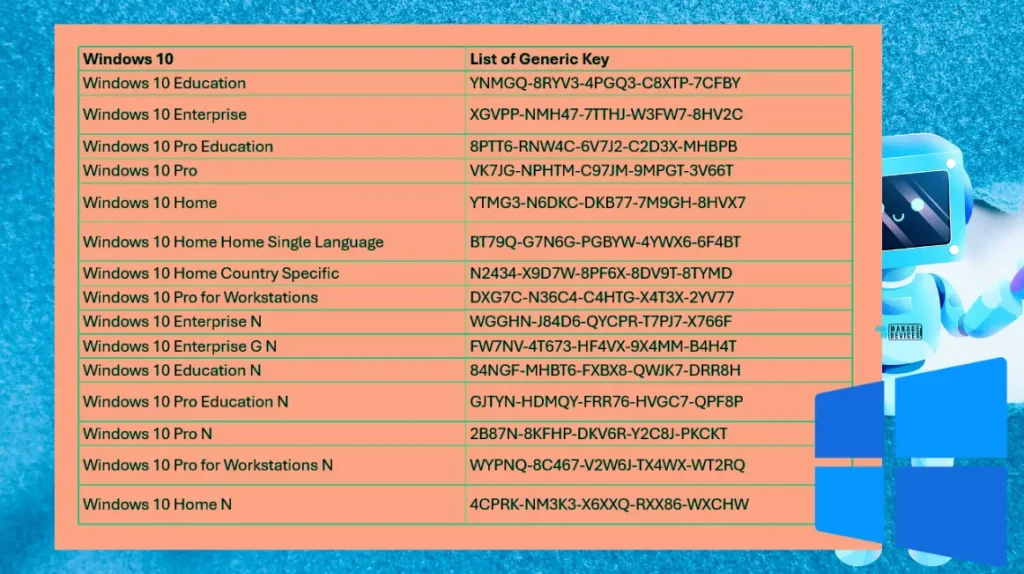
Image source: Anoop C Nair
How to Fix Common Windows 10 Activation Errors
Even with a valid key, activation can fail due to network issues, hardware changes, or server-side glitches. When the standard "Troubleshoot" button in Settings fails, you can use manual command-line overrides.
Using slmgr Commands to Force Activation
The Software Licensing Management Tool (
slmgr
) is a powerful script that interacts directly with the activation engine. Open Command Prompt as Administrator to use these:
-
slmgr /ipk XXXXX-XXXXX-XXXXX-XXXXX-XXXXX: This "installs" the product key, replacing any existing one. -
slmgr /ato: This forces Windows to attempt online activation immediately. -
slmgr /dli: This displays basic license information, including whether your key is Retail, OEM, or Volume.
How to Use the slui 4 Command for Phone Activation
If online activation fails, Microsoft still maintains a legacy phone activation system. This is often the most effective way to activate a retail key that the server thinks is "already in use."
-
Press
Windows Key + R
, type
slui 4, and press Enter. - Select your country from the list.
- Call the provided toll-free number and follow the automated prompts to provide your Installation ID.
- The system will provide a Confirmation ID to type into the boxes on your screen.
Troubleshooting Hardware Changes
If you replace your motherboard, Windows will likely deactivate because the hardware hash no longer matches. If you have a digital license linked to your Microsoft Account, you can fix this by going to Settings > Update & Security > Activation > Troubleshoot . Select "I changed hardware on this device recently" and follow the prompts to re-link your license to the new hardware.
Key Takeaways for Windows 10 Activation
Managing your Windows license doesn't have to be a source of frustration. By following these core principles, you can ensure your system remains genuine and fully functional.
- Check for a Digital License first in your Activation settings before searching for a physical key.
-
Use PowerShell
with the
Get-CimInstancecommand to retrieve keys embedded in your motherboard firmware. - Link your license to a Microsoft Account to make future hardware upgrades or re-installations seamless.
- Avoid grey market keys that cost only a few dollars, as they are frequently revoked by Microsoft.
- Utilize generic keys for installation purposes only; they will not provide a fully activated experience.
-
Master the
slmgrcommands to bypass UI glitches when the standard activation buttons fail. - Remember the Win 7/8 cutoff ; older keys are generally no longer valid for fresh activations on new hardware.
Ensure you have documented your product key or verified your digital link before performing any major system updates or hardware modifications.
Frequently Asked Questions
Can I find my product key if my hard drive crashed?
Yes, if you have a modern laptop or pre-built PC, the key is stored in the motherboard's firmware (UEFI), not the hard drive. When you reinstall Windows 10, the installer will automatically detect the key from the motherboard and activate itself. If you had a retail license, simply signing into the Microsoft Account you used previously will reactivate the device via your digital license.
Why does my retrieved key end in -3V66T?
If your key ends in
-3V66T
, you are seeing the generic Windows 10 Pro product key. This happens when your system is activated via a Digital License rather than a unique alphanumeric code. It is perfectly normal and indicates that your activation is tied to your hardware ID and Microsoft Account rather than a specific string of text.
Is it legal to use Windows 10 without activation?
Technically, using Windows 10 without activation violates the Microsoft Terms of Service, which state that you are authorized to use the software only if you are properly licensed. However, Microsoft does not "lock" the OS; instead, they apply a persistent watermark and disable personalization features (like changing wallpapers). For full security updates and legal compliance, purchasing a valid key is highly recommended.
How many times can I use a retail product key?
A retail product key can be used an unlimited number of times, but only on
one PC at a time
. If you want to move the key to a new computer, you should ideally deactivate it on the old one first using the
slmgr /upk
command. If the old PC is dead, you may need to use the "Phone Activation" (slui 4) method to convince the servers to release the license to the new hardware.
Does a Windows 10 key work for Windows 11?
As of 2026, Windows 10 and Windows 11 share the same licensing base. A valid Windows 10 product key will activate the equivalent edition of Windows 11 (e.g., Win 10 Pro activates Win 11 Pro). This cross-compatibility has remained a standard feature to encourage users to stay on the most secure and updated version of the operating system.
-
Topic: Windows Product Keys · GitHubhttps://gist.github.com/rvrsh3ll/0810c6ed60e44cf7932e4fbae25880df
-
Topic: Activate Windowshttps://support.microsoft.com/en-us/windows/activation/activate-windows
-
Topic: How to get my windows 10 key? : r/Windows10https://www.reddit.com/r/Windows10/comments/1m4ntfz/how_to_get_my_windows_10_key/

How to Install Linux on Surface Pro 4 to Replace Windows 10
Save your Surface Pro 4 from Windows 10 EOL. Learn how to install Linux, fix touchscreens, and optimize battery life with the custom surface kernel.

How MS Intune Secures Your Modern Workforce Through Unified Endpoint Management
Learn how MS Intune manages devices and apps. Explore 2026 licensing updates, privacy facts, and expert troubleshooting for IT administrators.


How to Use CHKDSK Commands to Repair Windows Drive Errors
Fix drive errors with CHKDSK commands like /f and /r. Learn SSD optimization, Event Viewer logs, and Status 50 fixes for Windows 10 and 11.