
How to Find and Download High-Resolution Album Art for Your Music Library
For high-resolution album art, iTunes Artwork Finder is a top choice for individual 1200px covers. For bulk processing, SACAD (Command Line) and Album Art Downloader XUI (Windows) offer the most robust automation. Aim for a minimum of 1200x1200px to ensure clarity on modern 4K displays and mobile devices.
Why High-Resolution Album Art Matters for Modern Displays
In the era of high-pixel-density displays, the standard 600x600px album cover is no longer sufficient. When you view your music library on a 4K monitor, a modern iPad, or a high-end Digital Audio Player (DAP), low-resolution art appears blurry and pixelated. The current industry standard for a "high-quality" digital experience is 1200x1200px, though many modern releases now provide source files up to 4000px.
There is a significant difference between a clean digital master and a physical scan. Many older tools scrape images from user-uploaded sites where "dusty" vinyl scans or poorly cropped CD booklets are common. Finding a digital-first source ensures that the colors are vibrant and the text is sharp. Furthermore, understanding how your player handles this art is vital. You must decide between embedding the art directly into the file metadata (ID3 tags) or using a "sidecar" file like
folder.jpg
. While embedding ensures portability across devices, sidecar files are often preferred by server software like Plex or Roon for faster library scanning.
Best Web-Based Tools for Quick Cover Art Retrieval
If you only need to fix a few albums, web-based scrapers are incredibly efficient. They require no installation and often tap directly into high-quality APIs.
iTunes Artwork Finder by Ben Dodson
This tool is widely considered one of the best options for the Apple ecosystem. It allows you to search the entire Apple Music database for high-resolution covers. A pro tip for this tool: if a standard name search fails, you can search by the specific Apple ID found in the URL of the album's store page. This ensures you get the exact regional release you are looking for. You can access it at Ben Dodson's iTunes Finder .
Spotify Artwork Downloader
For those who prefer the aesthetic of Spotify's curated covers or need playlist art, the Spotify Artwork Downloader is a strong contender. It saves files with clean naming conventions, which helps avoid the manual renaming process that often follows a bulk download.
covers.musichoarders.xyz
over older sites like Album Art Exchange. The latter frequently suffers from account activation bugs, whereas the MusicHoarders database is open and focuses on high-quality, verified digital masters.
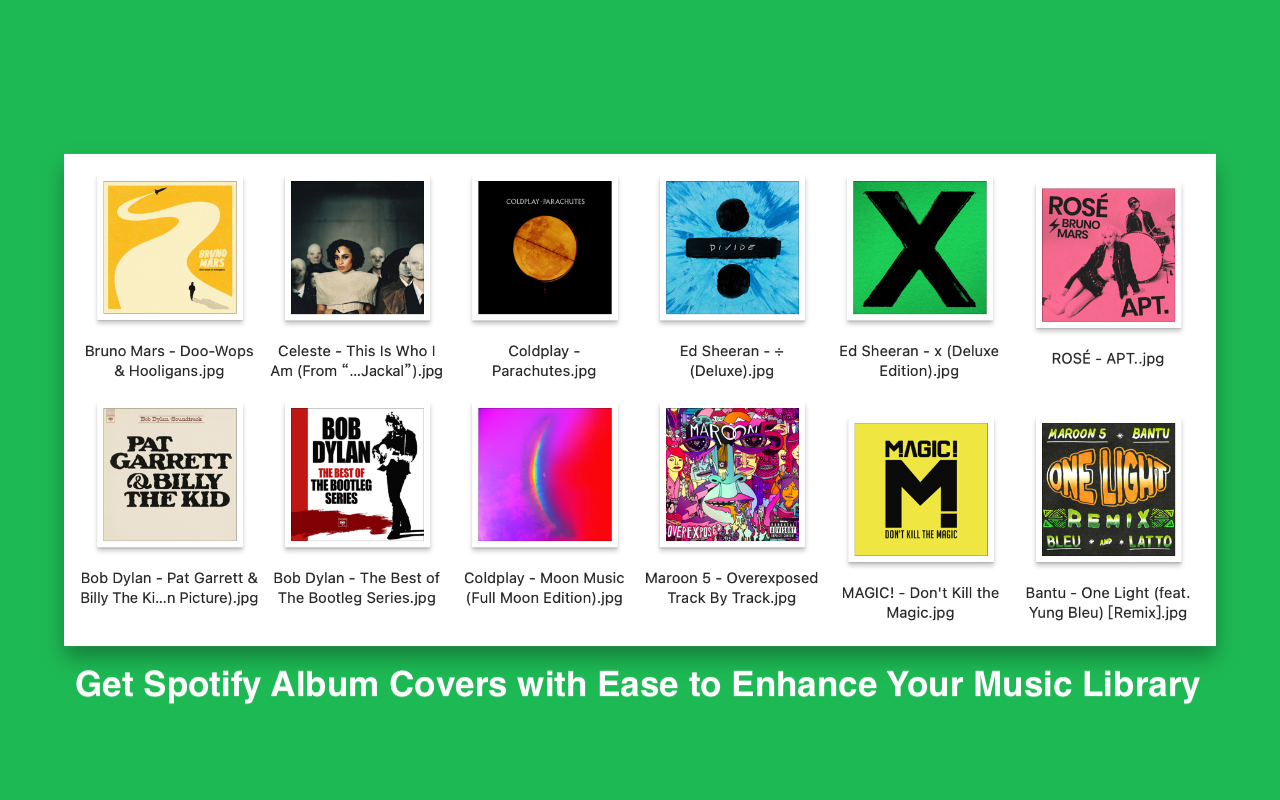
Image source: Chrome Web Store - Google
Top Desktop Software for Bulk Album Art Downloading
For users with thousands of tracks, manual searching is impossible. Bulk tools automate the process by scanning your folders and querying multiple databases simultaneously.
Album Art Downloader XUI for Windows
This Windows-only utility is a staple for audiophiles. It uses a plugin-based system to scrape sources like Discogs, MusicBrainz, and Amazon. Its greatest strength is the ability to preview multiple results side-by-side, allowing you to choose the one with the best color balance or highest resolution. You can find the project on SourceForge .
SACAD Cross-Platform CLI
SACAD (Smart Automatic Cover Art Downloader) is a notably innovative tool written in Rust. It is a top-tier choice for Plex and Jellyfin server owners because it can be run as a command-line script. SACAD uses a smart sorting algorithm that doesn't just look at resolution; it analyzes image similarity and source reliability to ensure you don't end up with a high-res image of the wrong album. It is available on GitHub .
| Tool Name | Platform | Max Resolution | Best For |
|---|---|---|---|
| iTunes Finder | Web | Up to 4000px | Individual high-res tracks |
| SACAD | Win/Mac/Linux | Variable | Server automation & bulk fixes |
| XUI Downloader | Windows | Source-dependent | Manual selection for collectors |
| MediaMonkey | Windows | Source-dependent | Integrated library management |
How to Find 4000px Covers Using Advanced Search Techniques
Sometimes, even the top-rated tools miss a specific release. In these cases, you can use advanced Google search strings to find source-quality files that aren't indexed in standard databases.
[Album Name] [Artist] apple
. This specifically targets Apple Music's high-res CDN.
/1200x1200bb.jpg
. You can manually change these numbers to
4000x4000bb.jpg
to force the server to serve the original source file.
Using AI to Repair and Upscale Low-Quality Album Art
What happens when the only available art for an obscure 90s indie release is a grainy 300px scan? In the past, you were stuck with pixelation. Today, AI upscaling has become a significant advancement in library maintenance.
Tools like Photoshop Neural Filters offer a "JPEG Artifacts Removal" feature that can smooth out the blocky distortion found in old, highly compressed images. For those without a Creative Cloud subscription, Pixelmator Pro and Gigapixel AI use "Super Resolution" algorithms. These tools don't just stretch the pixels; they use machine learning to "guess" the missing detail, turning a blurry 600px scan into a sharp 1200px+ cover that looks excellent on modern displays. This is particularly useful for fixing the "artificial sharpening" artifacts often found on sites like Fanart.tv.
A Step-by-Step Workflow for a Perfect Music Library
Building a pristine library requires a systematic approach. Follow this workflow to ensure your art is high-quality and consistent across all devices.
- Scan for Missing Metadata: Use a tool like MusicBrainz Picard or SACAD to identify which albums are missing covers or have low-resolution art.
- Smart Selection: Run SACAD to fetch covers. Its algorithm will prioritize digital masters over vinyl scans based on reliability scores.
- PNG Crunching: One of SACAD's most impactful features is its ability to "crunch" PNG files. This can reduce file sizes by up to 30% without any loss in visual quality, which is essential for saving space on mobile devices.
- Embedding: Use a tag editor to embed the art into the files. This ensures that if you move the music to a phone or car, the art travels with it.
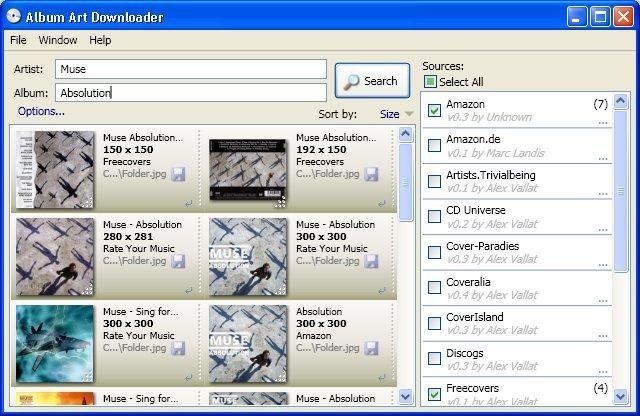
Image source: SourceForge
Best Mobile Apps for Fixing Art on the Go
If you manage your music directly on an Android device, you don't need a PC to fix your covers. The Album / Cover Art Finder for Android is a popular choice for mobile users.
This app features "One-Tap Search," which scans your local storage and automatically finds missing art while your phone is charging. It also allows for custom gallery uploads, which is perfect if you've taken a high-quality photo of a rare CD in your collection. However, users should be aware of the "Internal Storage" default; you may need to manually grant SD card write permissions in your Android settings to allow the app to save art directly to your music folders.
Troubleshooting Common Album Art Display Issues
Even with high-res art, you might encounter display bugs. Here are the most common pitfalls and how to fix them:
- The Genre Duplication Bug: Some Android apps have a bug where adding album art causes the "Genre" tag to duplicate for every song. To prevent this, ensure you are using a modern tagger that supports ID3v2.4 standards.
- Car Head Unit Limits: Many automotive players cannot display images larger than 800x800px or files larger than 500KB. If your art isn't showing up in your car, try resizing a copy of your library specifically for mobile use.
-
Hidden System Files:
Windows often creates hidden
Thumbs.dborSmall.jpgfiles in music folders. These can sometimes override your high-resfolder.jpg. Setting your file explorer to "Show Hidden Files" allows you to delete these low-res intruders.
Frequently Asked Questions
/ar "%a" /al "%l" /p %p\%l.jpg
, which passes the artist and album metadata directly to the search tool for hands-free processing.
The Bottom Line
Achieving a visually stunning music library is a balance of using the right tools and following a consistent workflow. Here are the key takeaways for your collection:
- Target 1200x1200px as your minimum resolution for future-proofing.
- Use iTunes Artwork Finder for the highest quality digital masters.
- Leverage SACAD for bulk automation and server-side library management.
- Apply AI Upscaling to repair rare or obscure low-res covers.
- Embed metadata to ensure your art displays correctly on all portable devices.
- Crunch your PNGs to save storage space without sacrificing visual fidelity.
- Check SD permissions if you are using mobile apps to fix art on Android.
Start by scanning your library with SACAD today to identify which albums need a high-resolution upgrade.
-
Topic: iTunes Artwork Finderhttps://bendodson.com/projects/itunes-artwork-finder/
-
Topic: Album Art Downloaderhttps://sourceforge.net/projects/album-art/
-
Topic: Does anyone know a place I can find high quality album ...https://www.reddit.com/r/musichoarder/comments/193o03o/does_anyone_know_a_place_i_can_find_high_quality/

How to Choose the Best Music Player App for Your Offline Library
Find a top-rated music player app for Android and iOS. Compare ad-free MP3 players, FLAC support, and learn to sync your local library.


How to Listen to Free Music Online Without Downloading Any Apps or Software
Stream free music online without apps or sign-ups. Compare top ad-free sites like Jango and AccuRadio for any device.

How to Find Create and Manage Images Using Search Engines and AI Tools
Master image search, AI generation, and professional editing. Learn to use Google Images, AI tools, and fix common display bugs in 2026.