How to Fix a Chrome New Tab Page That Changed Without Your Permission
If your Chrome new tab page has suddenly changed to Yahoo, Bing, or a strange search engine, it is likely due to a
malicious extension
or a
search hijacker
. To fix this immediately:
Go to
chrome://extensions
and remove any unfamiliar tools. Then, navigate to
Settings > Search Engine
and ensure Google is set as your default. If the page is locked, you may need to clear
Registry keys
or edit the
Preferences JSON file
.
Finding that your Google Chrome new tab page has changed without your consent is a common frustration for many users. Whether the page now displays a Yahoo search bar, a cluttered dashboard of unwanted "shortcuts," or a suspicious logo like the "Phoenix" icon, the cause is rarely a random glitch. In most cases, this shift indicates that a third-party software or browser extension has overridden your default settings to generate ad revenue or track your browsing habits.
As of 2026, browser hijackers have become more sophisticated, often hiding deep within system policies or using "Managed by your organization" flags to prevent users from reverting changes. This guide provides a comprehensive walkthrough to help you identify the root cause and restore your preferred browsing experience, ranging from simple setting toggles to advanced technical repairs.
Why Did My Chrome New Tab Page Change Suddenly?
Before diving into the fixes, it is essential to distinguish between a simple configuration change and a malicious hijack. Chrome manages the "Startup page" (what you see when you first open the browser) and the "New Tab page" (what appears when you click the '+' icon) through separate menus. If only the New Tab page is affected, the issue is almost certainly tied to your default search engine settings or an extension override.
Quick Diagnostic Checklist
-
Is it a redirect?
Does the URL bar flash a different address (like
akamaihd.net) before landing on Yahoo or Bing? - Is the "Customize Chrome" button missing? The pencil icon in the bottom-right corner usually disappears if a hijacker is active.
-
Are there unfamiliar extensions?
Check
chrome://extensionsfor anything related to "Search," "Tabs," or "Weather" that you didn't install. - Does it say "Managed by your organization"? Look at the bottom of the main Chrome menu (three dots). If this appears on a personal PC, it's a red flag for a policy-based hijacker.
According to IT security experts at Spiceworks , persistent redirects that survive a standard settings reset often indicate that the malware has modified the Windows Registry or the Chrome Preferences file directly. Understanding these distinctions is the first step toward a permanent solution.
How to Restore the Default Google New Tab Layout
If your diagnostic check suggests a simple setting change rather than malware, you can often fix the issue in seconds. Chrome's default New Tab page is intrinsically linked to your default search engine. If you or a piece of software changed your default search to Bing or DuckDuckGo, the New Tab page will change its layout to match that provider's style.
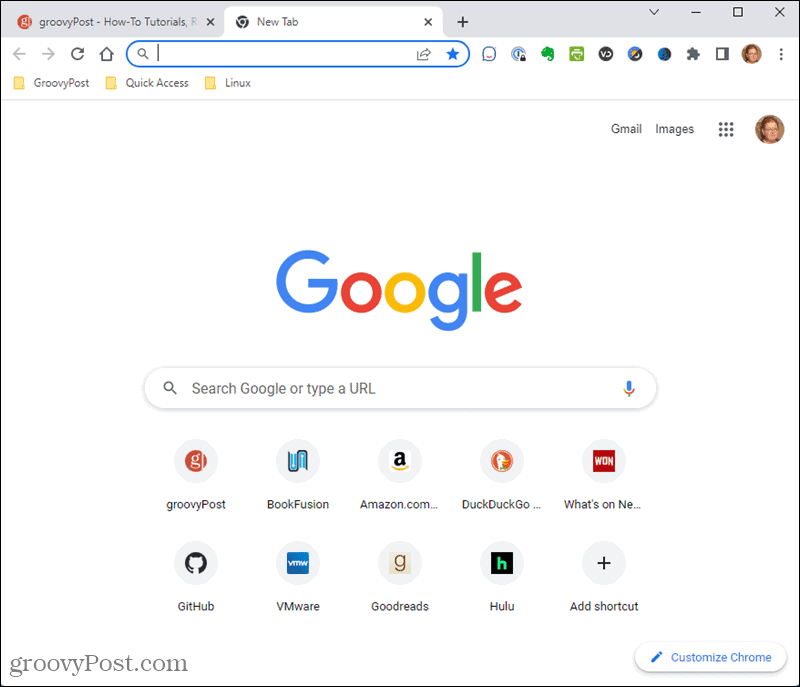
Image source: groovyPost
Step 1: Reset the Default Search Engine
- Click the three dots in the top-right corner and select Settings .
- On the left sidebar, click Search engine .
- Next to "Search engine used in the address bar," ensure Google is selected.
- Click Manage search engines and site search . Ensure Google is set as the "Default" and remove any suspicious entries (like "Search Marquis" or "Lkysearch").
Step 2: Use the Customize Chrome Button
If the layout is still slightly "off" (e.g., missing shortcuts), look for the Customize Chrome pencil icon in the bottom-right corner. This menu allows you to toggle between "My shortcuts" (manually curated) and "Most visited sites" (algorithmically generated). As noted in Google's official documentation , these customization options are only available when you are signed in and using Google as your primary engine.
How to Stop Chrome From Redirecting to Yahoo or Bing
The "Yahoo Redirect" is perhaps the most frequent complaint among Chrome users. Ironically, Yahoo is not the culprit; rather, malicious developers use Yahoo's search API to provide results while they collect data on your queries. These hijackers often enter your system via "software bundling"—when you download a free tool and forget to uncheck the "Recommended Search Settings" box during installation.
| Symptom | Normal New Tab | Hijacked New Tab |
|---|---|---|
| Search Bar | Google (centered) | Yahoo, Bing, or "Search" |
| URL in Bar |
Empty or
chrome://newtab
|
Long strings with
akamaihd
or
find-it
|
| Shortcuts | Your top sites | Sponsored ads or "Top Deals" |
| Background | Custom or White | Often locked to a specific image |
The Extension Audit
Most hijackers live in the
chrome://extensions
menu. Some are clever and use names like "Google Docs Offline" or "Chrome Media Player" to blend in. To find the culprit, use the
Process of Elimination
:
- Disable all extensions.
- Open a new tab. If the page is back to normal, one of your extensions is the cause.
- Re-enable them one by one until the redirect returns.
- Once found, click Remove and report the extension to the Chrome Web Store.
How to Fix the Managed by Your Organization Error on Personal PCs
If you see the message "Managed by your organization" on a computer that does not belong to a school or workplace, a hijacker has likely installed a Group Policy to lock your settings. This is a top-tier persistence mechanism because it prevents you from changing the search engine or new tab page through the standard settings UI.
Removing Rogue Registry Policies
Win + R
, type
regedit
, and hit Enter.
HKEY_LOCAL_MACHINE\SOFTWARE\Policies\Google\Chrome
.
NewTabPageLocation
or
DefaultSearchProviderSearchURL
.
Chrome
folder under
Policies
to reset all enterprise locks.
According to
user reports on Quora
, this registry fix is often the only way to remove the
lkysearchds
and
akamaihd
redirects that lock the search engine to a specific URL.
How to Manually Edit the Chrome Preferences File to Remove Hijacks
For power users, or when the Chrome UI is so glitched that you cannot access settings, you can edit the raw JSON configuration file. Chrome stores its extension overrides in a file called
Preferences
. If an extension has hijacked your new tab page, its ID will be listed under the
chrome_url_overrides
key.
Locating the Preferences File
Navigate to the following path in Windows Explorer (replace
[User]
with your Windows username):
C:\Users\[User]\AppData\Local\Google\Chrome\User Data\Default
Editing the JSON
- Close Chrome completely.
-
Open the
Preferencesfile (no extension) with a text editor like Notepad++. -
Search (Ctrl + F) for the string
"chrome_url_overrides". - You will see a block of code similar to this:
"newtab": "chrome-extension://aaaangaohdajkgeopjhpbnlpkehbhmbj/index.html"
}
The 32-character string (e.g.,
aaaangaohdaj...
) is the ID of the malicious extension. Delete the entire
chrome_url_overrides
block or simply delete the corresponding extension folder in the
Extensions
directory to break the hijack. This method is exceptionally strong for finding "hidden" extensions that don't show up in the browser's UI.
How to Fix the New Tab Page on Chrome for Android and iOS
While mobile browsers are less prone to registry-style hijacking, they often suffer from "Home page" redirects. In Chrome for Android, the "Home" button can be set to a custom URL, which users often mistake for the New Tab page.
Android Fix:
- Tap the three dots > Settings .
- Under "Advanced," tap Home page .
- If it is "On," ensure it is set to Chrome's homepage and not a custom URL like Yahoo.com.
- Clear your site data: Settings > Privacy and security > Clear browsing data (select "Advanced" and check "Site settings").
iOS Fix:
On iOS, Chrome is more restricted. If your new tab page is changed, it is usually due to a malicious profile installed in your system settings. Go to Settings > General > VPN & Device Management . If you see any profiles you don't recognize, remove them immediately.
What to Do if the New Tab Page Title Shows as a URL
A specific bug that users often encounter is the tab title displaying
chrome://newtab
instead of "New Tab." This is frequently a sign of profile corruption. As discussed in the
TenForums community
, this "Raw URL" glitch often disappears in Incognito mode, which confirms that a profile setting or extension is interfering with the page's metadata.
Flushing the DNS Cache
If the page title is correct but the content still redirects, your browser might be caching a malicious DNS entry. You can flush Chrome's internal DNS cache by navigating to:
chrome://net-internals/#dns
Click the Clear host cache button. This forces Chrome to re-resolve the address for the New Tab page, often breaking the cycle of persistent redirects.
How to Customize Your New Tab Page Once It Is Fixed
Once you have regained control, you can take advantage of Chrome's modern customization features. By 2026, Google has integrated several AI-driven and productivity-focused tools into the New Tab experience.
- AI Themes: Use the "Customize Chrome" panel to generate unique backgrounds based on a mood or subject.
- Google Drive Cards: For users signed into a workspace account, Chrome can now display your three most relevant recent files directly on the New Tab page for quick access.
- Shortcut Management: You can now group shortcuts into folders on the New Tab page, similar to how you organize apps on a smartphone.
Frequently Asked Questions
This happens because the source of the hijack—usually a malicious program on your computer or a rogue registry key—is still active. Even if you change the setting in Chrome, the external program "re-hijacks" it every time you restart. You must remove the underlying extension or registry policy to stop the cycle.
The Phoenix logo is a common visual identifier for a specific family of search hijackers. While it may not be a "virus" in the sense that it destroys files, it is considered malware or a Potentially Unwanted Program (PUP) because it tracks your data and changes settings without permission.
Ensure that Google is set as your default search engine in Settings > Search engine . If you are using a different engine like Bing or Yahoo, Chrome will replace the Google search bar with that provider's interface.
The "Customize Chrome" button only appears when the New Tab page is in its default state. If an extension has overridden the page, or if your search engine is not set to Google, the button is disabled because Chrome no longer controls the layout of that page.
No. Using the "Reset settings" option in Chrome will revert your startup page, new tab page, and search engine, and it will disable all extensions. However, your bookmarks, history, and saved passwords will remain intact.
Final Thoughts
Restoring a changed Chrome new tab page requires a systematic approach to identify whether the cause is a simple setting or a deep-seated hijacker. By following the hierarchy of fixes, you can regain a clean browsing experience.
- Check your search engine settings first; this is the most common non-malicious cause.
- Audit your extensions by disabling them all to see if the redirect stops.
- Look for "Managed by your organization" to identify if a registry-level policy is locking your browser.
- Use the Registry Editor to delete rogue Google policies on personal machines.
- Edit the Preferences JSON file as a last resort to find hidden extension overrides.
- Flush your DNS cache to clear persistent redirects that survive other fixes.
To maintain a clean browser, perform a monthly audit of your installed extensions and avoid downloading software from third-party "aggregator" sites that bundle unwanted tools.
-
Topic: Chrome new tab page changed but I want it backhttps://superuser.com/questions/468524/chrome-new-tab-page-changed-but-i-want-it-back
-
Topic: How to Change Google Chrome New Tab Settingshttps://sites.google.com/view/change-chrom-new-tab-settings/home
-
Topic: Chrome behaves as hijacked. How can I reset the page ...https://community.spiceworks.com/t/chrome-behaves-as-hijacked-how-can-i-reset-the-page-that-opens-when-clicking-on-new-tab/1249590
How to Set Up and Use the New Tab Redirect Extension Safely
Set a custom URL or local file as your new tab page. Fix Incognito issues, address bar focus, and avoid malware with this expert guide.


How to Hide the Bookmarks Bar in Google Chrome on Any Device
Learn to hide the Chrome bookmarks bar with shortcuts, settings, and fixes for the New Tab page. Resolve grayed-out options and save screen space.


How to Find Manage and Organize Your Open Tabs on Any Device
Search, group, and close open tabs on Chrome, Safari, and Firefox. Fix performance issues and find tabs across all your devices.