
How to Get and Check Your Voicemail on Any Phone or Carrier
To get your voicemail immediately, open your phone's dial pad and touch and hold the "1" key . This universal shortcut works for most major mobile carriers. Alternatively, dial *86 if you are on Verizon or Visible, or *99 if you use Xfinity Mobile. If you have an iPhone or a supported Android device, you can also access messages via the Voicemail tab in your Phone app.
In an era dominated by instant messaging and video calls, voicemail remains a critical tool for professional and personal communication. Whether you are expecting a call from a healthcare provider, a potential employer, or a family member, knowing how to efficiently retrieve your messages is essential. While the technology has evolved from simple recordings to AI-driven transcriptions, the core methods for accessing these messages vary significantly depending on your hardware and service provider.
This guide provides a deep dive into the various ways to get your voicemail, ranging from traditional dial-in methods to modern visual interfaces. We will also address complex technical hurdles, such as authentication loops and third-party app conflicts, that often prevent users from receiving their notifications.
What Is the Fastest Way to Access Your Voicemail Right Now?
For the vast majority of mobile users, the most efficient path to your messages does not require navigating complex menus. Carriers have standardized several shortcuts that allow for near-instant access to your mailbox.
The Universal "Hold 1" Shortcut
Since the early days of cellular technology, the "1" key on the dial pad has been reserved as the primary gateway to voicemail. To use this, simply open your Phone app, navigate to the dialer, and press and hold the number 1 for two to three seconds. Your phone will automatically initiate a call to your carrier's voicemail system. This method is widely regarded as a top choice for reliability, as it functions even when data services are unavailable or when visual voicemail apps are malfunctioning.
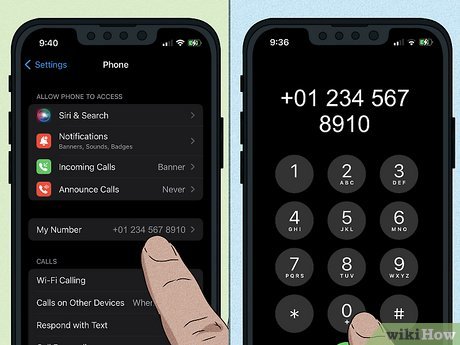
Image source: wikiHow
The Notification Tray Method
When you receive a new message, your device typically displays a small cassette-tape icon in the status bar (Android) or a banner notification (iOS). Tapping this notification is often the quickest way to launch the specific voicemail interface. On Android, this usually opens the Visual Voicemail (VVM) screen, while on iPhone, it takes you directly to the Voicemail tab within the Phone app.
Carrier-Specific Dial-In Codes
While "Hold 1" is nearly universal, some carriers utilize specific shortcodes that may be more reliable in certain regions or on specific device types. If the standard shortcut fails, try these specific codes:
| Carrier | Dial-In Code | Notes |
|---|---|---|
| Verizon / Visible | *86 | Stands for "VM" on the keypad. |
| Xfinity Mobile | *99 | Also works for many Comcast landlines. |
| AT&T / T-Mobile | Hold 1 | Standard GSM protocol. |
| Consumer Cellular | Hold 1 | Uses underlying partner networks. |
How to Get Voicemail on an iPhone Using Visual Voicemail
Apple's implementation of voicemail, known as Visual Voicemail, changed how users interact with their messages by presenting them as a list rather than an audio-only menu. This allows you to play, pause, and delete messages in any order without listening to the entire mailbox.
Navigating the Phone App
To access your messages on an iPhone, open the Phone app (the green icon with the white handset). Look at the bottom navigation bar and tap the Voicemail icon on the far right. If your carrier supports Visual Voicemail, you will see a list of all your current messages, including the caller's name (if in your contacts) or their phone number.
Understanding iPhone Layouts
According to Apple Support , the iPhone interface can appear in two distinct ways depending on your carrier settings:
- Unified Layout: Voicemails are sometimes integrated into the "Recents" list, though this is less common in recent iOS versions.
- Classic Layout: A dedicated tab where all messages are stored chronologically.
Using iOS 17+ Live Voicemail
A notably innovative feature introduced in recent years is Live Voicemail . When someone calls and begins leaving a message, your iPhone can display a real-time transcription of what they are saying on your lock screen. This allows you to decide whether to pick up the call mid-message. To ensure this is active, go to Settings > Phone > Live Voicemail and toggle the switch to ON.
How to Access Voicemail on Android Devices
Android devices offer a high degree of flexibility, but this also means the voicemail experience can vary between a Google Pixel, a Samsung Galaxy, and other manufacturers. Most modern Android phones rely on the Google Phone app or a manufacturer-specific equivalent.
Using the Google Phone App
For Pixel users and those using stock Android, the process is straightforward. Open the Phone app and tap the Voicemail icon at the bottom right. If you don't see this icon, your carrier may not support Visual Voicemail through the Google app, or it may not be enabled in your settings. As noted by Google Phone App Help , VVM is explicitly supported by carriers like AT&T, T-Mobile, and Google Fi.
Visual Voicemail (VVM) Requirements
Unlike traditional dial-in voicemail, Visual Voicemail requires a cellular data connection . It typically will not update or download new messages over Wi-Fi alone unless your carrier specifically supports "Voicemail over Wi-Fi." If you find your messages aren't appearing, ensure that your mobile data is toggled on and that you have a functional signal.
Enabling Transcriptions
Many Android users on carriers like Visible, Xfinity, and Spectrum can enable text summaries of their voicemails. This feature, available on Android 8.0 and higher, allows you to read your messages in the notification shade. Warning: When you enable this, Google may ask if you want to "donate" your audio snippets to help train their AI models. You can decline this while still using the transcription service.
How to Check Your Voicemail from a Different Phone or Computer
There are many scenarios where you might need to get your voicemail without having your physical device—perhaps your battery died, you left the phone at home, or you are traveling internationally and want to avoid roaming charges.
The Remote Access Sequence
To check your mobile voicemail from any other phone (landline or mobile), follow these steps:
Checking Voicemail for VoIP and Business Systems
For those using business systems like RingCentral , you can often check messages through a web portal or a desktop application. These systems frequently offer "Email-to-Voicemail," where an MP3 file of the recording is sent directly to your inbox. This ranks among the top methods for remote workers to stay connected without needing a desk phone.
Why Is My Voicemail Not Working?
If you are following the standard steps but still cannot get your voicemail, you may be facing a specific technical conflict. Standard carrier support often overlooks these nuanced issues.
Fixing the "Authentication Error" on Samsung FE Models
Users of the Samsung Galaxy S21FE and S24FE on networks like Xfinity and Verizon have reported a persistent "Authentication Error" or "Authorization in Progress" loop. This often occurs because the Visual Voicemail app loses sync with the carrier's server. A highly effective fix involves:
- Going to Settings > Apps > Visual Voicemail .
- Tapping Storage and selecting Clear Data and Clear Cache .
- Restarting the device and re-opening the app to trigger a fresh handshake with the network.
Third-Party App Conflicts
Alternative SMS and dialer apps, such as Handcent or specialized call blockers, can sometimes "hijack" the notification listener service. If you have installed a third-party messaging app and your voicemail notifications have stopped, try temporarily setting the stock Phone app as your default to see if functionality returns.
Google Voice Interference
If you previously used Google Voice for your voicemail and recently switched devices, your carrier's "Conditional Call Forwarding" (CCF) might still be pointing to your old Google Voice number. To reset this and return to carrier voicemail, you typically need to dial a specific "deactivation" code provided by your carrier (e.g.,
##004#
for many GSM networks).
The "Activation Email" Hack
For legacy Sprint or T-Mobile systems, a unique community-discovered fix involves sending a blank voicemail or a specific text trigger to
activate@vvm.sprint.com
. While less common in 2026, this remains a significant advancement for those struggling with older account migrations.
How to Set Up Your Voicemail for the First Time
If you have a new phone or have recently switched carriers, your mailbox must be initialized before it can receive messages. An uninitialized mailbox will often result in callers hearing a generic system message stating that the "subscriber has not set up their mailbox."
Initializing the Mailbox
The first step is always to dial into the system using the "Hold 1" method. The automated system will guide you through three primary steps:
- Create a PIN: Choose a 4-to-6 digit number. Avoid obvious choices like 1234 or the last four digits of your phone number, as these are easily guessed.
- Record Your Name: This is used for the system-standard greeting (e.g., "John Doe is not available").
- Choose a Greeting: You can select a standard system greeting or record a custom one. A custom greeting is widely regarded as a more professional choice for business lines.
Dual-SIM Management
If you use a phone with two SIM cards (e.g., a work line and a personal line), you must set up each mailbox separately. In your Phone app settings, ensure you have toggled the correct line for Visual Voicemail. Switching your "Primary Data" SIM can sometimes disable VVM for the secondary line, so always double-check these settings after a reboot.
Frequently Asked Questions
On an iPhone, you can check the "Deleted Messages" folder at the bottom of the Voicemail tab. On Android, recovery is more difficult and often depends on whether your carrier stores messages on their server. Once a message is purged from the carrier's server, it is generally unrecoverable unless you have a third-party backup service.
This is often due to "Background Data" being restricted. Go to your app settings for the Phone or Visual Voicemail app and ensure that "Background Data" and "Unrestricted Data Usage" are enabled. Also, check that notifications aren't silenced in your "Do Not Disturb" or "Focus" mode settings.
Dialing into your voicemail (Hold 1) typically uses your monthly voice minutes. Accessing Visual Voicemail uses a small amount of cellular data. If you are roaming internationally, dialing in can result in significant charges, so using a Wi-Fi-based visual interface is a top-tier option for saving money.
Yes, many carriers like Xfinity and AT&T allow you to log into your account portal on a computer to listen to or read transcriptions of your messages. This is particularly useful if you lose your phone or are working in an area with poor cellular reception.
If you prefer the traditional experience where callers go straight to a recorded box without you seeing the transcript, go to Settings > Phone > Live Voicemail and toggle it off. This will revert the behavior to the standard carrier-side voicemail system.
The Bottom Line
Getting your voicemail is a straightforward process once you understand the specific requirements of your device and carrier. Here are the key takeaways to remember:
- Use the "Hold 1" shortcut as your primary backup method if visual apps fail.
- Check carrier-specific codes like *86 (Verizon) or *99 (Xfinity) for direct access.
- Enable cellular data to ensure Visual Voicemail and transcriptions function correctly.
- Set a secure PIN immediately to allow for remote access from other devices.
- Clear app cache if you encounter "Authentication Errors" on Samsung or other Android devices.
- Leverage Live Voicemail on iOS 17+ to screen calls in real-time without picking up.
To ensure you never miss an important message, take a moment now to dial into your mailbox and verify that your greeting and PIN are correctly configured.
-
Topic: How to check your voicemail - Phone app Helphttps://support.google.com/phoneapp/answer/2811844?hl=en
-
Topic: How to Open your Voice Mail on Android Phone if you can't ...https://www.youtube.com/watch?v=vov1lynFabs
-
Topic: Check your voicemail on iPhonehttps://support.apple.com/guide/iphone/check-voicemail-iph003dae603/ios

How to Call Your Voicemail on Any Phone or Carrier
Learn how to call your voicemail on iPhone, Android, or from another phone. Find carrier codes, fix full inboxes, and reset your PIN in minutes.


How to Silence Unknown Callers on iPhone and Stop Spam for Good
Stop spam calls on iPhone. Learn to silence unknown numbers, fix Mac ringing, and use iOS 18 shortcuts to stay productive.


How to Access, Manage, and Fix Internal Storage on Your Device
Learn how to access internal storage, clear system data, and fix storage full errors on Android and iPhone. Manage WhatsApp bloat and hidden files.