How to Identify and Fix White Spots on Your TV, Laptop, or Phone Screen
White spots on a display are typically caused by hardware defects rather than software glitches. On televisions, they often indicate a fallen LED diffuser lens . On laptops and phones, they are frequently pressure marks or a sign of a swollen battery pushing against the LCD panel. To confirm, perform a screenshot: if the spot is invisible in the image file, the damage is physical and requires hardware repair or replacement.
Discovering a bright white spot on your screen can be incredibly distracting, whether you are watching a high-definition movie or working on a critical spreadsheet. These spots often appear suddenly and can vary from tiny pinpricks to large, glowing orbs. While your first instinct might be to try a factory reset, these issues are almost always mechanical in nature.
This guide provides a comprehensive framework for diagnosing the root cause of screen discoloration across different devices. By understanding the physics of your display—from the LED backlight strips to the liquid crystal layers—you can determine if your device is a candidate for a DIY fix, a warranty claim, or if it is time to consider a replacement.
Start With the Screenshot Test to Rule Out Software Issues
Before you reach for a screwdriver or call a repair shop, you must perform the "Screenshot Test." This is the most effective way to distinguish between a failing Graphics Processing Unit (GPU) and a physical screen defect. According to technician communities on platforms like Android Central , software cannot "photograph" physical damage.
How to Perform the Test
- Capture the Screen: Use your device's built-in screenshot tool (Win+Shift+S on Windows, Cmd+Shift+4 on Mac, or the Power+Volume Down combo on mobile).
- View on Another Device: Send that image to a different phone, tablet, or computer.
- Analyze the Result: If the white spot is visible in the screenshot when viewed on a different device, the problem lies in your software, drivers, or GPU. If the screenshot looks perfectly clean but the spot remains on your physical screen, you are dealing with a hardware failure.
This simple step can save you hours of unnecessary troubleshooting. If the test confirms a hardware issue, the next step is identifying which specific component has failed based on the visual characteristics of the spot.
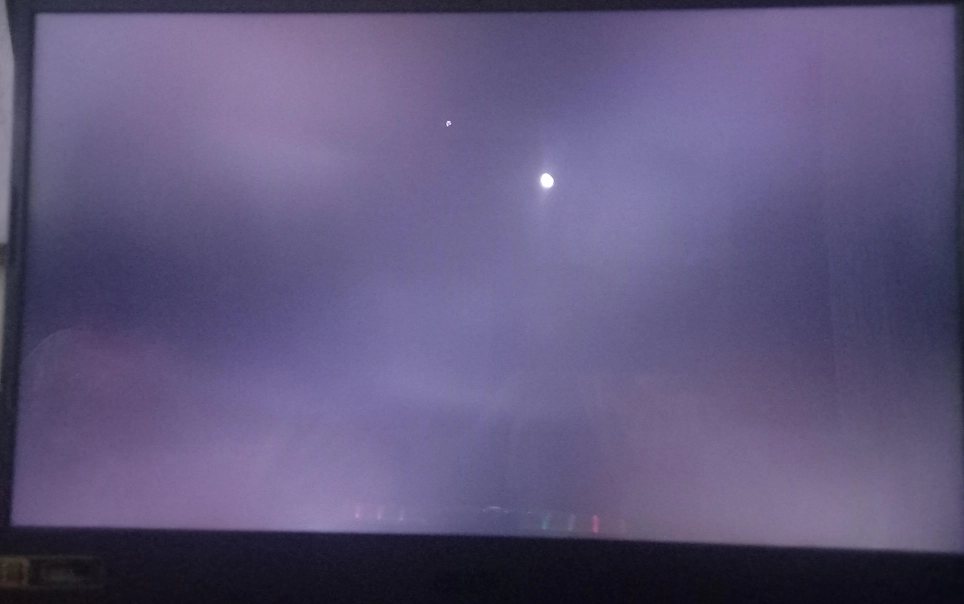
Image source: Miqidisplay
What Do the White Spots on Your Screen Actually Mean?
Not all white spots are created equal. The shape, size, and behavior of the spot provide vital clues about what is happening behind the glass. Experts at CDTech note that white spots in industrial and consumer displays are often indicators of structural instability within the display stack.
Common Visual Symptoms
- The "Glowing Orb"
- Large, perfectly circular, and very bright spots. These are almost exclusive to LED TVs and indicate that a diffuser lens has detached from the backlight strip.
- The "Cloudy Patch"
- Faint, irregular white areas that are most visible on light backgrounds. These are typically "pressure marks" where the layers of the LCD have been squeezed together.
- The "Pinprick"
- A tiny, sharp white dot. This is often a "stuck pixel," where a single transistor is permanently stuck in the "on" position, allowing all light to pass through.
Symptom Comparison Table
| Symptom | Likely Cause | Primary Device | Fixability |
|---|---|---|---|
| Large Bright Orbs | Fallen LED Lens | LED Televisions | High (DIY Possible) |
| Faint White Clouds | Pressure Damage | Laptops / Tablets | Low (Requires LCD Swap) | Stuck Pixel | All Monitors | Medium (Software Tools) |
| Expanding White Patch | Swollen Battery | Phones / Laptops | Critical (Safety Risk) |
Why White Spots Appear on Different Types of Displays
The mechanical construction of a display determines its vulnerability to white spots. Most modern screens use a "sandwich" of layers: a backlight at the rear, a series of diffusers and reflectors in the middle, and the liquid crystal panel at the front. When any of these layers shift or fail, light is no longer distributed evenly.
Mechanical Stress and External Pressure
Laptops and smartphones are particularly susceptible to pressure marks. Carrying a laptop in a cramped backpack where other items press against the lid can compress the liquid crystal layers. Over time, this compression becomes permanent, creating a "hot spot" where light leaks through more intensely. This is a common complaint among users in the Surface community , where thin form factors make the screens more vulnerable to internal and external pressure.
Optical Component Failure
In larger displays like TVs, the backlight consists of rows of LEDs. Each LED is covered by a small plastic "diffuser lens" that spreads the light evenly across the screen. These lenses are held in place by adhesive. If the adhesive fails due to heat or age, the lens falls off. Without the lens, the raw, concentrated light of the LED shines directly onto the LCD panel, appearing as a bright white circle.
Placing your television in direct sunlight or near a high-heat source like a radiator can significantly accelerate adhesive degradation. According to reports from Samsung Community members, TVs exposed to high ambient temperatures are much more likely to develop "fallen lens" spots within the first 3 to 5 years of use.
The Danger of Swollen Batteries in Laptops and Smartphones
While most white spots are cosmetic nuisances, some are early warning signs of a dangerous hardware failure. In portable electronics, the battery is often located directly behind the display assembly. Lithium-ion batteries can "off-gas" and expand due to age, heat, or manufacturing defects—a phenomenon often referred to as a "spicy pillow."
As the battery swells, it applies localized pressure to the back of the screen. This pressure manifests as a white spot or a yellowish discoloration. If you notice a white spot that seems to be growing or is accompanied by the screen physically lifting away from the frame, stop using the device immediately . A punctured or severely swollen battery poses a significant fire and explosion risk.
"A white spot on a laptop screen that appears to be 'pushing' from the center is often the first visual indicator of battery swelling before the chassis itself begins to warp."
How to Fix White Spots on a Television Screen
If your TV has large, bright white dots, the good news is that the panel itself is likely healthy. The issue is almost certainly the backlight lenses. This is a common problem in older Samsung and LG models. While professional repair is an option, many tech-savvy users opt for a DIY approach.
The DIY Repair Process (High Level)
Fixing a fallen lens involves disassembling the TV to access the backlight strips. This is a delicate process because the LCD panel is extremely thin and fragile. According to repair guides from FixItPhil , the steps generally include:
- Disassembly: Removing the back cover and disconnecting the internal boards.
- Panel Removal: Carefully lifting the LCD glass and the various diffuser sheets.
- Lens Re-attachment: Locating the plastic lenses that have fallen to the bottom of the chassis and gluing them back onto the LEDs using a clear, heat-resistant adhesive.
- Reassembly: Putting the layers back in the exact order they were removed.
Safety Note: Televisions contain high-voltage capacitors that can hold a charge even when unplugged. If you are not comfortable working with electronics, seek professional assistance.
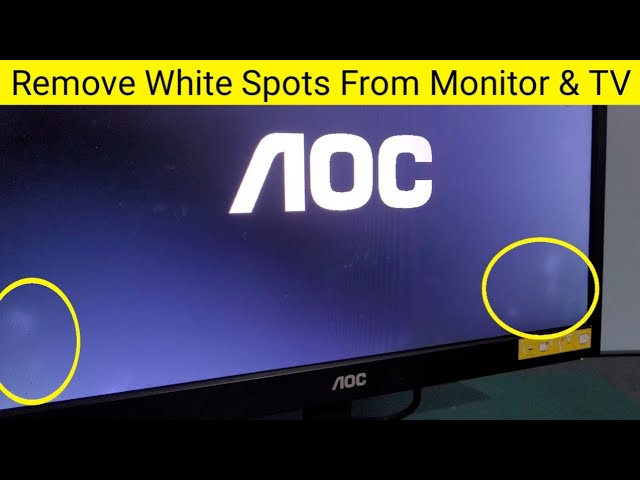
Image source: YouTube
How to Fix White Spots on a Laptop or Computer Monitor
Laptops present a different challenge. Because the display layers are often bonded together, you cannot simply "glue" a component back into place. If the spot is a pressure mark, the damage is usually permanent within the LCD stack.
The "Massage" Method: Fact or Fiction?
Some guides suggest gently massaging the white spot with a microfiber cloth to "realign" the liquid crystals. While this may occasionally provide temporary relief for minor pressure marks, it is a risky maneuver. Applying additional pressure can easily worsen the damage or cause the spot to spread. Most experts recommend avoiding this method on high-value or in-warranty screens.
Software Solutions for Stuck Pixels
If your white spot is a tiny, single pixel, it might be "stuck" rather than physically damaged. Tools like JScreenFix or various "pixel repair" videos on YouTube work by rapidly cycling colors in the affected area. This high-speed flickering can sometimes "jolt" the stuck transistor back into operation. This ranks among the top non-invasive methods to try before seeking a replacement.
Should You Repair Your Screen or Buy a New Device?
Deciding whether to invest in a repair depends on the age of the device and the nature of the fault. A single white spot might be tolerable, but multiple spots usually signal a systemic failure of the backlight or battery.
The 7-Year Rule
For televisions, experts at Reliance Digital suggest that if a TV is older than seven years, a professional screen or backlight repair is often not cost-effective. The labor costs and the likelihood of other components failing soon after make replacement a more logical financial choice.
Avoiding the "Motherboard Projection" Scam
Be wary of repair shops that claim white spots are caused by a "motherboard projection" or "GPU chip failure" that requires an expensive logic board replacement. If the spot is static, does not flicker, and passes the screenshot test, it is almost certainly a screen-level defect. Dishonest shops may use technical jargon to overcharge for what is essentially a backlight or panel issue.
How to Prevent White Spots From Coming Back
Prevention is significantly easier than repair when it comes to display health. By changing how you handle and store your electronics, you can extend the life of your screen indefinitely.
- Use Hard-Shell Sleeves: For laptops, a soft sleeve is not enough. A hard-shell case prevents external objects in your bag from pressing against the lid.
- Microfiber Only: Never press hard while cleaning. Use a clean microfiber cloth and avoid liquid cleaners that can seep into the bezel and degrade the internal adhesives.
- Control Your Environment: Keep screens away from direct sunlight. UV rays and heat are the primary enemies of the glues used in modern displays.
- Avoid "Screen Pinching": When opening a laptop, lift from the center of the lid rather than the corners to prevent twisting the panel.
Key Takeaways for Managing White Spots
- Perform the screenshot test first to confirm the issue is hardware-based and not a software glitch.
- Check for battery swelling immediately if the spot is on a laptop or phone, as this is a critical safety hazard.
- Identify the spot type: Large orbs usually mean fallen lenses (TVs), while cloudy patches indicate pressure damage (laptops).
- Evaluate repair costs against the age of the device; TVs over 7 years old are generally better off being replaced.
- Use software tools like JScreenFix for tiny pinprick spots, as these may be fixable stuck pixels.
- Protect your screen from heat and physical pressure to prevent future spots from developing.
If you have confirmed a hardware defect, check your warranty status immediately, as many manufacturers cover backlight failures within the first year of ownership.
Frequently Asked Questions
Can white spots on a screen spread over time?
Yes, white spots can spread or increase in number depending on the cause. If the spots are caused by a swollen battery, they will worsen as the battery continues to expand. If they are caused by fallen LED lenses in a TV, more lenses are likely to fall as the adhesive continues to age. Pressure marks on laptops generally stay the same size unless further pressure is applied to the area.
Will a factory reset fix white spots on my screen?
No, a factory reset will not fix white spots because they are almost exclusively hardware-related. Whether it is a detached lens, a compressed LCD layer, or a stuck pixel, these are physical issues that software cannot resolve. The only exception is if the "spot" is actually a software artifact, which you can rule out using the screenshot test mentioned earlier in this guide.
Does using "Dark Mode" help hide white spots?
Dark mode can be a highly effective temporary workaround for backlight-related white spots. Since these spots are caused by light leaking through the panel, they are most visible on white or light-colored backgrounds. By switching to a dark theme, the LCD pixels remain "closed," which blocks much of the backlight and makes the spots significantly less noticeable during daily use.
Is a white spot covered under a standard manufacturer warranty?
In most cases, yes, provided there is no evidence of physical impact or liquid damage. Manufacturers typically view backlight failures (like fallen lenses) or manufacturing defects (like dust trapped in the panel) as warranty-eligible repairs. However, "pressure marks" on laptops are often classified as accidental damage, which may require an extended protection plan like AppleCare+ or Dell ProSupport to cover.
Can I use a hair dryer to fix the glue on a fallen TV lens?
You should never use a hair dryer or any external heat source on your screen. While heat is what caused the glue to fail, adding more heat can warp the plastic diffuser sheets or damage the delicate liquid crystal layer. Proper repair requires disassembling the unit and applying a small amount of fresh, appropriate adhesive directly to the LED housing.
-
Topic: White spots on screen.. do they get bigger over timehttps://www.reddit.com/r/Surface/comments/u24sgp/white_spots_on_screen_do_they_get_bigger_over_time/
-
Topic: White Spots on LCD Screen: Causes, Fixes & Prevention ...https://www.cdtech-display.com/knowledges/white-spots-on-lcd-screen-causes-fixes-industrial-solutions-2026-guide/
-
Topic: What is the problem with white spots on my TV screen and ...https://www.facebook.com/groups/kakirepair/posts/24053639337623030/

How to Identify and Fix White Spots on Your Display Screen
Identify and fix white spots on laptops, TVs, and phones. Use our diagnostic flowchart to find causes like pressure marks or stuck pixels.


How to Diagnose and Fix White Dots on Your LCD Screen
Learn why white spots appear on monitors or TVs. Use the screenshot test to diagnose hardware vs software and find top-rated repair solutions.

Fix White Spots on LCD Screens and TVs
Learn to diagnose white spots on LCDs using the screenshot test, identify battery bloat, and fix fallen TV lenses with this expert repair guide.