
How to Use Google Translate for English and 240 Other Languages
Google Translate supports 249 languages as of 2026, with 108 available for direct text typing. For the highest accuracy, users should download Neural Machine Translation (NMT) offline packs (approx. 35MB–45MB). While the tool is a top choice for casual travel and quick text conversion, professional contexts often require comparing results with tools like DeepL or ChatGPT for better stylistic nuance.
Navigating the world of digital translation has become increasingly complex as artificial intelligence evolves. Whether you are trying to translate English to Spanish for a vacation or deciphering a technical manual in Korean, understanding the specific mechanics of the Google Translate ecosystem is essential. This guide explores the advanced features, common troubleshooting steps, and privacy considerations that every modern user needs to know.
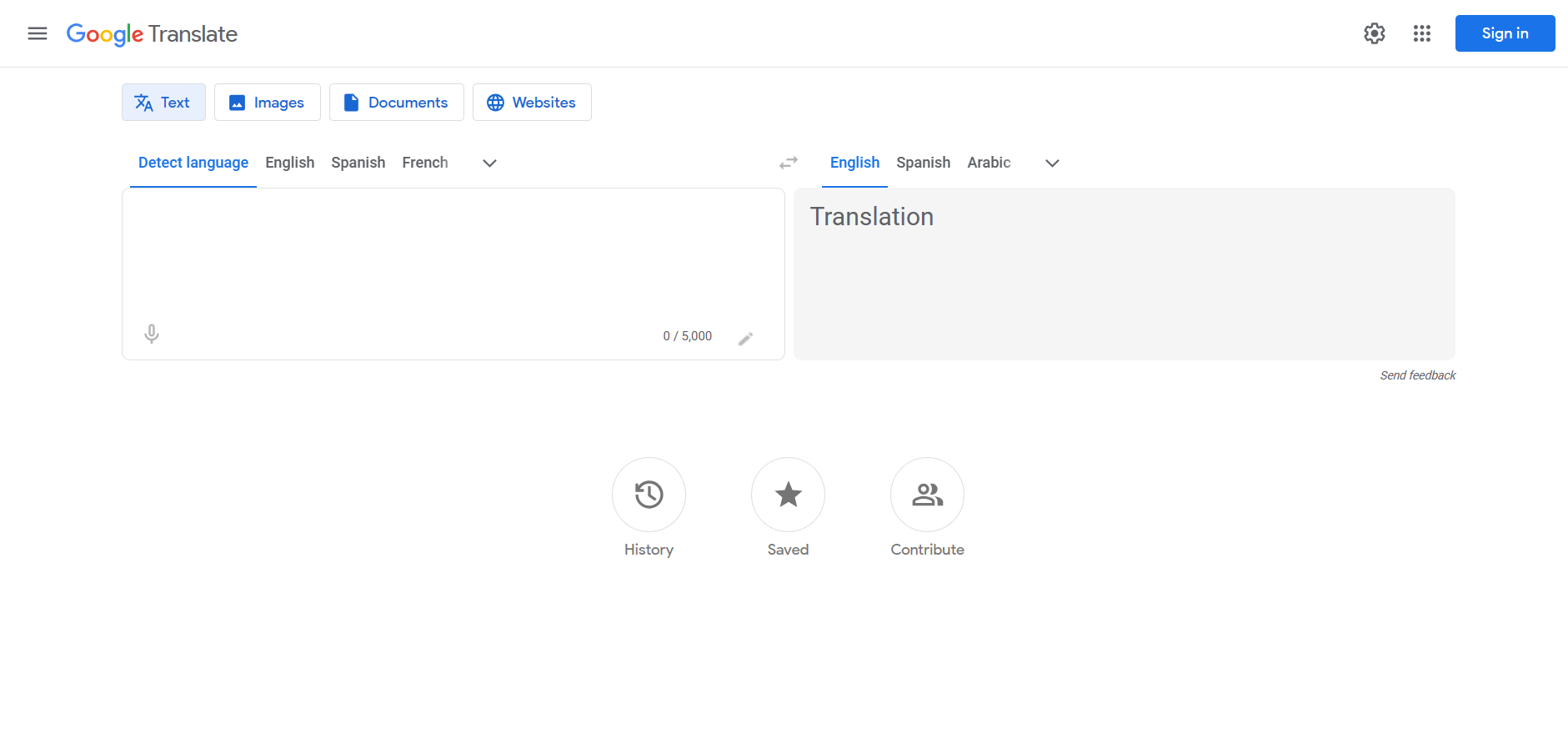
Image source: Wikipedia
How to Get Started with Google Translate Right Now
Accessing the tool is straightforward, but the experience varies significantly depending on your platform. For desktop users, the web interface offers the most robust document translation features, while the mobile apps provide critical real-time tools like camera and voice translation.
- Web Interface: Visit translate.google.com for text, documents, and website translation.
- Android App: Available on the Google Play Store , featuring Tap to Translate and offline modes.
- iOS App: Found on the Apple App Store, optimized for the latest iOS versions with widgets and Siri integration.
Once you open the tool, the interface is divided into two main sections: the source language (left) and the target language (right). The "Detect Language" feature is exceptionally strong at identifying scripts, even if you only have a few words of text. A frequently overlooked feature is the "Swap Languages" button (the two arrows in the center), which is vital for back-translation—a common technique used to verify the accuracy of a translated phrase.
What Languages Does Google Translate Actually Support?
There is often confusion regarding the total number of languages supported. According to recent data from the Google Play Store and Apple App Store, the platform supports a library of 249 languages. However, not all languages are treated equally in terms of functionality.
The discrepancy between the "108 languages" often cited in documentation and the "249 languages" listed in app stores comes down to the level of support. While 108 languages support full text typing and two-way translation, the extended library includes regional dialects, ancient scripts, and languages currently in the "beta" phase of data collection. Input methods also vary by language:
| Input Method | Number of Languages | Best Use Case |
|---|---|---|
| Text Typing | 108 | General correspondence and emails. |
| Handwriting | 96 | Languages with complex scripts (e.g., Chinese, Arabic). |
| Instant Camera | 94 | Translating menus, street signs, and labels. |
| Photo Upload | 90 | Translating screenshots or physical documents. |
In recent years, Google has added support for languages like Quechua, Guarani, and Aymara, reflecting a significant step forward in preserving indigenous languages through digital tools. However, for these newer additions, the translation quality may not yet match the high standard set by major language pairs like English-to-Spanish.
How to Use Google Translate Offline Without Losing Accuracy
One of the most impactful advancements in mobile translation is the shift to Neural Machine Translation (NMT) for offline use. Previously, offline translation relied on phrase-based systems that often produced "robotic" or grammatically incorrect results. NMT, however, analyzes entire sentences at once, using context to determine the most accurate output.
To set up offline translation on your mobile device, follow these steps:
- Open the Google Translate app on your iOS or Android device.
- Tap your profile icon or the settings menu in the top right corner.
- Select "Downloaded languages."
- Find the language you need (e.g., English or French) and tap the download arrow. Ensure you have at least 50MB of free space per language.
According to CNET , these NMT packs allow the app to maintain a high level of grammatical integrity even when you are completely disconnected from the internet, making it a top-tier option for international travelers.
Why Your Microphone Isn't Working in Google Translate
A common frustration for users on desktop computers is the "Voice input isn't supported" error. This is rarely a hardware issue and is almost always a browser compatibility limitation. According to the Google Help Center , full voice-to-text translation is currently exclusive to the Google Chrome browser.
If you are using Safari, Microsoft Edge, or Firefox, you may be able to hear translations played back to you, but you will not be able to speak into the microphone to input text. To resolve this, you must switch to Chrome or use the mobile app, which has full system-level access to your microphone.
How to Adjust the Audio Speed for Better Learning
For language learners, the default playback speed can sometimes be too fast to catch subtle pronunciations. Google has hidden a setting that allows you to slow down the audio. By navigating to Settings > Speed within the app, you can toggle between "Normal," "Slow," and "Slower." This feature is particularly useful when practicing the phonetics of tonal languages or complex English idioms.
How to Use Google Translate as a Dictionary and Thesaurus
Most users view Google Translate as a bridge between two different languages, but it is also a notably innovative tool for native English speakers. By using the "English-to-English" hack, you can transform the interface into a powerful writing assistant.
When you set both the source and target languages to English, the tool stops trying to translate and instead provides:
- Definitions: Clear, concise meanings of the word.
- Synonyms: A list of alternative words to improve your writing variety.
- Example Sentences: Real-world context for how the word is used.
- Grammar Notes: Information on whether the word is a noun, verb, or adjective.
This makes the tool a strong contender for students and professionals who need a quick reference without opening a separate dictionary application.
Why Google Translate Fails on Some Websites and Forums
Users often report that the Google Translate browser extension fails to work on dynamic websites, particularly those built on the Discourse forum platform. This happens because dynamic web apps frequently update the content on the page without a full refresh, which can confuse the translation script.
Furthermore, the Chrome Web Store notes that the standalone extension no longer supports full-page translation in the way it once did. This is because the feature has been integrated natively into the Chrome browser. If the extension isn't working, look for the small "Translate" icon that appears in the right side of your URL bar (Omnibox) instead.
Is Google Translate Safe for Sensitive Business Documents?
Privacy is a major concern for corporate users. When you paste text into the free version of Google Translate, that data may be used to improve Google's translation models. For personal use, this is rarely an issue, but for proprietary code or legal contracts, it represents a significant risk.
An audit of the iOS app's privacy labels shows that Google collects data linked to your identity, including location and search history. While the web tool supports translating `.docx`, `.pdf`, and `.xlsx` files, users should be aware that these documents are processed on Google's servers. For highly sensitive material, many experts suggest using the paid Google Cloud Translation API, which offers stricter data privacy guarantees, or keeping the translation in-house.
Google Translate vs DeepL vs ChatGPT — Which Is More Accurate?
In 2026, Google Translate is no longer the only major player in the field. Depending on your needs, other tools might offer better results. The following table breaks down how these top-rated options compare:
| Feature | Google Translate | DeepL | ChatGPT (GPT-4o) |
|---|---|---|---|
| Language Count | 249 (High variety) | 30+ (Focus on quality) | 90+ (Conversational) |
| Accuracy | Strong for general use | Ranks among the top for nuance | Excellent for tone/style |
| Best For | Travel & Quick Reference | Professional Documents | Creative Writing |
| Offline Mode | Yes (NMT Packs) | Limited | No |
While Google Translate stands out for its sheer breadth of language support and mobile utility, DeepL is widely regarded as one of the best for European languages like German and French due to its superior handling of formal vs. informal pronouns. ChatGPT, meanwhile, is a popular choice for "transcreation"—where you need to not just translate words, but adapt the entire tone of a message for a specific audience.
Key Takeaways
- Use Chrome for Voice: Full microphone support is currently limited to the Google Chrome browser on desktop.
- Update Offline Packs: Ensure you are using the 35MB–45MB NMT-enabled files for significantly better offline grammar.
- Try the Dictionary Hack: Set your language pair to English-to-English to access a built-in thesaurus and dictionary.
- Check Native Chrome Features: If the extension fails, use the built-in translation icon in the Chrome URL bar.
- Verify Sensitive Data: Avoid pasting proprietary or highly confidential information into the free web tool.
- Compare for Nuance: For professional European translations, consider cross-referencing results with DeepL.
To get the most out of your next translation, try downloading your destination's language pack today while you have a stable Wi-Fi connection.
Frequently Asked Questions
Is Google Translate free to use for everyone?
Yes, Google Translate is free for individual consumers via the web and mobile apps. However, developers who wish to integrate the translation service into their own apps or websites must pay for the Google Cloud Translation API. This API is billed based on the number of characters processed, though a free tier is often available for low-volume usage. For the average user, there are no hidden costs for translating text, documents, or speech.
How do I use Google Translate on my iPhone?
To use the tool on an iPhone, download the app from the Apple App Store. Once installed, you can type text directly, use the "Camera" button to translate signs in real-time, or use the "Conversation" mode for two-way speech translation. The iOS version also supports a "Translate" widget that you can add to your home screen for even faster access to your most frequent language pairs.
Can I translate a whole PDF for free?
Yes, the web version of Google Translate allows you to upload entire documents. Supported file types include .pdf, .docx, .pptx, and .xlsx. To use this, click the "Documents" button at the top of the Google Translate home page, upload your file, and select your target language. The tool will then generate a translated version of the document while attempting to preserve the original formatting as much as possible.
Why is the Google Translate extension not working on some pages?
The extension often struggles with "Single Page Applications" (SPAs) or sites with heavy JavaScript, like Discourse forums. Additionally, because Google has moved page translation features directly into the Chrome browser, the extension is sometimes redundant or conflicts with native settings. If a page won't translate, try right-clicking anywhere on the page and selecting "Translate to English" from the context menu.
Does Google Translate work without an internet connection?
It does, provided you have downloaded the necessary language packs beforehand. These packs use Neural Machine Translation (NMT) technology to provide high-quality results without a data connection. Note that features like "Instant Camera" and "Text Translation" work offline, but "Transcribe" (real-time long-form speech translation) generally requires an active internet connection to process audio data.
What is the most accurate language pair in Google Translate?
Generally, language pairs that have the most available training data are the most accurate. English-to-Spanish, English-to-French, and English-to-Portuguese are among the strongest performers. Conversely, translations between two non-English languages (like Korean to Swahili) may be less accurate because the system often uses English as an intermediate "bridge" language during the processing phase.
-
Topic: Google Translatehttps://translate.google.com/
-
Topic: Google Translate - Apps on Google Playhttps://play.google.com/store/apps/details?id=com.google.android.apps.translate&hl=en_US
-
Topic: Translate by speech - Computerhttps://support.google.com/translate/answer/6142468?hl=en&co=GENIE.Platform%3DDesktop

What Does Traducirías Mean and How Do You Use It Correctly?
Learn the meaning of traducirías, how to conjugate traducir, and find top tools for Spanish to English translation in 2026.

How to Find a Top-Rated Diccionario del Español al Inglés for Your Needs
Compare top Spanish-English dictionaries like WordReference and Linguee. Find accurate translations for every context.

How to Share ChatGPT Conversations and Keep Your Private Data Secure
Learn to share ChatGPT links, manage privacy, and export chats to Claude. Step-by-step guide for personal and enterprise users.