
How to Use reportaproblem.apple.com to Get a Refund for Apps and Subscriptions
To request a refund, visit reportaproblem.apple.com , sign in with your Apple Account, and select "Request a refund" from the dropdown menu. You must wait for the charge to move from "Pending" to "Invoiced" (usually 24-48 hours) before the item appears. If a refund is denied, you can escalate the issue by contacting Apple Support or emailing their privacy team for a manual review.
Managing digital purchases can be complex, especially when an accidental subscription or an unauthorized app purchase occurs. Apple provides a centralized portal at reportaproblem.apple.com specifically designed to handle these disputes. While the interface is streamlined, many users encounter hurdles such as missing items, pending charges, or automated denials that official documentation often glosses over.
This guide explores the technical nuances of the portal, providing actionable steps to navigate the refund process, troubleshoot common visibility issues, and understand the escalation paths available when the automated system fails to provide a resolution.
What Can You Actually Do on the Report a Problem Portal?
The reportaproblem.apple.com website serves as the primary gateway for users to manage their transaction history and dispute charges. It is not merely a refund tool; it is a comprehensive dashboard for your Apple Account (formerly Apple ID) billing activity. According to Apple Support , the portal covers a wide range of content, including apps, in-app purchases (IAPs), subscriptions, music, movies, and books.
Beyond requesting money back, users can use the portal to:
- Report Quality Issues: If an app doesn't work as advertised or a movie has technical glitches, you can flag these specific problems to Apple.
- Identify Unknown Charges: If you see "apple.com/bill" on your bank statement, this portal helps you match that charge to a specific item.
- Manage Subscriptions: While the portal allows for refunding subscriptions, it also provides links to cancel them to prevent future billing cycles.
It is important to note that Apple collects specific metadata when you use this site. As detailed in their Privacy Policy , Apple uses your account identifiers, network activity, and purchase history to prevent fraud. This automated fraud detection system plays a significant role in whether your request is approved or denied.
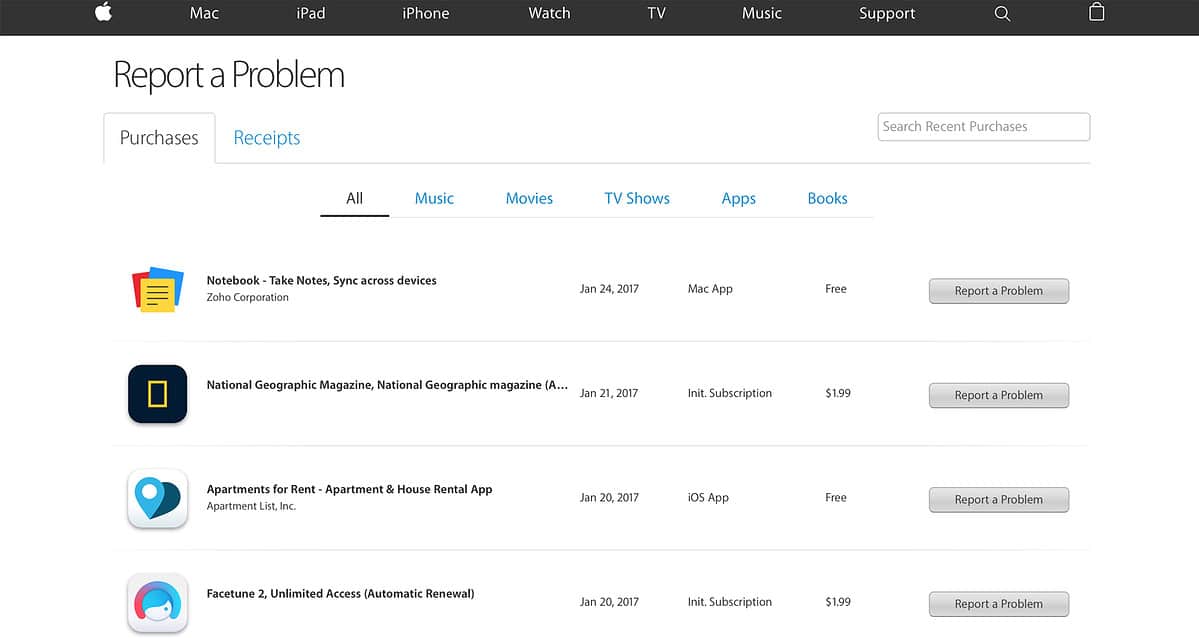
Image source: The Mac Observer
How to Request a Refund in Three Simple Steps
The refund process is designed to be user-friendly, but selecting the correct "Reason" is vital for a successful outcome. Follow these steps to initiate a claim:
Once submitted, Apple typically provides an update within 48 hours. However, the time it takes for the funds to actually appear in your account varies significantly by payment method. For instance, Apple Account Balance refunds can take as little as 48 hours, while credit card or mobile phone billing refunds may take up to 30 days depending on your financial institution.
Why Is My Purchase Not Showing Up on reportaproblem.apple.com?
One of the most frequent frustrations shared in community forums is the "disappearing purchase." You know you were charged, but the item is nowhere to be found on the portal. This is usually due to one of three technical reasons:
The "Pending" Trap
Apple cannot process a refund for a transaction that hasn't been finalized. When you first buy an app, the charge is often marked as "Pending" in your bank account. On the Apple portal, these items will not have a "Refund" button until the transaction is "Invoiced." You must wait for the official email receipt from Apple, which usually arrives within 24 to 48 hours of the purchase. Only then will the item become eligible for a refund request.
The Grouping Logic
Apple often bundles multiple small purchases into a single bill to reduce transaction fees. If you bought three $0.99 items over two days, you might see one $2.97 charge on your bank statement. On the portal, you may need to look for the grouped invoice to find the individual items within it. If you are struggling to find a specific item, viewing your full purchase history in the App Store settings on your iPhone is often a more reliable way to see every granular transaction.
Regional and Version Differences
In certain regions, particularly within the European Union, recent regulatory changes allow developers to use alternative billing systems. If you purchased content through a third-party payment processor rather than Apple's own system, that transaction will not appear on reportaproblem.apple.com . In these cases, you must contact the app developer directly for a refund.
How to Check the Status of Your Refund Request
After submitting a request, you don't have to wait for an email that might end up in your spam folder. You can track the progress directly on the site. Click the "Check status of claims" tab at the top of the page to see a list of your active and past requests.
| Status Label | What It Means | Typical Action Required |
|---|---|---|
| Pending | Apple is currently reviewing your request using automated and manual checks. | None. Wait 48 hours. |
| Approved | The refund has been granted and the funds are being sent back to your payment method. | Check your bank statement after 5-7 days. |
| Refunded | The transaction is complete on Apple's end. | Contact your bank if funds aren't visible. |
| Denied | The request was rejected based on Apple's terms and conditions. | See the escalation section below. |
According to official guidelines , once a refund is approved, you lose access to the content immediately. If it was a subscription, it will not renew, and your access will typically terminate at the end of the current billing period or immediately, depending on the reason for the refund.
What to Do if Apple Denies Your Refund Request
Receiving a "Not eligible for refund" message is common, especially for consumable in-app purchases (like game currency) that have already been used. However, if you believe the denial is an error, there are advanced steps you can take that are not widely advertised.
The "Flagging" Threshold
Community data from platforms like Reddit suggests that Apple's automated system may "flag" accounts that exceed a certain number of refund requests. While Apple does not officially disclose this number, users have reported that after approximately five refund requests in a short period, subsequent requests are automatically denied regardless of their validity. This is a fraud prevention measure designed to stop users from "renting" apps for free.
The DPO Escalation Path
If the automated portal denies you and a standard support chat doesn't help, there is a specific escalation path. Apple's privacy documentation mentions that users can contact their Data Protection Officer (DPO) regarding automated decisions. By emailing dpo@apple.com , you can request a manual review of a decision made by the automated fraud system. This is a highly effective method for resolving complex cases where a child made significant unauthorized purchases that the automated system flagged as "intentional."
Regional Support Phone Numbers
Sometimes, speaking to a human is the only way to resolve a billing dispute. If the portal fails, use these regional numbers to reach Apple's billing department:
- United States: 800-275-2273
- Australia: (61) 1-300-321-456
- United Kingdom: 0800 107 6285
Managing Refunds for Family Sharing and Subscriptions
Family Sharing adds a layer of complexity to the refund process. If you are the Family Organizer, you are responsible for all charges made by family members, but you might not see their purchases by default on the portal.
For Family Organizers
To see a child's purchase, click the Apple Account icon on the portal and select "All." This toggles the view to show every transaction billed to your card, regardless of which family member made it. You can then initiate a refund on their behalf.
For Subscriptions
Requesting a refund for a subscription does not always cancel it. To ensure you aren't charged again, you should manually cancel the subscription in your device settings (Settings > [Name] > Subscriptions) in addition to filing the refund claim.
In the EU, the Digital Markets Act has introduced "Alternative Terms of Business." If a developer opts into these, Apple may not be the "merchant of record." If you don't see a purchase on the portal, check your email for a receipt from a third-party processor like Stripe or PayPal, as you will need to contact them or the developer directly for a refund.
The Danger of Disputing Apple Charges Through Your Bank
When Apple denies a refund, the temptation to call your bank and initiate a "chargeback" is high. However, this is widely considered a last resort with significant risks. As noted in Apple Discussion forums , initiating a chargeback often results in a permanent ban of your Apple Account.
When a bank forces a refund, Apple views it as a violation of the Terms of Service. This can lead to:
- Account Disabling: You may lose access to all purchased apps, music, and iCloud data.
- Device Locking: In extreme cases, your hardware may be restricted from accessing the App Store.
- Loss of Services: Your email (@icloud.com) and iMessage may stop functioning.
Always exhaust the dpo@apple.com and phone support paths before even considering a bank dispute. Most billing issues can be resolved within the Apple ecosystem if you provide sufficient evidence of an error or unauthorized use.
Frequently Asked Questions
The Bottom Line
Navigating Apple's refund system requires a mix of patience and technical knowledge. To ensure the best chance of success, keep these key takeaways in mind:
- Wait for the invoice: You cannot refund a "Pending" charge; wait 24-48 hours for the email receipt.
- Select the right reason: "Child bought this" and "Did not mean to buy" are the most successful categories for accidental charges.
- Check Family Sharing: Use the "All" toggle to see purchases made by other family members on your card.
- Avoid bank chargebacks: Disputing a charge through your bank can lead to a permanent Apple Account ban.
- Escalate via DPO: If the portal denies you, email dpo@apple.com for a manual review of automated decisions.
- Monitor your status: Use the "Check status of claims" tab rather than waiting for an email notification.
If you are facing a denied refund for a legitimate error, your next step should be to gather your receipt and contact Apple Support via their regional phone line for a human intervention.
How to Set Up and Use Apple Pay on Your iPhone for Every Transaction
Master Apple Pay on iPhone. Learn to set up cards, fix NFC errors, and pay securely in stores or online with expert troubleshooting tips.

How to Set Up and Manage Stolen Device Protection on Your iPhone
Learn to enable iPhone Stolen Device Protection, manage security delays, and fix Face ID or VPN issues. Secure your Apple ID with this expert guide.


How to Reboot Apple Watch Even if It Is Frozen or Unresponsive
Learn to reboot Apple Watch Series 9, Ultra, and SE. Fix frozen screens, stuck logos, and unresponsive buttons with expert troubleshooting steps.