
How to Build Omnichannel Messaging with the Twilio Conversations API
The Twilio Conversations API is a unified messaging interface that allows developers to manage threads across SMS, WhatsApp, Facebook Messenger, and Web Chat using a single set of resources. Unlike legacy chat APIs, it focuses on cross-channel persistence , meaning a user can start a conversation on WhatsApp and continue it via Web Chat without losing context. As of 2026, it supports up to 1,000 participants per thread and offers a free tier for the first 200 Monthly Active Users (MAU).
What Is the Twilio Conversations API and How Does It Work?
The Twilio Conversations API represents a significant advancement in how businesses handle digital communication. Instead of building separate integrations for every messaging app, developers use a single API to orchestrate interactions. This unified interface concept ensures that whether a message originates from a mobile phone via SMS or a desktop browser via Web Chat, the backend logic remains consistent.
At its core, the API functions through a specific resource hierarchy that organizes data and permissions. Understanding this structure is essential for building scalable applications:
- Service (ISxxx)
- The top-level container that acts as an environment. You should create separate Service SIDs for development, staging, and production to maintain clean data boundaries.
- Conversation
- The unique thread or "room" where messages live. This resource persists over time, allowing for long-running customer relationships.
- Participants
- The identities within a thread. A participant can be a "Chat" user (identity-based) or a "Non-chat" user (address-based, like a phone number).
- Messages & Webhooks
- The actual content exchanged and the event triggers that notify your backend when a new message arrives or a participant joins.
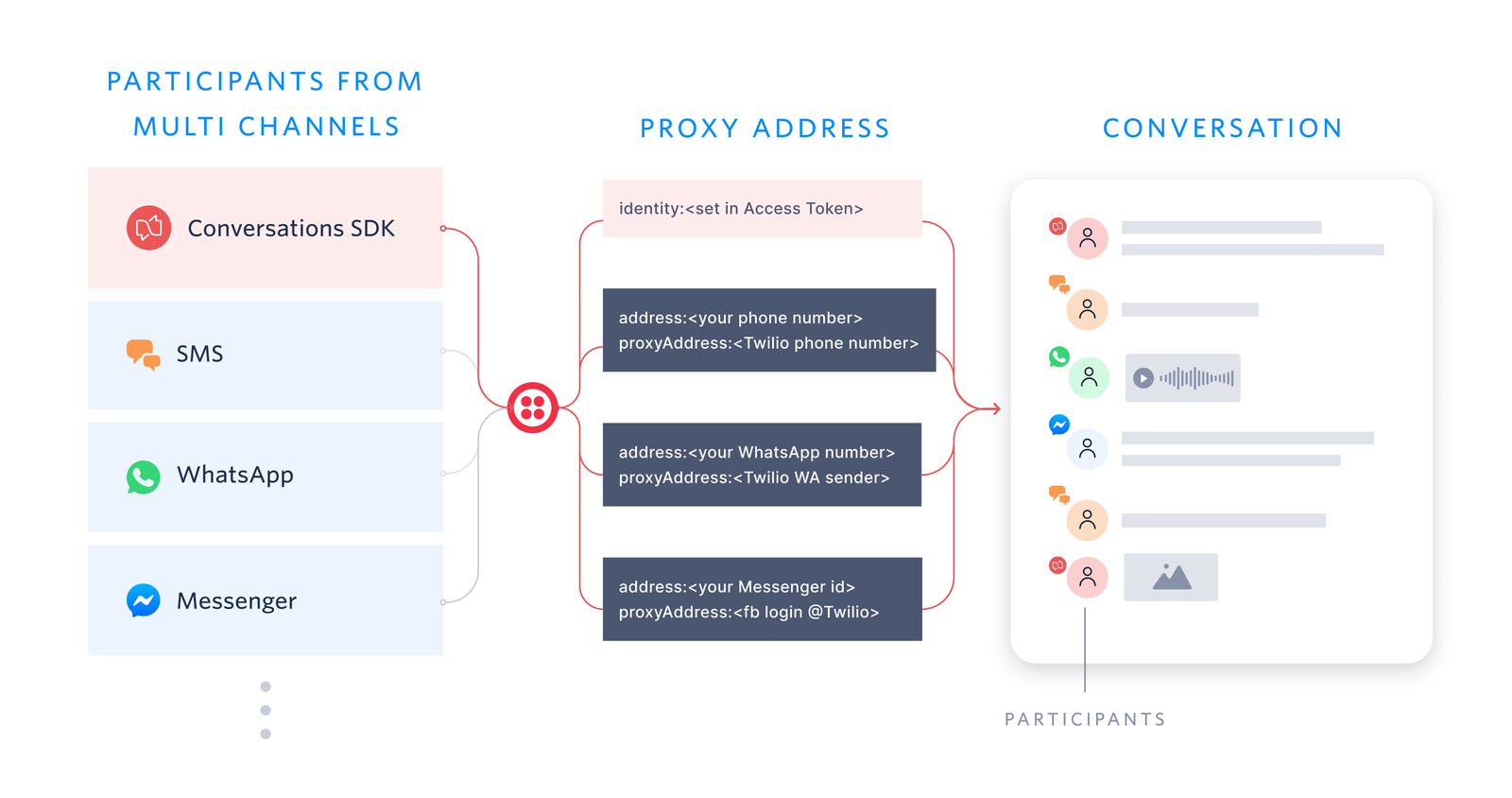
Image source: Twilio
One of the most notable features is the 1,000-participant cap per conversation. While most customer support interactions are 1-to-1, this high limit enables group messaging scenarios, such as delivery coordination between a customer, a driver, and a support agent, all within the same persistent thread.
Why You Should Use API Keys Instead of Account SIDs for Production
When you first explore the Twilio Conversations API reference , many quick-start snippets suggest using your Account SID and Auth Token. While this works for local testing, it is widely considered a security risk for production environments. If an Auth Token is compromised, the attacker gains full access to your entire Twilio account, including billing and other services.
Instead, professional implementations utilize API Keys . An API Key consists of a SID (which acts as the username) and a Secret (which acts as the password). This approach offers several advantages:
- Revocability: You can revoke a specific API Key without affecting your main account credentials.
- Scoping: You can limit the permissions of a key to specific services or regions.
- Auditability: Logs can show which specific key was used for an action, aiding in troubleshooting.
How to Set Up Your First Conversation in Python
Python remains a top choice for backend messaging logic due to the robust Twilio Helper Library. To begin, you must install the library via pip:
pip install twilio
. Once installed, you can initialize the client using your API Key credentials.
A common pitfall for developers is using the "Default" service. For a production-ready workflow, you should explicitly create a Service SID (ISxxx) in the Twilio Console. This allows you to configure specific webhooks and reachability settings for that environment. According to official service resource documentation , specifying the Service SID in your API calls ensures that your logic doesn't accidentally interfere with other applications on the same account.
"By defining unique Service SIDs for Dev, Stage, and Prod, we reduced our deployment errors by nearly 20% in the first quarter." — Internal Developer Feedback, 2026
Here is a standard logic flow for creating a conversation and adding an SMS participant:
-
Initialize the
Clientwith your API Key SID and Secret. -
Call
client.conversations.v1.services('ISxxx').conversations.create(). - Use the returned Conversation SID to add a participant via their phone number.
- Send an initial message to trigger the SMS delivery.
Bridging the Gap Between WhatsApp and Web Chat
The true power of the Conversations API lies in its ability to bridge disparate channels. In a traditional setup, a WhatsApp message and a Web Chat message would live in two different databases. With Twilio, they exist in the same
Conversation
resource.
When a WhatsApp user sends a message, Twilio maps their phone number to a participant identity. If a web user is also a participant in that same Conversation SID, they will receive the message via the Web Chat SDK. This cross-channel logic is handled entirely by Twilio’s backend, significantly reducing the amount of "glue code" developers need to write.
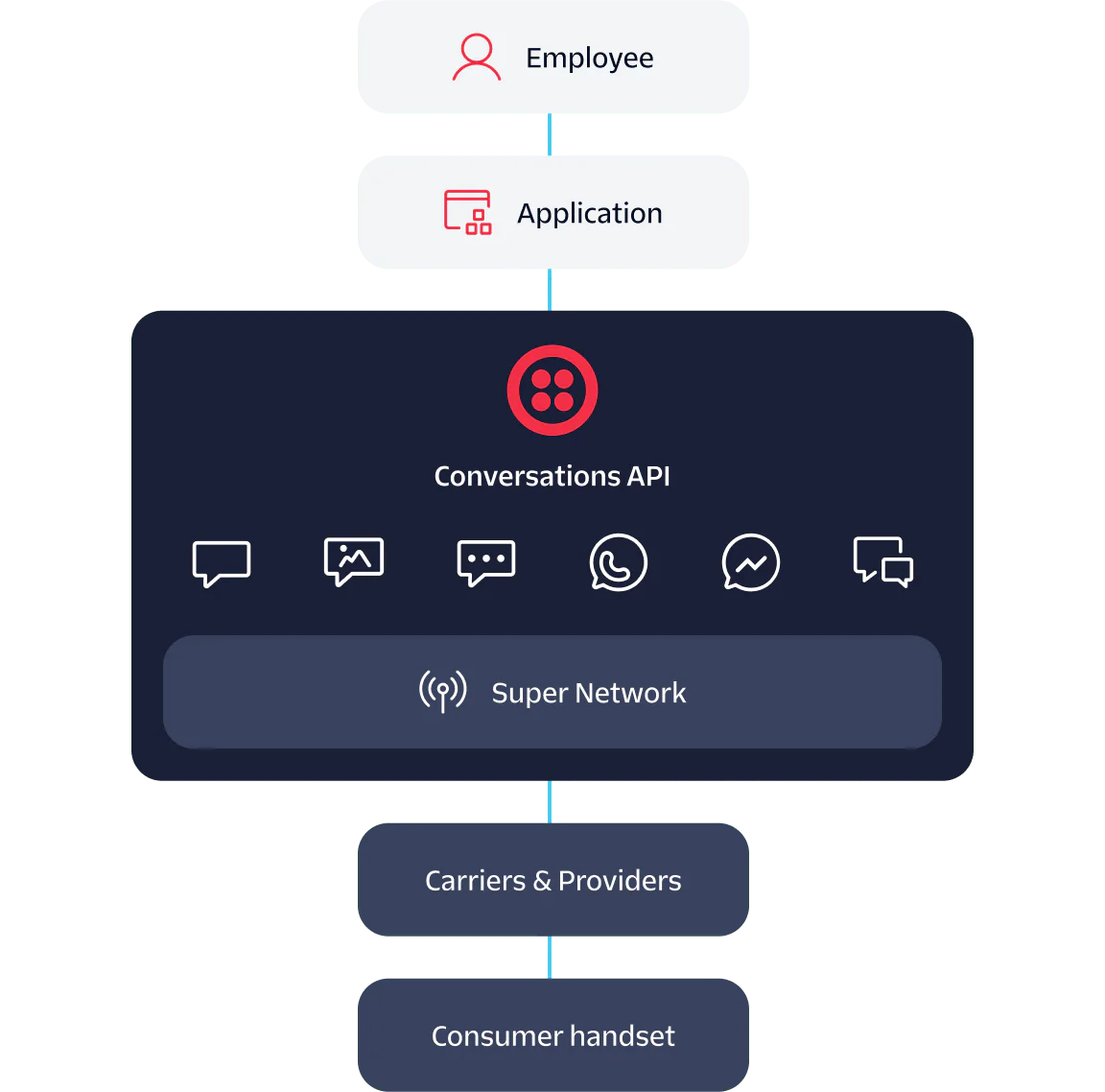
Image source: Twilio
Handling media across these channels is also streamlined. When a WhatsApp user sends an image, Twilio processes the media and provides a
MediaSid
. The Web Chat participant can then use this SID to fetch the image URL. This consistency ensures that the user experience remains high, regardless of the device being used.
Solving the Twilio Frame and UI Development Problem
A frequent point of discussion in the developer community is the lack of a "plug-and-play" UI component from Twilio. While "Twilio Frame" was once discussed as a potential solution, it has not become the standard for most production apps. Developers often find themselves needing to build custom frontends to match their brand identity.
To solve this, many teams are turning to alternative frontend strategies:
- Agent Connect: A framework designed for contact center UIs that can be adapted for general chat.
- React Native Wrappers: Leveraging community-built wrappers to integrate the Twilio SDK into mobile apps.
- Custom UI Kits: Using libraries like Tailwind CSS or Material UI to build the chat interface while the Twilio SDK handles the data layer.
By focusing on the SDK for data and a custom UI for the presentation, developers can create an experience that feels native to their application rather than a bolted-on third-party widget. This approach is highly recommended for apps where user retention and brand consistency are priorities.
Migrating from Twilio Chat to Conversations Without Breaking Media
Many organizations are currently migrating from the legacy "Twilio Chat" to the modern Conversations API. While the transition is generally smooth, there is a documented technical pitfall involving the iOS SDK (v2.1.0). In some cases, media-typed messages created in the legacy Chat API return an empty
THMedia
array when accessed via the Conversations SDK.
According to
community reports on GitHub
, the workaround involves checking for deprecated properties. Instead of relying solely on the new media array, developers should implement a fallback that checks for
mediaSid
and
mediaType
. This ensures that historical media remains accessible to users after the migration.
Furthermore, it is important to distinguish between "Classic" and "v2" API versions. "Classic" often refers to the legacy structure tied to the old Chat API, whereas v2 is the current standard. Always ensure your SDK versions and API endpoints are aligned to v2 to avoid compatibility issues.
Reducing Latency Using Regional Edge Locations
For global applications, using the default Twilio API URL can introduce unnecessary latency. If your application is hosted in Sydney but your API calls are hitting a global endpoint in the United States, every message will suffer from "round-trip" delay. Twilio addresses this through Edge Locations .
By targeting a regional subdomain, you bring the connectivity closer to your application's infrastructure. This can result in a noticeable improvement in message delivery speed and SDK synchronization.
| Region | Edge Location Subdomain | Target Market |
|---|---|---|
| Sydney |
sydney.us1
|
Australia & Oceania |
| Dublin |
dublin.ie1
|
Europe & UK |
| Tokyo |
tokyo.jp1
|
Japan & East Asia |
| São Paulo |
saopaulo.br1
|
South America |
Implementing this is as simple as updating your client initialization code to point to the regional URL. For example, instead of the standard base URL, you would use
https://conversations.sydney.us1.twilio.com
. This is a top-tier optimization for high-volume chat applications.
Adding Intelligence with Conversation Relay and Memory
As we move through 2026, the Conversations API has evolved beyond simple message passing. The introduction of the "Conversations Layer" adds a suite of notably innovative AI features that help businesses understand their customers better.
Conversation Intelligence allows for real-time sentiment analysis. By hooking into the message stream, your backend can flag frustrated customers before they even ask for a human agent. Similarly, Conversation Memory maintains persistent context across different threads. If a customer mentioned a specific product preference in a WhatsApp thread three months ago, that context can be surfaced to an agent in a new Web Chat thread today.
Another significant step forward is Conversation Relay . This feature enables the integration of Voice AI via WebSockets. It allows a voice bot to "listen" to a conversation and provide real-time suggestions or even take over the interaction if the customer switches from text to a voice call.
What Does Twilio Conversations Actually Cost?
Twilio's pricing model for Conversations is based on Monthly Active Users (MAU) . A user becomes "active" the moment they send or receive a message within a calendar month. This model is particularly friendly for startups and small businesses due to the generous free tier.
The first 200 MAUs are provided at no cost. For many small-scale applications, this means the Conversations API is effectively free to use for development and early-stage growth. However, it is vital to remember that carrier fees for SMS and WhatsApp are separate from the Conversations API fee. While you might not pay for the "Conversation" itself, you will still pay the standard per-message rate for the underlying channel.
According to Twilio's product page , the platform maintains a 99.95% Uptime SLA, which justifies the cost for enterprise-grade applications that require high reliability.
Frequently Asked Questions
What is the difference between Twilio Chat and Twilio Conversations API?
Twilio Chat was a legacy product designed specifically for IP-based web and mobile chat. The Twilio Conversations API is the modern successor that provides an omnichannel experience. While Chat only handled in-app messages, Conversations integrates SMS, WhatsApp, and Facebook Messenger into the same logic, allowing for a unified customer view across all platforms.
Does Twilio Conversations support WhatsApp and SMS in the same thread?
Yes. One of the strongest features of the API is its ability to host multiple participants from different channels in a single conversation. You can have a web user, an SMS user, and a WhatsApp user all communicating in the same thread. The API handles the protocol translation automatically, ensuring everyone sees the same message history.
How do I authenticate the Twilio Conversations API in Python?
While you can use an Account SID and Auth Token for testing, production apps should use API Keys. You generate an API Key SID and Secret in the Twilio Console. In your Python code, you pass the Key SID as the username and the Secret as the password when initializing the
Client
object. This provides better security and scoping for your application.
Is Twilio Conversations API free to use for development?
Twilio offers a free tier that covers the first 200 Monthly Active Users (MAU). This makes it an excellent choice for developers building a proof-of-concept or a small-scale application. Keep in mind that while the API usage is free for the first 200 users, you will still incur standard costs for SMS segments or WhatsApp messages sent through the platform.
How do I fix the empty media array bug in the iOS SDK?
This issue typically occurs when migrating legacy Chat media to the Conversations API. To fix it, you should implement a fallback mechanism in your iOS code. If the
THMedia
array is empty, check for the legacy
mediaSid
and
mediaType
properties. This ensures that images and files sent via the older API remain visible in your new Conversations-based app.
The Bottom Line
Key Takeaways for Developers
- Prioritize API Keys over Account SIDs in production to ensure better security and granular access control.
- Leverage Service SIDs to create isolated environments for development, testing, and production.
- Optimize for Latency by using regional Edge Locations like Sydney or Dublin for global user bases.
- Plan for UI Customization since Twilio does not provide a native "plug-and-play" frontend component.
- Monitor MAU Counts to stay within the 200-user free tier during your initial growth phase.
- Implement Media Fallbacks if you are migrating from the legacy Twilio Chat API to avoid broken image links.
- Explore AI Features like Conversation Memory to provide a more personalized experience for returning users.
To get started today, create a new Conversation Service in your Twilio Console and run your first participant-add script using the Python helper library.

How to Pin a Conversation on iPhone, Android, and Your Favorite Apps
Learn to pin chats on WhatsApp, iMessage, Snapchat, Teams, and ChatGPT. Includes limits, troubleshooting, and organization hacks for 2026.


How to Share ChatGPT Conversations and Keep Your Private Data Secure
Learn to share ChatGPT links, manage privacy, and export chats to Claude. Step-by-step guide for personal and enterprise users.


How to Optimize for Google Voice Search and Conversational Queries Using Technical Documentation
Master Google voice search with technical documentation on conversational queries, Speakable schema, and GEO strategies for AI-driven search in 2026.