How to Optimize for Google Voice Search and Conversational Queries Using Technical Documentation
Speakable
and
FAQPage
schema, structuring data for Generative Engine Optimization (GEO), and leveraging Google CX Agent Studio, organizations can capture the 27% of search volume now driven by natural language. Success is measured not by keyword rankings, but by the ability to provide concise, contextually relevant answers that Google Assistant can deliver verbally.
The Shift from Keywords to Conversational Context
The evolution of search has moved beyond the era of "staccato" keywords. In the early days of SEO, users would type fragmented phrases like "weather London" or "best pizza NYC." Today, as of 2026, the landscape is defined by natural language. According to Circles Studio , approximately 71% of users now prefer speaking over typing, leading to a surge in full-sentence queries such as, "What is the weather like in London right now?" or "Where can I find a gluten-free pizza place near me that is open until midnight?"
This shift is driven by advancements in Natural Language Processing (NLP). Modern search engines no longer treat queries as isolated strings of text. Instead, they utilize context awareness to understand the intent behind the words. For example, if a user asks, "Who directed Inception?" and follows up with, "What other movies did he make?", Google understands that "he" refers to Christopher Nolan. This "threaded" search experience is a cornerstone of conversational AI, requiring documentation that is structured to support follow-up logic.
Furthermore, the volume of voice-driven searches has stabilized at roughly 27% of all global queries. While earlier predictions suggested even higher numbers, this current reality represents a massive market, with voice commerce projected to reach $80 billion by the end of 2026. To compete, technical documentation must move away from rigid headers and toward answering the specific questions users are asking their smart devices.
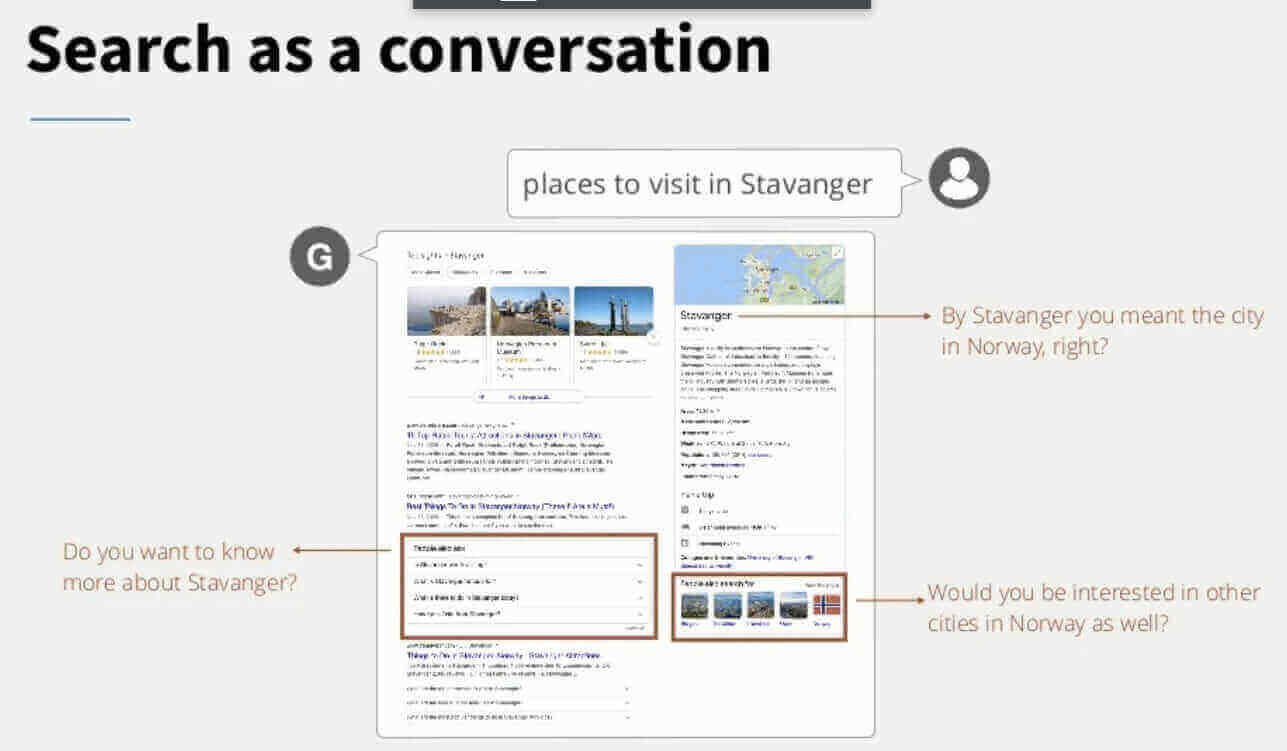
Image source: WordLift
How Google Processes Conversational Intent and Voice Signals
Understanding the technical pipeline of a voice query is essential for effective optimization. The process typically follows a three-stage workflow:
- Automatic Speech Recognition (ASR): The device captures the audio signal and converts it into text. This stage is highly sensitive to phonetic clarity and local dialects.
- Natural Language Processing (NLP): The text is analyzed for intent, entities, and context. Google’s Gemini-class models determine whether the user wants information, navigation, or to perform an action.
- Text-to-Speech (TTS): Once the search engine identifies the most relevant answer, it converts the text back into a natural-sounding voice response for the user.
Research from Resoneo indicates that voice queries are 30 times more likely to be action-oriented than text searches. These "action queries" include commands like "Call," "Buy," "Navigate," or "Play." For businesses, this means that local SEO and Google Business Profile accuracy are non-negotiable. If a user asks, "Call the nearest hardware store," Google relies on structured data to fulfill that request instantly.
Another fascinating development is the "Lumos" effect—a term describing how cultural shortcuts and brand-specific "hot words" trigger specific device behaviors. Just as Harry Potter fans use "Lumos" to turn on their phone's flashlight, brands are now optimizing for verbal shortcuts that bypass traditional search results entirely, creating a direct link between the user's voice and the brand's digital presence.
Technical Documentation for Implementing Speakable and FAQ Schema
To ensure your content is eligible for voice playback, you must provide explicit instructions to search crawlers using Schema.org vocabulary. There are three primary pillars of voice-ready schema that every technical SEO audit should include.
Implementing the Speakable Property for Audio Playback
The
Speakable
property allows you to identify specific sections of a webpage that are particularly well-suited for text-to-speech conversion. This is especially useful for news articles or long-form guides where only the summary or key takeaways should be read aloud. By using CSS selectors or XPaths, you can point Google Assistant to the most relevant paragraphs.
{
  "@context": "https://schema.org/",
  "@type": "WebPage",
  "name": "Voice Search Optimization Guide",
  "speakable": {
    "@type": "SpeakableSpecification",
    "cssSelector": [".article-summary", ".key-takeaways"]
  },
  "url": "https://example.com/voice-search-guide"
}
Structuring FAQPage Schema for Assistant Responses
Structured Q&A is the primary source for Google Assistant's verbal responses. When a user asks a question, Google often pulls the answer directly from an
FAQPage
schema block. To optimize this, ensure your questions are written in natural language (exactly how a user would speak them) and your answers are concise—ideally between 40 and 50 words. This length ensures the Assistant can read the answer in under 20 seconds, which is the threshold for maintaining user engagement.
Additionally,
How-to
schema is vital for multimodal results. On devices with screens, such as the Nest Hub,
How-to
schema allows Google to provide step-by-step visual and verbal instructions. This is a top-tier strategy for recipe sites, DIY blogs, and technical support documentation.
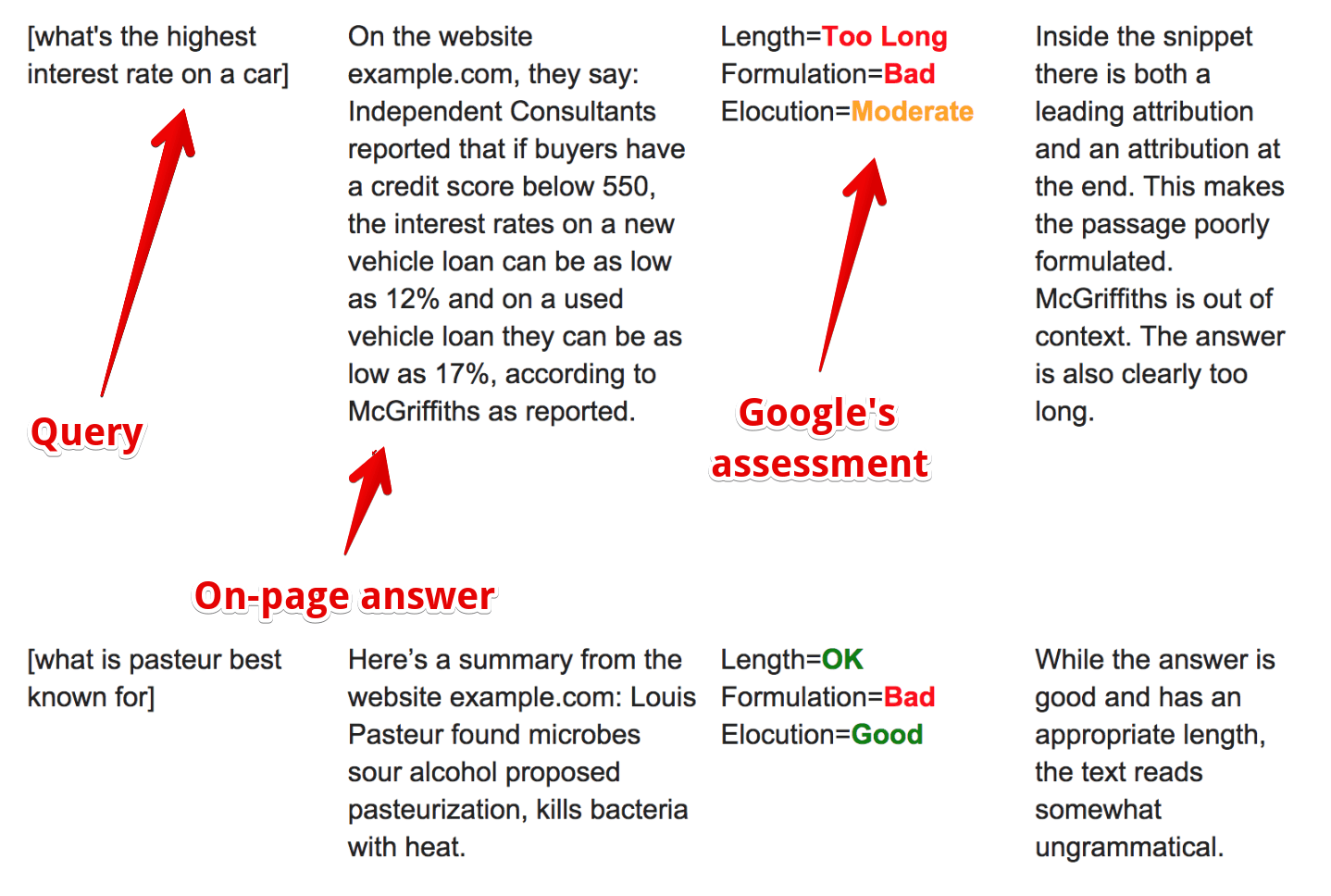
Image source: SE Ranking
Transitioning from Traditional SEO to Generative Engine Optimization (GEO)
As we move deeper into 2026, the industry is shifting from traditional SEO to Generative Engine Optimization (GEO). This framework focuses on how conversational AI models, like Google Gemini, process and summarize information. Unlike traditional ranking, which focuses on links and keywords, GEO prioritizes the Claim-Evidence-Source format.
| Feature | Traditional SEO | Voice Search SEO | GEO (Generative) |
|---|---|---|---|
| Primary Goal | Rank in Top 10 | Secure "Position Zero" | Be the AI Synthesis Source |
| Content Style | Keyword-dense | Natural Language | Claim-Evidence-Source |
| Technical Focus | Backlinks & Metadata | Schema & Latency | Contextual Connectivity |
| User Intent | Browsing/Research | Immediate Action | Complex Problem Solving |
To excel in a GEO environment, your documentation must be multimodal. This means optimizing image and video metadata so that Google Lens and Assistant can "describe" visual content to users. For instance, if a user points their camera at a product and asks, "How do I set this up?", the AI should be able to pull the relevant steps from your structured video metadata or alt-text descriptions.
Building Conversational Landing Pages with Google CX Agent Studio
Beyond simply ranking in search, forward-thinking brands are using Google CX Agent Studio to build dedicated "Brand Assistants." These agents act as conversational landing pages, handling complex user queries that a static webpage cannot.
CX Agent Studio allows for low-code development of agents that support human-like voices in over 40 languages. A key feature for global organizations is Audio-to-Audio (A2A) translation. This technology reduces latency by translating the user's voice directly into the agent's processing language and back again, without the need for intermediate text conversion. This creates a seamless, low-latency experience that is essential for maintaining user trust in voice interactions.
Support for 40+ languages with native-sounding AI voices to reach international markets.
A2A translation ensures responses are delivered in near real-time, matching human conversation speed.
Define your agent's personality and knowledge base to ensure every interaction reflects your brand values.
How to Measure Voice Search Performance in Google Search Console
One of the most significant challenges in voice search optimization is the "Measurement Gap." Currently, Google Search Console (GSC) does not provide a dedicated "Voice Search" filter. However, technical SEOs can use Regular Expressions (Regex) to isolate conversational queries and proxy voice performance.
Use this Regex string in the GSC Query filter to isolate natural language questions:
^(who|what|where|when|why|how|can|is|does|will)
By filtering for queries that start with these question words, you can identify which conversational topics are driving traffic. Additionally, analyzing query length is a highly effective proxy. Voice searches are typically 3-5 words longer than text searches. By isolating queries with five or more words, you can gain a clearer picture of your voice search footprint.
Common Pitfalls in Conversational Query Optimization
Even with the right schema, several common errors can hinder your voice search performance. One of the most frequent is "Instruction Neglect." Users often fail to use precise "action words" when speaking to devices. For example, a user might simply say "music" instead of "play jazz music." Documentation that accounts for these "lazy" queries by providing broad contextual relevance ranks among the top performers.
Another critical issue is the "Starter" restriction. Small businesses using basic Google Voice accounts may face limitations on call volume and automated features, which can impact their ability to handle voice-driven leads effectively. It is essential to ensure your communication infrastructure can scale with the increased demand that successful voice optimization brings.
Finally, latency remains a non-negotiable factor. If your page takes more than two seconds to load, Google is unlikely to use it as a source for a voice answer. The Assistant requires immediate access to data to provide a fluid user experience. Prioritizing Core Web Vitals—specifically Time to First Byte (TTFB) and Largest Contentful Paint (LCP)—is a prerequisite for any conversational search strategy.
Key Takeaways for Conversational Search Strategy
- Prioritize Natural Language: Structure content to answer full-sentence questions rather than targeting isolated keywords.
-
Implement Speakable Schema:
Use the
Speakableproperty to designate high-value text for audio playback. - Optimize for GEO: Adopt the Claim-Evidence-Source framework to satisfy generative AI synthesis requirements.
- Leverage FAQPage: Create concise, 40-50 word answers for common user questions to secure voice snippets.
- Use Regex for Tracking: Filter Google Search Console data for question-based triggers to measure conversational success.
- Minimize Latency: Ensure mobile load times are under two seconds to meet the speed requirements of voice assistants.
- Build Brand Assistants: Explore Google CX Agent Studio to create interactive, voice-first customer experiences.
Start by auditing your top-performing pages for
Speakable
schema eligibility and implementing the conversational Regex filter in your Search Console today.
Frequently Asked Questions
- How do I implement Speakable Schema for Google Voice Search?
-
To implement Speakable schema, add the
SpeakableSpecificationto your page's JSON-LD. You must identify the specific parts of the page that are suitable for audio playback using eithercssSelectororxpath. Ensure the selected content is concise and provides a clear summary of the page's topic. - What is the difference between a voice query and a conversational AI prompt?
- A voice query is typically a search-oriented request (e.g., "What is the height of the Eiffel Tower?") aimed at retrieving a specific fact. A conversational AI prompt is often task-oriented or exploratory (e.g., "Plan a three-day trip to Paris including historical sites"), requiring the AI to generate a complex, synthesized response based on multiple sources.
- Does Google Search Console show data for voice search queries?
- Google Search Console does not currently provide a specific label for voice search. However, you can proxy this data by using Regex filters to isolate long-tail, question-based queries (starting with who, what, how, etc.) which are highly characteristic of voice-driven search behavior.
- How do I optimize my FAQ section for conversational intent?
-
Optimization involves writing questions exactly as a user would speak them and providing direct, concise answers. Aim for answers that are 40-50 words long. Use
FAQPageschema to make this content easily discoverable by Google Assistant, ensuring it can be read aloud as a featured snippet. - What is the "Lumos" effect in search?
- The "Lumos" effect refers to the use of cultural or brand-specific verbal shortcuts that trigger specific actions on a device. It represents a shift where users memorize specific "hot words" to interact with technology, bypassing traditional search engine results pages in favor of direct, voice-activated commands.
-
Topic: Google Voice Search: Optimizing Content for Voice-Activated ...https://www.abstraktmg.com/what-is-google-voice-search/
-
Topic: How to Optimize for Voice Search in 2026https://circlesstudio.com/blog/optimize-for-voice-search/
-
Topic: Voice Search Optimization: The Ultimate Guidehttps://seranking.com/blog/voice-search-seo/

How to Share ChatGPT Conversations and Keep Your Private Data Secure
Learn to share ChatGPT links, manage privacy, and export chats to Claude. Step-by-step guide for personal and enterprise users.


How to Use Google Translate for English and 240 Other Languages
Master Google Translate for English and 240+ languages. Learn about NMT accuracy, offline mode, and how to fix common browser errors in 2026.

Are Grok AI Conversations Private and How Did the xAI Leak Happen?
Learn if your Grok AI chats are private after the 2025 xAI leak. Find out how to enable Private Chat mode and protect your data from search engines.