
How to Check Your SEO Keyword Rankings for Free and Improve Your Search Visibility
To accurately check your SEO keyword rankings, you must bypass Google's personalization bias.
Ahrefs
and
Semrush
offer top-tier free tools for database-driven insights, while
Seobility
provides real-time "live" scraping. For the most precise data, always compare mobile versus desktop results and use neutral parameters like
&pws=0
to see what your audience actually sees.
Monitoring your position in search engine results pages (SERPs) is a fundamental aspect of any digital strategy. However, the process is more complex than simply typing a query into Google. Because search results are now hyper-personalized based on your location, browsing history, and device type, the rank you see on your screen is rarely the same rank your potential customers see. To gain a competitive edge, you need a dedicated seo keywords rank checker that provides neutral, objective data.
Why You Cannot Trust a Standard Google Search for Your Rankings
Many website owners make the mistake of checking their rankings by performing a manual search. While this feels intuitive, it is one of the least reliable ways to measure SEO success. Google’s primary goal is to provide the most relevant result for the individual user, which means the search engine uses a variety of signals to customize the SERP.
The Personalization Bias
Every time you search for your own website, Google takes note. If you frequently click on your own links, Google’s algorithm may begin to "promote" your site in your personal search results. This creates a false sense of security. According to Keyword-Tools.org , search history, cookies, and even your logged-in Google account status can skew results significantly. A dedicated rank checker bypasses these user-specific profiles to show you the "neutral" rank.
The Neutrality Gap and GPS Location
Even if you use an incognito window, Google still uses your IP address to determine your physical location. If you are a local business in Chicago searching for "plumbing services," you will see different results than someone in New York. Dedicated tools allow you to set a specific "proxy" location, ensuring you see the rankings as they appear in your target market, not just your office.
Live Scraping vs. Database Data
It is important to understand how different tools gather their information. Some tools perform "Live Checks," which involve scraping the SERP in real-time. This is excellent for immediate accuracy. Others, like the Ahrefs Keyword Rank Checker , rely on massive historical databases containing over 500 million keywords. While database tools are better for seeing long-term trends, live checkers are often preferred for verifying the impact of a recent on-page change.
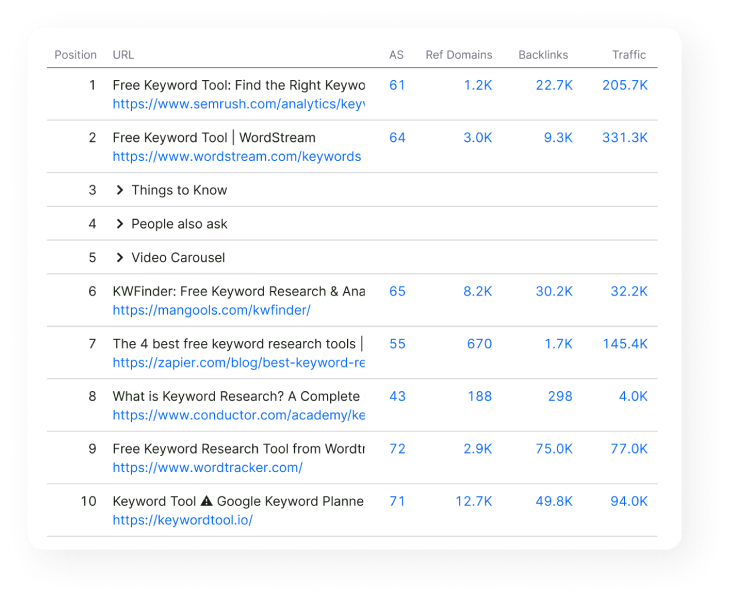
Image source: Semrush
Which Free SEO Rank Checker Should You Use?
The market is crowded with tools, but not all are created equal. Most premium platforms offer a limited free version that is sufficient for small websites or occasional checks. Below is a comparison of the most reliable options available today.
| Tool Name | Keyword Limit (Free) | Location Granularity | Device Toggle | Registration Required? |
|---|---|---|---|---|
| Seobility | Limited Daily Checks | Country/City | Yes | No |
| Ahrefs | Unlimited (Single Check) | Country | No | No |
| Semrush | 10 Keywords | Global/Local | Yes | Yes |
| SE Ranking | Trial Basis | Zip Code Level | Yes | Yes |
Ahrefs Keyword Rank Checker
Ahrefs is widely regarded as a top-tier choice for database depth. Their free rank checker is particularly useful for quick, "no registration" checks. You simply enter your domain and the keyword, and it provides your current position along with the top 10 competitors. It is an excellent choice for those who need a fast pulse check without setting up a full project.
Semrush Free Tools
If you are interested in more than just a number, Semrush offers a highly impactful suite of tools. Their free version allows you to track up to 10 keywords with daily updates. What sets it apart is the ability to track SERP features like Featured Snippets, Image Packs, and the increasingly important AI Overviews. In the modern SEO landscape, being #1 is less valuable if an AI summary is pushing your link below the fold.
Seobility and Keyword-Tools.org
For those who prioritize "Live" neutral scraping, Seobility stands out as a top choice. It allows for city-level granularity, which is vital for local SEO. Because it scrapes the data in real-time, you avoid the "database lag" that can sometimes occur with larger platforms that only update their indexes every few weeks.
How to Track Rankings Across Different Devices and Locations
In 2026, the idea of a single "ranking" is largely a myth. Google uses mobile-first indexing, meaning the mobile version of your site is the primary version used for ranking. However, the results on a smartphone and a desktop computer can vary wildly.
The Mobile-First Indexing Reality
It is common to rank #3 on desktop but #8 on mobile. This discrepancy often stems from page speed issues or intrusive interstitials (pop-ups) that only trigger on smaller screens. According to research from SEO Review Tools , device divergence is one of the most overlooked reasons for traffic drops. If your rank checker doesn't allow you to toggle between devices, you are only seeing half the picture.
Hyper-Local Tracking
For local businesses, country-level data is almost useless. If you own a bakery in Brooklyn, you don't care if you rank #1 in Los Angeles. You need to know how you rank for users within a 5-mile radius. Advanced tools now offer zip-code specificity. This is crucial because Google’s "Map Pack" (the local 3-pack) is heavily influenced by the physical distance between the searcher and the business.
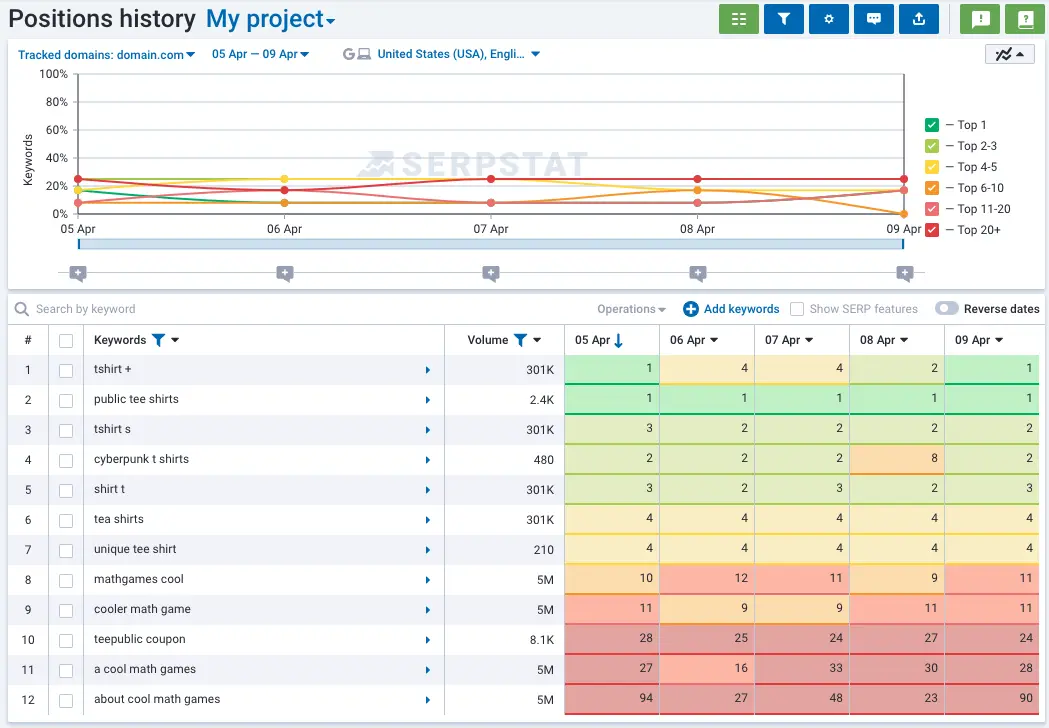
Image source: Serpstat
Why Your Rankings Look Different in Every Tool
It can be frustrating to see a tool report you are at position #5, only to find yourself at #12 when you check manually. This is often referred to as the "Ghost Ranking" phenomenon.
- Ghost Ranking
- A situation where a rank tracking tool identifies a position that is not visible to the user due to data center synchronization delays or localized algorithm testing.
- Search Depth
- The number of results a tool analyzes. Some free tools only check the top 20 results, while premium versions may go as deep as the top 100.
- Data Center Variance
- Google operates thousands of data centers. A tool might be hitting a data center in Virginia while you are hitting one in California, leading to slight variations in the SERP.
The &pws=0 Parameter
If you want to perform a manual check that is as neutral as possible, you can use a technical hack. Add
&pws=0
to the end of your Google search URL. This parameter tells Google to disable "Personalized Web Search." While it isn't as accurate as a professional
seo keywords rank checker
, it is a significant step forward compared to a standard search.
How to Fix Rankings That Are Not Showing Up
Sometimes, a rank checker will return a "Not in Top 100" result for a page you know exists. This is often a technical issue rather than a content problem.
The JavaScript Crawling Gap
A significant advancement in our understanding of indexing comes from troubleshooting sites built on platforms like Bubble.io. Research indicates that many rank checkers (and Google’s own crawlers) struggle with JavaScript-heavy sites where links are triggered by "workflows" rather than standard HTML
<a href>
tags. If your links are not visible in the source code, the rank checker may fail to find the internal structure of your site. The solution is to implement text-element hyperlinks to ensure crawlers can navigate your pages effectively.
Cannibalization Detection
If you see your rankings "flickering"—jumping from #10 to #60 and back again—you may be suffering from keyword cannibalization. This happens when two or more pages on your site are optimized for the same keyword. Google becomes confused about which page to rank and ends up penalizing both. Use your rank history to see if two URLs are "swapping" positions, which is a clear signal that you need to merge the content or differentiate the targeting.
How to Use the Striking Distance Strategy for Quick Wins
One of the most effective ways to use a rank checker is to identify "Striking Distance" keywords. These are terms where you are currently ranking on Page 2 (positions 11–20).
"Moving a keyword from position #11 to position #9 can result in a massive increase in traffic, as the click-through rate (CTR) for Page 1 results is exponentially higher than Page 2."
- Filter your results: Set your rank checker to show only keywords in positions 11–20.
- Analyze the intent: Ensure the page ranking is the best fit for the user's query.
- Boost internal links: Add 2-3 internal links from high-authority pages on your site to the "striking distance" page.
- Update the content: Add fresh data, images, or a more compelling meta description to improve CTR.
- Monitor the jump: Check back in 7-14 days to see if the page has moved to Page 1.
How to Automate Your Rank Tracking with Google Sheets
For those managing dozens of keywords, checking each one manually in a web tool is inefficient. You can build a custom dashboard by connecting SEO APIs to Google Sheets. This allows for bulk tracking and long-term data visualization without the high cost of a premium subscription.
By using scripts or third-party connectors, you can pull SERP data directly into a spreadsheet. This method is highly recommended for agencies or power users who need to correlate ranking changes with other metrics like conversion rates or ad spend. It provides a centralized "source of truth" that is easier to share with stakeholders than individual tool exports.
How AI Overviews Are Changing the Meaning of Rank #1
As of 2026, the traditional "blue link" ranking is no longer the only metric that matters. Google’s AI Overviews (formerly SGE) now occupy the top of the SERP for many informational queries. This means that even if you rank #1 organically, your link might be pushed "below the fold" by a large AI-generated summary.
Modern SEO success is now measured by "Visibility Share." This involves tracking whether your content is being used as a source for the AI Overview or if you are appearing in the "People Also Ask" (PAA) boxes. Tools like Semrush have notably innovative features that track these 15+ different SERP features, giving you a more accurate picture of your actual search presence.
Tracking Local Rankings with Grid Heatmaps
For local SEO, a single ranking number is often a simplification. In reality, your ranking changes block-by-block. A business might rank #1 for someone standing in their lobby but drop to #10 for someone three blocks away. This is why "Grid Tracking" has become a standard practice for local businesses.
Tools like LocalFalcon create a heatmap over a map of your city. Each point on the grid shows your rank at that specific coordinate. This allows you to see exactly where your "authority" ends and where a competitor takes over. If you see your rankings dropping in a specific neighborhood, it may indicate a need for more localized content or neighborhood-specific backlinks.
Frequently Asked Questions
How often should I check my keyword rankings?
For most websites, a weekly check is sufficient. Rankings fluctuate daily due to minor algorithm tweaks and competitor activity. Checking too often can lead to "rank anxiety." However, if you have just launched a major campaign or a new product, daily monitoring for the first two weeks can help you identify and fix indexing issues quickly.
Why did my ranking drop suddenly?
A sudden drop can be caused by several factors: a Google algorithm update, technical errors (like an accidental noindex tag), or a competitor significantly improving their content. First, check Google Search Console to see if there are any manual actions or crawl errors. If the site is healthy, use your rank checker to see if the drop is across all keywords or just a specific page, which might indicate a cannibalization issue.
Is there a truly unlimited free rank checker?
Google Search Console is the only truly unlimited free tool, as it provides data directly from Google. However, it has a 2-3 day data lag and does not show "live" rankings. For real-time, unlimited checks, most users rely on a combination of free tools like Ahrefs (for quick checks) and Seobility (for daily tracking of a small set of core terms).
What is a good CTR for a #1 ranking?
Historically, the #1 organic result has a CTR of approximately 28%. However, this number is decreasing as more SERP features (ads, AI overviews, map packs) are added. By the time you reach position #10, the CTR typically drops to around 1%. This is why moving from Page 2 to the bottom of Page 1 is a significant step forward, but moving into the top 3 is where the real traffic gains occur.
Can I check my competitors' rankings for free?
Yes. Most tools that allow you to enter a URL will work for any domain, not just your own. Using the free versions of Ahrefs or Semrush, you can enter a competitor's URL to see which keywords they rank for. This is a highly effective way to find "keyword gaps"—terms your competitors are winning on that you haven't targeted yet.
The Bottom Line on SEO Keyword Tracking
Success in search engines is no longer about chasing a single number. It is about understanding your visibility across different devices, locations, and SERP features. To stay ahead, follow this distilled strategy:
-
Use neutral tools:
Always bypass personalization by using dedicated checkers or the
&pws=0parameter. - Prioritize mobile: Since Google uses mobile-first indexing, your mobile rank is your "true" rank.
- Target Page 2: Use the "Striking Distance" strategy to find keywords in positions 11-20 for the fastest traffic gains.
- Monitor Visibility Share: Don't just look at the blue links; track your presence in AI Overviews and Featured Snippets.
- Go Local: If you serve a specific area, use grid heatmaps to understand your neighborhood-level authority.
- Correlate with Traffic: Rankings are a means to an end. Always verify that your rank improvements are leading to actual clicks and conversions in your analytics.
Start by identifying your top five "striking distance" keywords today and add three internal links to each to see how quickly you can move to Page 1.

How to Find and Use a Top-Rated SEO Keyword Position Tool for Your Website
Find a top SEO keyword position tool to track rankings, AI overviews, and local SERPs. Compare free and paid options for 2026.


How to Create and Manage a Google Business Profile That Ranks
Create, verify, and optimize your Google Business Profile to rank higher in local search and attract more customers. Expert tips for 2026 success.


How to Use Google AI Mode to Get Better Search Results with Gemini
Learn how to use Google AI Mode, trigger Deep Search, and fix Workspace issues. Master Gemini-powered search with our expert tips for 2026.