
How to Create and Manage a Google Business Profile That Ranks
A Google Business Profile (GBP) is a free tool that allows local businesses to manage their presence across Google Search and Maps. To succeed in 2026, you must verify your location, maintain consistent Name, Address, and Phone (NAP) data, and actively engage with customer reviews. Businesses with complete profiles are 2.7 times more likely to be considered reputable by consumers.
What Is a Google Business Profile and Why Does It Matter?
In the modern digital landscape, your Google Business Profile serves as the digital front door to your physical or service-based company. It is the bridge that connects your operational data—such as hours, location, and services—directly to users searching on Google Maps and Search. For many local enterprises, this profile is the primary driver of discovery, often appearing before traditional organic search results in what is known as the "Local Pack."
The official Google Business Profile portal is where you begin the journey of claiming your business. Once claimed, your profile powers the information displayed when someone searches for "plumber near me" or your specific brand name. According to Map Labs , the profile is not just a listing; it is a dynamic asset that allows for real-time updates, customer interaction, and direct booking.
The "Local Pack" is the set of three business listings that appear at the top of Google Search results for local queries. Securing a spot here is vital because it captures the vast majority of local intent clicks. Without a verified and optimized profile, your business remains effectively invisible to a significant portion of your local market, regardless of how well your main website ranks.
Why a Complete Profile Is Essential for Your Bottom Line
Data consistently shows that the effort put into a business profile correlates directly with consumer trust and conversion rates. According to Setmore's analysis of GBP statistics , customers are 2.7 times more likely to consider a business reputable if the profile is complete. This reputation boost is not merely psychological; it translates into measurable actions.
Consider these key performance metrics for optimized profiles:
- Conversion Rates: On average, over 5% of profile views lead to a direct action, such as a phone call, direction request, or booking.
- Engagement: Profiles that are fully filled out are 70% more likely to attract actual location visits and 50% more likely to lead to a final purchase.
- The Visual Advantage: High-quality imagery is a major differentiator. Businesses that regularly upload photos see 42% more direction requests and 35% more website clicks than those with stagnant or empty galleries.
In 2026, the "set it and forget it" approach no longer works. Google’s algorithm favors active profiles that provide fresh evidence of their existence. This includes responding to reviews, posting weekly updates, and ensuring that your attributes (like "outdoor seating" or "wheelchair accessible") are current. This active management signals to Google that your business is operational and reliable, which in turn maintains your prominence in search results.
How to Set Up Your Profile Without Making Critical Mistakes
The setup phase is where many businesses inadvertently sabotage their future rankings. The most common error is a lack of consistency in the NAP (Name, Address, Phone) data. Your information on Google must exactly match the information on your website, social media, and local directories. Even small discrepancies, like "Street" vs. "St.", can occasionally confuse automated systems, though Google has become better at reconciling these over time.
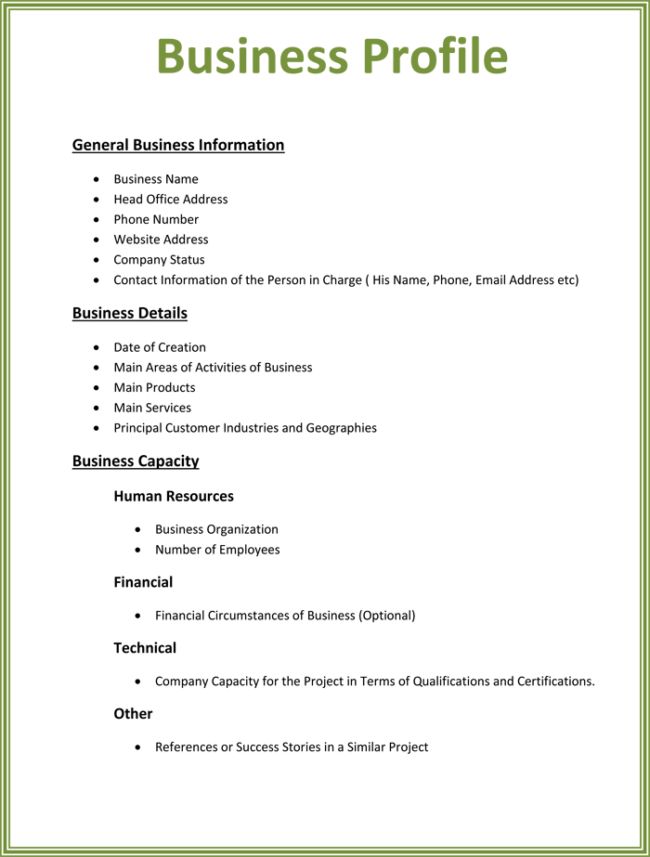
Image source: Pinterest
When selecting your Primary Category , you must be specific. If you run a "Pizza Restaurant," do not simply choose "Restaurant." The primary category carries the most weight in determining which searches you appear for. While you can add sub-categories later, "over-categorizing" by adding irrelevant tags can dilute your relevance and potentially trigger a manual review.
For those who operate out of a home office or travel to customers, the Service-Area Business (SAB) setting is essential. You can hide your physical address while still appearing in searches for the specific zip codes or cities you serve. This prevents customers from showing up at your private residence while ensuring you still rank for "near me" searches in your target territory.
How to Verify Your Business Profile Quickly
Verification is the process by which Google confirms you are the rightful owner of the business. Until this step is complete, you cannot respond to reviews, see detailed insights, or appear reliably in Google Maps. The Google Support verification guide outlines several methods, but the available options depend on your business type and history.
How Google Determines Your Local Search Ranking
Google’s local algorithm is distinct from its global web algorithm. It relies on three core pillars to decide which business profile appears at the top. Understanding these allows you to prioritize your optimization efforts effectively.
| Ranking Factor | What It Means | How to Improve It |
|---|---|---|
| Relevance | How well your profile matches the user's search query. | Use detailed descriptions and select the most accurate categories. |
| Distance | The proximity of your business to the user's location. | Ensure your service area or physical address is precisely mapped. |
| Prominence | How well-known or authoritative your business is. | Gather high-quality reviews and build local backlinks to your site. |
While you cannot control Distance , you have significant influence over Relevance and Prominence . Prominence is often the tie-breaker between two equally relevant businesses. Google looks at your overall web presence, including mentions in local news, links from other reputable sites, and the sheer volume and sentiment of your Google reviews. This is why a business with 500 reviews often outranks a closer competitor with only 5 reviews.
Advanced Optimization Using the Holistic Evidence Strategy
To move beyond basic setup, top-performing businesses use what we call the Holistic Evidence Strategy . This involves creating a data feedback loop between your website and your Google Business Profile. Google’s crawlers are constantly looking for "evidence" that confirms your business is what it claims to be.
First, ensure your website’s service pages use the exact terminology found in your GBP categories. If your primary category is "HVAC Contractor," your website should have a dedicated page for "HVAC Services" with Schema markup that points back to your Google profile. This cross-referencing builds a strong "relevance" signal.
Second, practice Review Mining . When asking customers for reviews, gently encourage them to mention the specific service they received. For example: "We’d love it if you could mention the kitchen remodel we did for you." When Google sees keywords like "kitchen remodel" appearing frequently in your reviews, it increases your prominence for those specific search terms. This is a top-tier strategy for ranking in competitive niches.
Industry-Specific Features You Should Be Using
Google has introduced specialized tools for different sectors that can significantly increase the "real estate" your profile takes up on the screen. Using these features makes your profile a top-tier option for users who want to take action without leaving the search results.
Retailers and In-Store Products
Retailers can leverage the "See What's In Store" feature. By integrating your Point of Sale (POS) system or manually uploading a product feed, you can show real-time inventory directly on your profile. When a user searches for a specific item, your profile can appear with a "In Stock" badge, which is a massive driver for foot traffic. This transparency sets a high standard for local retail competition.
Restaurants and Food Services
For restaurants, the "Reserve with Google" integration is essential. It allows users to book a table directly from the search result, bypassing third-party apps that might charge high commissions. Additionally, you should manually upload your menu rather than relying on third-party scans. This ensures your pricing and dish descriptions are accurate, which improves the user experience and reduces friction in the decision-making process.
Service-Area Businesses (SABs)
SABs often struggle with the "Distance" factor because they lack a storefront. To counter this, define your service areas by specific zip codes rather than just a broad city name. This provides Google with more granular data about where you actually operate. Furthermore, using the "Updates" post feature to showcase photos of jobs completed in specific neighborhoods can help reinforce your local relevance in those areas.
The Suspension Survival Guide: How to Keep Your Profile Active
A profile suspension can be devastating for a local business, often resulting in an immediate drop in leads. Suspensions are usually triggered by automated systems looking for "Quality Issues." Understanding the hidden triggers is the best way to protect your asset.
Other common triggers include:
- Address Changes: Changing your physical address and your business name at the same time is a major red flag for fraud detection.
- Account Health: If an "Owner" or "Manager" of your profile has a history of managing other suspended profiles, your listing may be flagged by association.
- Virtual Offices: Using a P.O. Box or a virtual co-working space as your business address is strictly prohibited and is a leading cause of takedowns.
If you are suspended, do not create a new profile. This is considered "circumventing the system" and can lead to a permanent ban. Instead, follow the official reinstatement process, providing legal proof of your business (like a utility bill or business license) that matches your profile data exactly.
Managing Multiple Locations at Scale
For franchises or enterprises with dozens of locations, manual management is inefficient. The Google Business Profile API allows developers to push updates to thousands of locations simultaneously. This is particularly useful for updating holiday hours or responding to reviews across a global brand.
Enterprises with 10 or more locations can also apply for Bulk Verification . This process allows you to verify all current and future locations at once, bypassing the need for individual postcards. This requires a high level of data accuracy and a dedicated account manager, but it is a significant advancement for brand consistency.
Image source: Sample Templates
Frequently Asked Questions
Yes, Google Business Profile is a free tool provided by Google. There are no subscription fees for creating, verifying, or managing your profile. While Google offers paid "Local Services Ads" that appear near the top of search results, the core profile management and organic Maps presence remain free for all eligible businesses.
Absolutely. If you are a service-area business (like a locksmith, plumber, or mobile pet groomer) that travels to customers, you can create a profile. During setup, you simply select the option to hide your address from the public and define the geographic areas you serve. This allows you to rank in local searches without exposing your home address.
If you find a listing for your business that you didn't create, you can use the "Request Access" workflow. Google will send an email to the current owner. If they don't respond within 3-7 days, Google often provides you with the option to verify your relationship with the business and take over the listing yourself.
The most common reasons are a lack of verification, a recent suspension, or poor ranking factors. If your profile is new, it may take a few weeks for Google to index it fully. If you are verified but still not appearing, check for "Quality Issues" in your dashboard or focus on improving your "Prominence" through reviews and local SEO.
Google My Business (GMB) was the previous name for the platform. Google rebranded it to "Google Business Profile" to reflect a shift toward managing listings directly within Google Search and Maps rather than through a separate app. The core features remain largely the same, but the management interface has been streamlined.
A Google Business Profile is a top-tier asset for any local business aiming to thrive in 2026. Success requires more than just a one-time setup; it demands ongoing engagement and strategic data management.
- Verify your NAP consistency across all digital platforms to build foundational trust.
- Upload at least 10 high-quality photos to significantly increase user engagement and direction requests.
- Select one specific primary category and use sub-categories sparingly to maximize relevance.
- Post updates weekly to signal to Google that your business is active and reliable.
- Respond to every review , as this is a primary driver of the "Prominence" ranking factor.
- Avoid keyword stuffing in your business name to prevent costly profile suspensions.
Start by auditing your current profile today to ensure every field is complete and your photos reflect the current state of your business.

How to Check Your SEO Keyword Rankings for Free and Improve Your Search Visibility
Check Google rankings for free. Compare top SEO keyword rank checkers for mobile, desktop, and local accuracy to improve search visibility.


How to Find and Use a Top-Rated SEO Keyword Position Tool for Your Website
Find a top SEO keyword position tool to track rankings, AI overviews, and local SERPs. Compare free and paid options for 2026.


How to Use Google AI Mode to Get Better Search Results with Gemini
Learn how to use Google AI Mode, trigger Deep Search, and fix Workspace issues. Master Gemini-powered search with our expert tips for 2026.