
How to Find a Song by Humming Even If You Do Not Know the Lyrics
We have all experienced the "earworm" phenomenon: a melody that loops endlessly in your mind, yet the lyrics remain elusive. In the past, identifying these tracks required a stroke of luck or a knowledgeable friend. Today, advancements in audio fingerprinting and machine learning have made it possible to identify a song simply by humming, whistling, or singing a few bars into your device.
This process relies on complex algorithms that strip away the timbre of your voice and focus purely on the pitch sequence. Whether you are using a mobile device or a desktop computer, several tools stand out as top choices for resolving these musical mysteries. According to Google's official documentation , their system transforms audio into a number-based sequence that can be matched against a vast database of studio recordings.
Using Google Hum to Search on Your Mobile Device
Google's "Hum to Search" feature is widely considered one of the most accessible tools for melody identification. It is integrated directly into the Google Search ecosystem, meaning most Android and iOS users already have the necessary software installed. The technology behind this feature is notably innovative, utilizing machine learning to match your hummed melody against the "fingerprints" of millions of songs.
To use this feature effectively, follow these steps:
- Open the Google App or access the Google Search widget on your home screen.
- Tap the Microphone icon .
- Tap the button labeled "Search a song" or simply ask, "What is this song?"
- Hum, whistle, or sing the melody for 10 to 15 seconds .
The "10–15 second rule" is critical for success. While the AI is highly capable, it requires a sufficient sample of the pitch contour to distinguish between similar-sounding tracks. Once the recording is complete, Google will present you with several potential matches, each accompanied by a percentage indicating the algorithm's confidence in the result. This tool is particularly effective for popular hits and tracks with distinct melodic lines.
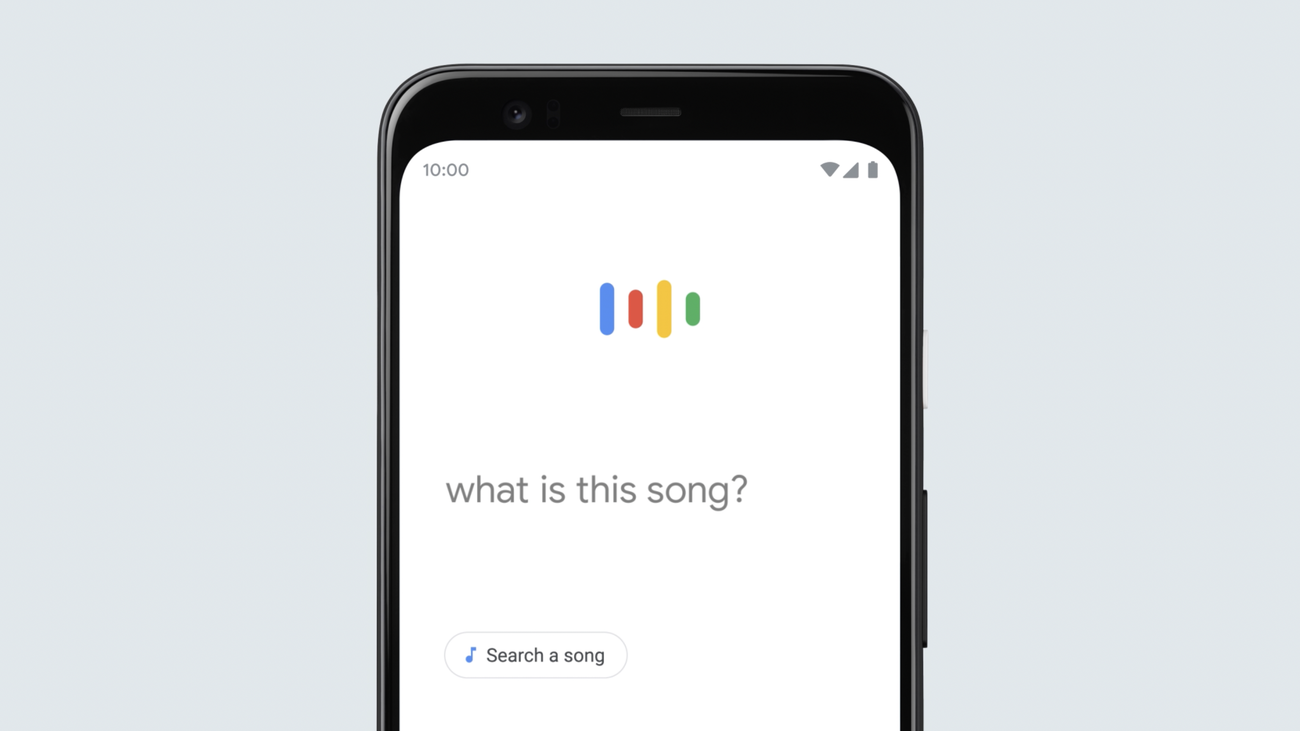
Image source: Google Blog
Identifying Melodies Directly Within the YouTube App
In recent months, YouTube has introduced a dedicated "Hum to Search" capability that functions independently of the main Google Search app. This feature is a significant step forward for users who primarily consume music through video platforms. Because YouTube's database includes user-generated content, covers, and viral tracks, it may find results that traditional music databases overlook.
To access this feature, open the YouTube app and tap the search icon. You will notice a microphone icon; tapping it often reveals a toggle between "Voice" and "Song." Selecting the "Song" tab allows you to hum or play a snippet of music. This tool is exceptionally strong at identifying tracks that have gained popularity through social media trends or video soundtracks.
According to YouTube's feature demonstration , the integration of Google Assistant's smarts into the video platform allows for a seamless transition from identification to playback. If the melody you are humming belongs to a viral video or a specific live performance, YouTube is often the most effective platform for finding that exact version.
Finding a Song by Humming on a Desktop Computer
One common frustration for users is the "Desktop Gap." While Google’s native hum-to-search tool is currently limited to mobile devices, PC and Mac users have several reliable workarounds. You do not need to reach for your phone if you are already working at a computer.
Another browser-based alternative is HumtoSearch.app . This website allows you to record a melody directly through your browser without installing any software. This is particularly useful for users who may be on a public computer or a work device where app installations are restricted. While these third-party tools may have different user interfaces, they utilize similar audio fingerprinting technology to provide accurate results.
Comparing the Accuracy of Popular Melody Recognition Tools
Not all song identification tools are created equal. Some excel at identifying recorded audio (like Shazam), while others are specifically tuned for the nuances of the human voice. The following table compares the most popular options based on their database size and platform availability.
| Tool Name | Best For | Database Size | Platform |
|---|---|---|---|
| Google Hum Search | Pop hits & Whistling | ~500,000 (Hum-specific) | iOS, Android |
| YouTube Hum | Viral & Video tracks | Extensive (Video-based) | iOS, Android |
| AHA Music | Obscure & International | 100 Million+ | Web, Chrome |
| SoundHound | Singing & Humming | Large | iOS, Android |
| Shazam | Recorded Audio | 100 Million+ | All Platforms |
It is important to note the discrepancy in database sizes. While Google’s general "Sound Search" database is massive, its specific "Hum to Search" database is estimated to be around 500,000 songs, according to technical analyses . This is why you might find that AHA Music or SoundHound succeeds where Google fails, especially for niche or international music.
Improving Your Humming Accuracy Using Vocal Science Techniques
You do not need to be a professional singer to use these tools, but the way you hum can significantly impact the AI's ability to recognize the pitch. By understanding a few basic principles of vocal science, you can provide a clearer signal for the microphone.
- The "Golf Ball" Technique
- Imagine you have a small golf ball at the back of your throat. This creates a resonant space that stabilizes your pitch and prevents the "breathy" quality that can confuse AI algorithms.
- Tongue Placement
- Rest your tongue gently behind your upper front teeth while humming. This helps direct the sound through the nasal passages more clearly, creating a sharper "hum" that is easier for the software to analyze.
- Pitch vs. Rhythm
- If you cannot hit the notes perfectly, focus on the rhythm. Many algorithms use the rhythmic pattern as a secondary identifier, which can help narrow down the results even if the melody is slightly off-key.
Furthermore, research from Vocalist.org suggests that humming increases nitric oxide production in the nasal passages. This not only helps clear your sinuses but can actually lead to a more consistent audio signal. If the search fails, try whistling instead; the AI often finds the pure pitch contour of a whistle easier to isolate than a vocal hum.
Understanding the Machine Learning Technology Behind Audio Fingerprinting
How does a computer understand a "bad" hum? The technology, often referred to as SPICE (Self-supervised Pitch Estimation) , is designed to ignore the quality of the voice and focus on the fundamental frequency. When you hum, the system creates a mathematical representation of the melody, known as an embedding space .
In this high-dimensional space, the hummed melody is compared to studio recordings. The AI "strips the timbre," meaning it ignores whether the sound is coming from a piano, a guitar, or a human voice. It only cares about the sequence of notes. If your hummed sequence matches the sequence of a recorded song within a certain mathematical threshold, a match is identified. This is why you can be "off-key" and still get a correct result; the AI looks for the relative changes between notes rather than absolute pitch perfection.
Troubleshooting Common Issues When a Search Fails to Find a Match
Even the most advanced tools can fail. If you are repeatedly getting the "Unable to find match" message, consider these common pitfalls:
- Ambient Noise: Background sounds like fans, traffic, or other people talking can interfere with the microphone's ability to isolate your voice.
- Sample Length: Ensure you are humming for at least 15 seconds. A 5-second clip is rarely enough for the AI to build a unique fingerprint.
- Microphone Quality: If you are on a desktop, ensure your microphone levels are not peaking (distorting) or too quiet.
- AI-Generated Tracks: With the rise of AI music, you might be humming a song that was generated by an AI and isn't in traditional databases. Tools like AHA Music offer an "AI Music Detector" to help identify these cases.
Distinguishing Between the Band Hum and Technical Audio Problems
It is worth noting that a search for "hum song" might lead you to two very different places. First, there is the 90s rock band Hum , known for their hit "Stars." According to Spotify data , the band maintains a significant following with hundreds of thousands of monthly listeners. If you are looking for their discography, you are in the right place, but for a different reason.
Second, some users land on these guides while trying to fix an "electrical hum" in their audio equipment. If you are hearing a constant low-frequency buzz in your speakers, you are likely dealing with a ground loop. This is a technical hardware issue involving decoupling capacitors or ground jumpers, rather than a musical earworm. Disambiguating these intents ensures that you find the specific solution you need.
Frequently Asked Questions
Can Shazam identify a song if I hum it?
Traditionally, Shazam was designed to identify recorded music by matching exact acoustic fingerprints. However, in recent updates, Shazam has improved its ability to recognize sung or hummed melodies, though it still generally ranks behind Google and SoundHound for this specific task. For the most accurate results with humming, Google or SoundHound remain the top-rated options.
Is there a hum to search website for PC?
Yes, while Google's native tool is mobile-only, you can use websites like AHA Music or HumtoSearch.app on a desktop computer. These sites use your computer's microphone to capture the melody and match it against their databases. The AHA Music Chrome extension is also highly recommended for identifying music playing in other browser tabs.
Why does Google Hum to Search keep saying "Unable to find match"?
This usually happens due to one of three reasons: the hum was too short (less than 10 seconds), there was too much background noise, or the song is very obscure and not in the 500,000-song hum database. Try whistling the melody or using a different tool like SoundHound, which may have a different database of indexed melodies.
Does humming a song work for classical music?
Yes, humming works for classical music, provided the melody is distinct. However, because classical pieces often have complex arrangements and multiple movements, the AI may struggle if you hum a secondary orchestral part rather than the main theme. Focusing on the most recognizable "hook" of the piece will yield the strongest results.
Is my humming data being saved by Google?
Google uses the audio to process the search request, but you can manage your voice and audio activity settings in your Google Account. By default, Google may save snippets to improve their speech recognition technology, but you can opt-out or delete this history at any time through your privacy settings.
Final Thoughts on Identifying Your Favorite Melodies
Identifying a song by humming is no longer a matter of guesswork. By using the right tools and techniques, you can solve your musical mysteries in seconds.
- Start with the Google App for the quickest results on mobile devices.
- Use the YouTube App if you suspect the song is from a viral video or social media trend.
- Try AHA Music on a desktop computer to bypass mobile-only limitations.
- Hum for at least 15 seconds to give the AI enough data for an accurate match.
- Whistle the melody if your humming isn't producing results, as the pitch is often clearer.
- Apply vocal resonance by using the "golf ball" technique to stabilize your pitch.
Next time a melody gets stuck in your head, simply open your favorite recognition app and let the technology do the work for you.

How to Find a Song When You Only Know the Melody or Lyrics
Stuck with an earworm? Use Google Hum to Search, Shazam, or Reddit to identify songs by melody, whistling, or lyrics. Find your music now.


How to Listen to Free Music Online Without Downloading Any Apps or Software
Stream free music online without apps or sign-ups. Compare top ad-free sites like Jango and AccuRadio for any device.


Spotify - Web Player: Music for Everyone and How to Stream Anywhere
Stream music and podcasts in your browser with Spotify Web Player. Access login, mobile workarounds, and advanced search tips for 2026.