
How to Find a Song When You Only Know the Melody or Lyrics
We have all experienced the "earworm"—that stubborn fragment of a melody that loops endlessly in your mind, yet remains just out of reach. Whether it is a catchy tune from a passing car or a background track in a social media video, the frustration of not knowing the title can be significant. Fortunately, as of 2026, music identification technology has reached a point where even a vague hum or a single misheard phrase is often enough to find the answer.
Modern tools leverage deep neural networks to bridge the gap between human memory and digital databases. While Shazam remains a popular choice for recorded music, newer AI-driven methods from Google and specialized communities like Reddit offer robust alternatives for those moments when you only have a melody stuck in your head.
How to Use Google Hum to Search on Your Phone
The Science Behind the Search
Google's "Hum to Search" feature is a significant advancement in audio processing. Unlike traditional fingerprinting, which looks for exact matches in acoustic data, Google’s machine learning models transform audio into a number-based sequence representing the song’s melody. According to the Google Research Team , the system is designed to ignore "timbre"—the specific quality of your voice or the instruments—and focus entirely on the sequence of notes.
When you hum into your phone, the AI compares your input against a database of millions of songs. It looks for the "fingerprint" of the melody itself. This is why the tool works even if you are singing poorly or whistling. The algorithm requires approximately 10 to 15 seconds of audio to generate a high-confidence match. In recent years, this technology has evolved from the "Now Playing" feature on Pixel devices to a global search tool available to billions of users.
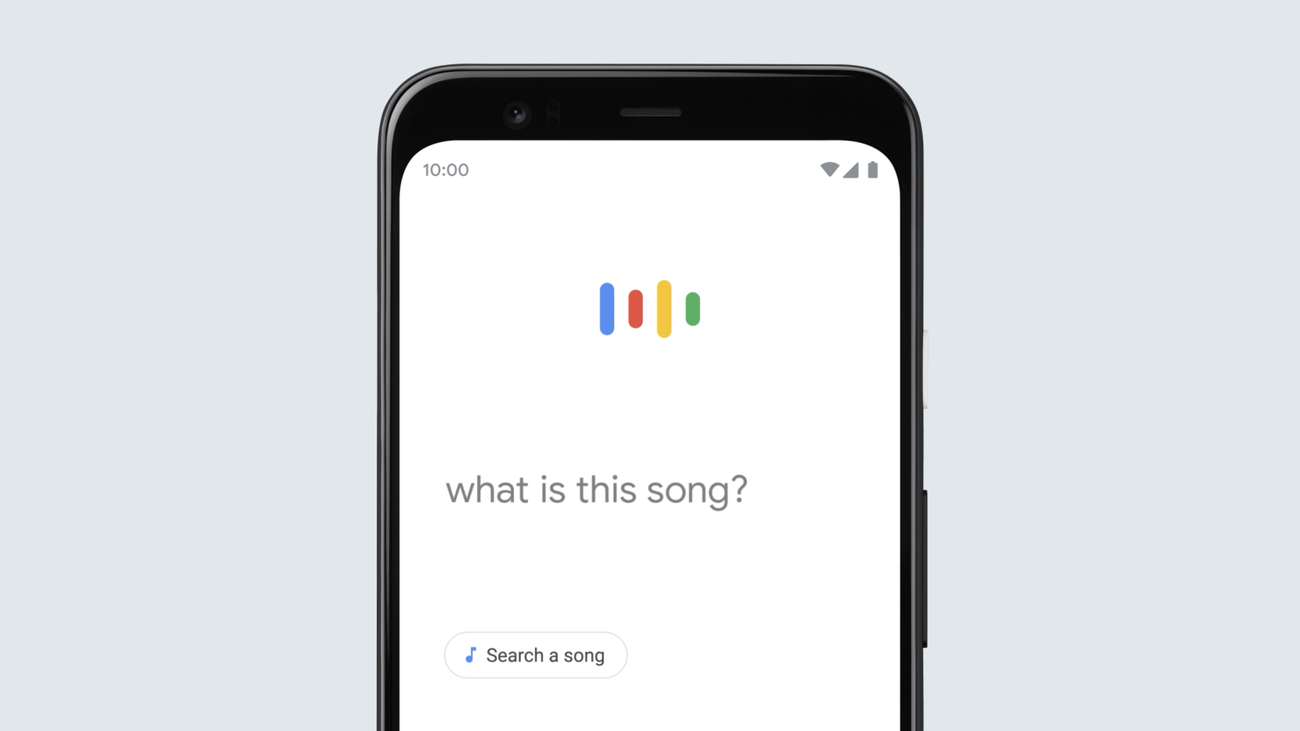
Image source: Google Blog
Step-by-Step for Android Users
Android users have several entry points for song identification, making it one of the most versatile platforms for music discovery. According to Google Support , you can access these features through the following methods:
- The Google App: Open the app, tap the microphone icon, and select the "Search a song" button.
- Circle to Search: On supported devices, you can long-press the home button or navigation bar and tap the music icon to identify songs playing in other apps, such as Instagram or TikTok.
- Gemini AI: You can ask the Gemini assistant directly, "What is this song?" and begin humming.
- Pixel "Now Playing": If you own a Pixel 2 or newer, your phone can automatically identify music playing in the background and display the title on your lock screen without you having to ask.
Step-by-Step for iPhone (iOS) Users
While the feature is available on iOS, there are some regional and technical differences to keep in mind. As noted in official documentation , the iOS version of the Google App currently supports song identification primarily in English, whereas the Android version supports over 20 languages.
- Download and open the Google App from the App Store.
- Tap the Microphone icon in the search bar.
- Tap the "Search a song" button that appears at the bottom of the screen.
- Hum, whistle, or sing the melody for at least 10 seconds.
Which Song Identification Tool Should You Use?
Not all song identifiers are created equal. Choosing the right tool depends on what information you have available. If you have the original recording playing, Shazam is a top-tier choice. However, if you only have a memory of the tune, other options may serve you better.
| Tool | Best For | Humming Support | Platform |
|---|---|---|---|
| Google Search | General humming and whistling | Yes (Excellent) | Android, iOS, Web |
| Shazam | Original recordings/Radio | No | iOS, Android, WatchOS |
| SoundHound | Whistling and off-key singing | Yes (Strong) | Android, iOS |
| Musixmatch | Identifying by lyrics | No | Android, iOS, Web |
| Niche remixes and obscure ads | Via Vocaroo | Web, App |
When to Use Shazam vs. SoundHound
Shazam is widely regarded as a standard for identifying recorded music. It works by matching the acoustic "spectrogram" of a recording against its massive database. However, Shazam typically fails when you try to hum or sing to it because it requires the exact textures of the original studio production.
SoundHound, conversely, uses a different underlying technology that was built from the ground up to recognize human singing and whistling. Many users find that SoundHound is a highly competitive alternative to Google when the melody is particularly complex or if you are whistling, which produces a cleaner frequency than humming.
Desktop and Browser Workarounds
If you are on a PC or Mac and don't have your phone handy, you can still find that song. The website Midomi (powered by SoundHound) allows you to sing or hum directly into your computer's microphone. Additionally, the Chrome browser's microphone feature in the Google search bar can sometimes trigger the "Search a song" functionality, though it is most reliable on mobile devices.
How to Find a Song Using Misheard or Fragmented Lyrics
The Phonetic Search Strategy
Sometimes you don't remember the melody, but you remember a specific sound or a misheard phrase. Search engines have become remarkably adept at handling "phonetic searches." For example, searching for "the song that goes eee er" will immediately point you toward Roddy Ricch’s "The Box."
- "Doo doo doo, doo-doo doo doo"
- Often refers to Semi-Charmed Life by Third Eye Blind or Tom's Diner by Suzanne Vega.
- "Da da da, da-da-da-da, da, da"
- A common search for the iconic bassline of Seven Nation Army by The White Stripes.
- "The song with the whistling in the beginning"
- Frequently leads to Young Folks by Peter Bjorn and John or Wind of Change by Scorpions.
Advanced Google Search Operators for Lyrics
If you remember a few words but aren't sure of the order, you can use advanced operators to narrow down the results. According to lyric database experts , using the asterisk (*) as a wildcard is one of the most effective strategies.
- Quotation Marks: Use "exact phrase here" to find songs that contain those specific words in that specific order.
-
The Wildcard (*):
If you forget a word, use an asterisk. For example:
"bye bye * american pie". -
The OR Operator:
If you aren't sure if the lyric is "blue house" or "blue car," search
"blue house" OR "blue car" lyrics.
What to Do When Shazam and Google Fail to Find the Song
The Social Media Ad Problem
A common complaint among music seekers is the inability to identify songs from Instagram Reels, TikTok ads, or Facebook videos. These tracks are often niche remixes, royalty-free library music, or unreleased snippets that haven't been indexed by Google or Shazam. In these cases, AI often returns "No match found."
Crowdsourcing with Human Experts
When technology fails, human intuition often succeeds. There are dedicated communities online where "music detectives" help identify obscure tracks. The most prominent is r/TipOfMyTongue on Reddit. To get a successful answer, you must follow their strict formatting rules:
- Use Vocaroo: Record yourself humming the tune on Vocaroo and include the link in your post. Human ears are often better at recognizing a "vibe" than an algorithm.
- Provide Context: Where did you hear it? What year was it? Was the singer male or female? What was the genre?
- Be Specific: Instead of saying "it's fast," compare it to other known songs (e.g., "It sounds like a faster version of a Queen song").
Why Google Might Not Recognize Your Humming and How to Fix It
Common Pitfalls and Technical Barriers
If you are receiving a "No match found" error, it is likely due to one of three common issues:
- Pitch vs. Rhythm: Google’s algorithm prioritizes the melody (pitch) over the rhythm. If you are tapping out the beat but your humming is monotone, the AI will struggle to find a match. Try to emphasize the rises and falls in the notes.
- Background Noise: Ambient noise—like a running faucet or a loud air conditioner—can distort the "fingerprint" the AI is trying to create. Ensure you are in a quiet environment.
- Duration: Many users stop humming after 3 or 4 seconds. The neural network needs a longer sample (10-15 seconds) to distinguish the song from others with similar openings.
Pro-Tips for Better Accuracy
Whistling is often a more accurate method than humming. Whistling produces a clearer, more distinct frequency (a "sine wave") that is easier for the AI to map against its database. If your humming isn't working, try whistling the tune instead. Additionally, ensure your phone case isn't muffling the microphone, as high-frequency clarity is essential for a successful match.
Frequently Asked Questions
How do I find a song by humming on a computer?
To find a song by humming on a desktop or laptop, you can use the website Midomi. It uses the SoundHound database and allows you to record your voice through your browser. Alternatively, if you have the Google Chrome browser, you can sometimes use the microphone icon in the search bar, though the dedicated "Search a song" feature is most robust in the mobile Google App.
Can Google find a song if I only know the tune?
Yes, that is exactly what the "Hum to Search" feature is designed for. By converting your humming into a digital melody sequence, Google can identify songs based solely on the tune, even without lyrics or the original recording. It is one of the most effective ways to solve an earworm when you can't remember any words.
Why isn't the 'Search a Song' button showing up?
If you don't see the button, first ensure your Google App is updated to the latest version. On iOS, the feature may be restricted if your primary language is not set to English. On Android, ensure you have granted the app permission to use your microphone. In some regions, the feature may still be rolling out or restricted by local regulations.
Does Hum to Search work for classical music?
Yes, Google's machine learning model includes a vast library of classical compositions. Because classical music relies heavily on distinct melodies rather than lyrics, it is actually one of the genres the AI identifies with high accuracy. Whether it's a Mozart symphony or a modern film score, humming the main theme should yield results.
What is the difference between Shazam and Google song search?
Shazam is a top-rated tool for identifying recorded music playing in your environment (like at a club or on the radio). It uses acoustic fingerprinting to match the exact sound. Google's search is a more versatile AI tool that can identify music from humming, whistling, or singing, making it better for songs that are only in your head.
Key Takeaways for Finding Your Song
- Use Google Hum to Search as your first option for melodies stuck in your head; it is widely considered one of the most effective AI tools available.
- Hum for at least 10-15 seconds to give the machine learning algorithm enough data to create a unique fingerprint.
- Try whistling if humming fails, as the clearer frequency often leads to a more accurate match.
- Leverage search operators like the asterisk (*) for fragmented lyrics to filter through millions of song pages.
- Turn to Reddit (r/TipOfMyTongue) for niche tracks, social media ads, or remixes that AI tools might miss.
- Check for regional differences , noting that Android typically offers broader language support for music identification than iOS.
Next time an earworm strikes, open your Google App and start humming immediately before you forget the melody.
-
Topic: Song stuck in your head? Just hum to searchhttps://blog.google/products-and-platforms/products/search/hum-to-search/
-
Topic: Find out what song plays near you - iPhone & iPadhttps://support.google.com/websearch/answer/7554088?hl=en&co=GENIE.Platform%3DiOS
-
Topic: what's that one song that goes like : r/Musichttps://www.reddit.com/r/Music/comments/13mi9vu/whats_that_one_song_that_goes_like/

How to Find a Song by Humming Even If You Do Not Know the Lyrics
Identify earworms instantly. Compare Google, YouTube, and AHA Music tools to find songs by humming, even without lyrics or perfect pitch.


Spotify - Web Player: Music for Everyone and How to Stream Anywhere
Stream music and podcasts in your browser with Spotify Web Player. Access login, mobile workarounds, and advanced search tips for 2026.

How to Listen to Free Music Online Without Downloading Any Apps or Software
Stream free music online without apps or sign-ups. Compare top ad-free sites like Jango and AccuRadio for any device.