
How to Install and Optimize Adblock Plus for Firefox on Desktop and Mobile
Searching for "adplus blocker firefox" usually points to Adblock Plus (ABP) , a premier extension used by over 100 million people. To install it, visit the official Mozilla Add-ons store, click "Add to Firefox," and follow the prompts. Unlike Chrome, Firefox continues to support powerful Manifest V2 blocking, making it a top-tier choice for privacy in 2026.
Understanding the Difference Between Adplus and Adblock Plus
If you have been searching for "adplus," you are likely looking for Adblock Plus (ABP) . "Adplus" is a frequent shorthand or typographical error used by users seeking the world's most widely recognized ad-blocking software. According to official data from Adblock Plus , the extension currently serves over 100 million active devices globally, supporting 24 different languages.
It is important to distinguish between Adblock Plus and its similarly named competitor, "AdBlock" (often identified by a red stop sign with a white hand logo). While both tools aim to improve your browsing experience, they are developed by different entities. Adblock Plus is managed by Eyeo GmbH and is particularly known for its "Acceptable Ads" initiative, which aims to balance user privacy with the financial needs of content creators.
In 2026, the digital landscape has become increasingly cluttered with intrusive scripts, auto-playing videos, and tracking cookies. Adblock Plus functions as a comprehensive shield, filtering out these elements before they can load in your browser. This not only cleans up the visual appearance of websites but also significantly improves page load speeds and reduces data consumption, which is vital for users on limited mobile plans.
Step by Step Instructions for Installing Adblock Plus on Firefox
Installing a content blocker on Firefox is a straightforward process that takes less than two minutes. Because Firefox prioritizes user security, it is highly recommended to only download extensions from the official Mozilla Add-ons (AMO) repository to avoid "copycat" malware that often uses similar names like "Adplus Pro" or "Adblocker Ultra."
Installing on Firefox Desktop
- Open your Firefox browser and navigate to the official Adblock Plus Firefox page or the Mozilla Add-ons store.
- Locate the blue "Add to Firefox" button. Verify that the developer is listed as "adblockplus.org" to ensure authenticity.
- A small pop-up will appear in the top-left corner of your browser window asking for permissions. Click "Add" to confirm the installation.
- Once installed, a new tab will open confirming the success. You will also see a small red "ABP" icon in your toolbar.
- (Optional) Right-click the ABP icon and select "Manage Extension" to customize your filter lists or toggle the "Acceptable Ads" setting.
Image source: YouTube
Why Firefox Remains a Top Choice for Ad Blocking Over Chrome in 2026
As of late 2026, a significant shift has occurred in the browser market regarding how extensions interact with web content. Google Chrome has fully transitioned to Manifest V3 , a technical framework that imposes strict limitations on how many "rules" an ad blocker can run. This change has notably impacted the efficiency of many popular blocking tools on the Chromium platform.
In contrast, Firefox has maintained its support for Manifest V2 while selectively implementing the beneficial parts of V3. This hybrid approach allows extensions like Adblock Plus and uBlock Origin to maintain deeper system integration. For the user, this means Firefox can block complex tracking scripts and "anti-adblock" pop-ups that Chrome may struggle to handle under the new restrictions.
Furthermore, Firefox includes built-in Enhanced Tracking Protection (ETP) . According to Mozilla's feature documentation , ETP works alongside your chosen ad blocker to stop social media trackers, cross-site tracking cookies, and cryptominers. When you combine Adblock Plus with Firefox’s "Strict" privacy mode, you create one of the most robust privacy environments available in a mainstream browser today.
A Comparison of Adblock Plus vs uBlock Origin and AdBlock
Choosing the right tool depends on your hardware and how much control you want over your browsing experience. While Adblock Plus is a popular choice for its "set and forget" nature, other options like uBlock Origin cater to different needs.
| Feature | Adblock Plus (ABP) | uBlock Origin (uBO) | AdBlock (Hand Logo) |
|---|---|---|---|
| Resource Usage | Moderate RAM usage | Low (Optimized for CPU) | Moderate RAM usage |
| Ease of Use | Very High (Simple UI) | Medium (Power-user focus) | High (User-friendly) |
| Acceptable Ads | Enabled by default | None (Blocks everything) | Optional |
| Special Features | Large community filters | Dynamic script blocking | Twitch "Hide and Mute" |
According to AdBlock's official Firefox page , they offer specific features for Twitch users, such as the ability to hide and mute mid-stream ads. Meanwhile, uBlock Origin is widely regarded as a "wide-spectrum content blocker" rather than just an ad blocker, making it a favorite for those using older hardware with limited RAM.
Setting Up Firefox for Android to Block Mobile Advertisements
One of the most significant advantages of using Firefox on mobile is its support for desktop-class extensions. Unlike Chrome for Android, which does not allow for ad-blocking extensions, Firefox for Android provides a curated list of add-ons that function just as they do on your PC.
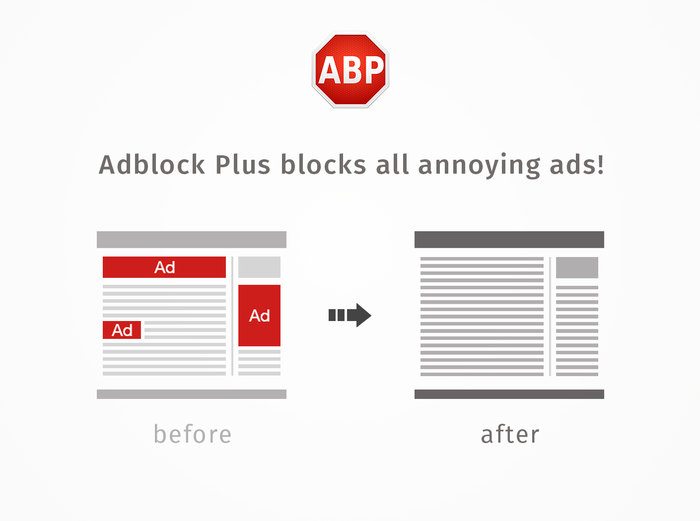
Image source: Firefox Addons
To enable Adblock Plus on your mobile device, open the Firefox app, tap the three-dot menu, and select "Add-ons." From there, you can find Adblock Plus in the recommended list. Enabling this on mobile is a significant step forward for battery life; by preventing heavy advertising scripts from loading, your processor does less work, and your battery lasts longer throughout the day.
How to Fix Adblock Detection Issues on Modern Websites
In recent years, many websites have implemented "anti-adblock" scripts that prevent you from viewing content unless you disable your blocker. This is particularly common on major news outlets and video platforms like YouTube. If you encounter a "Please disable your ad blocker" message, you do not necessarily have to turn off your protection.
Another effective strategy is using the Element Picker tool. By clicking the ABP icon and selecting "Block Element," you can manually click on the "Adblock Detected" overlay to hide it. While this doesn't always work for scripts that freeze the page, it is a highly impactful way to clear annoying pop-ups that aren't technically advertisements.
Managing Whitelists to Support Content Creators Responsibly
While blocking ads improves your experience, many independent creators rely on ad revenue to keep their sites running. Adblock Plus makes it easy to support these creators through "Whitelisting" or "Allow-listing."
To whitelist a site, simply click the ABP icon in your toolbar while visiting the page you wish to support. You will see a large power button or a toggle that says "This Website." Clicking this will turn off blocking for that specific domain only, while keeping your protection active everywhere else. This balanced approach ensures that your favorite local news sites or niche bloggers can continue their work while you remain protected from the rest of the web's more intrusive elements.
Final Thoughts on Optimizing Your Firefox Browsing Experience
Navigating the web in 2026 requires a proactive approach to privacy and performance. By correctly setting up Adblock Plus on Firefox, you gain a cleaner, faster, and more secure browsing environment.
- Verify your source: Always download "Adplus" (Adblock Plus) from the official Mozilla Add-ons store to ensure security.
- Leverage the Firefox advantage: Take advantage of Firefox's Manifest V2 support, which offers more robust blocking than modern Chrome versions.
- Go mobile: Use Firefox for Android to bring desktop-class ad blocking to your smartphone for better battery life.
- Stay updated: Manually update your filter lists in the ABP settings if you encounter "Adblock detected" messages.
- Balance your blocking: Use the whitelisting feature to support creators who provide value with non-intrusive advertisements.
- Compare your options: Consider uBlock Origin if you are on a low-spec machine, or AdBlock if you are a frequent Twitch viewer.
For the best results, install Adblock Plus today and spend five minutes exploring the settings menu to tailor the experience to your specific needs.
Frequently Asked Questions About Firefox Ad Blockers
- Is Adblock Plus free to use on Firefox?
- Yes, Adblock Plus is a free, open-source extension. It operates on a donation-based model and through its "Acceptable Ads" program, where large entities pay to have non-intrusive ads whitelisted by default. Individual users never have to pay to use the full features of the extension.
- Why is Adblock Plus not working on YouTube anymore?
- YouTube frequently updates its ad-delivery algorithms to bypass blockers. If you see ads, it usually means your filter lists are outdated. Open the ABP settings, go to the "Filter Lists" tab, and click "Update Now." This usually resolves the issue within seconds as the community updates the rules.
- Does using an ad blocker slow down my browser?
- While the extension itself uses a small amount of RAM, the net effect is usually a faster browsing experience. By preventing dozens of tracking scripts and large video ads from loading, the total time it takes for a page to become interactive is significantly reduced.
- Can I use Adblock Plus and uBlock Origin at the same time?
- It is generally recommended to use only one content blocker at a time. Running multiple blockers can cause conflicts, break website functionality, and actually slow down your browser as both extensions try to process the same page elements simultaneously.
- Is "Adplus" a safe extension to download?
- If you see an extension specifically named "Adplus," be cautious. While it is a common typo for Adblock Plus, malicious developers sometimes use typos to trick users into installing malware. Always look for the official "Adblock Plus" with the red ABP logo and millions of users on the Mozilla store.

How to Install and Use uBlock Origin Lite for Better Privacy
Learn how to install uBlock Origin Lite, compare it to the original uBO, and optimize filtering modes for Chrome and Safari in 2026.


How to Block a Website on Chrome on Desktop, Android, and iPhone
Learn how to block websites on Chrome using extensions, system files, or mobile settings. Fix the incognito loophole and boost your productivity.

Ungoogled Chromium Still Supports Manifest V2 Extensions via a Custom Patch
Learn how Ungoogled Chromium supports Manifest V2 extensions via custom patches and how to install uBlock Origin without the Chrome Web Store.