
How to Install and Use uBlock Origin Lite for Better Privacy
uBlock Origin Lite (uBOL) is a modern, permission-minimized content blocker designed for the Manifest V3 era. Unlike the original version, it uses the browser's native engine to block ads, resulting in near-zero CPU and RAM usage. It is a top choice for users on Chrome, Edge, and Safari who prioritize system efficiency and privacy without complex configuration.
What Is uBlock Origin Lite and Why Does It Exist?
In the evolving landscape of web privacy, uBlock Origin Lite (uBOL) represents a significant advancement in how we manage online content. Developed by Raymond Hill (gorhill), the same mind behind the original uBlock Origin, this "Lite" version was created specifically to address the technical shift in browser architecture known as Manifest V3 (MV3) .
For years, browser extensions relied on the "Web Request API," which allowed them to intercept and modify network requests in real-time. However, Google and other browser vendors transitioned to the "Declarative Net Request (DNR) API." This change means the browser, rather than the extension, now handles the actual filtering of ads and trackers. uBOL is built from the ground up to work within these new rules, ensuring that users maintain high-quality privacy protections as older extension formats are phased out.
One of the most notable benefits of uBOL is its resource efficiency . Because the browser performs the filtering natively based on rules provided by the extension, uBOL does not need a permanent background process running. According to official documentation , this results in zero CPU and memory consumption during active content blocking, making it an exceptionally strong option for laptops and mobile devices where battery life is a priority.

Image source: Digital Minimalist
Should You Choose uBlock Origin or uBlock Lite?
Deciding between the original uBlock Origin (uBO) and the Lite version (uBOL) depends largely on your browser choice and your desire for granular control. While both extensions share the same core filtering logic, they operate differently under the hood.
| Feature | uBlock Origin (Original) | uBlock Origin Lite |
|---|---|---|
| Architecture | Manifest V2 (Procedural) | Manifest V3 (Declarative) |
| Resource Usage | Very Low | Near Zero (Native) |
| Permissions | Requires "Read/Change Data" | Can run with Zero Permissions |
| Custom Filters | Extensive / Dynamic | Supported (DNR Compatible) |
| Best For | Firefox Users / Power Users | Chrome, Edge, Safari Users |
If you are a Firefox user, the developer currently recommends sticking with the original uBlock Origin. Firefox continues to support the more powerful Manifest V2-style filtering, allowing for advanced features like dynamic filtering and scriptlet injection that are more restricted in the MV3 environment. However, for those on Chromium-based browsers like Chrome or Edge, uBOL is the future-proof choice as Google begins to disable older extensions.
How to Install uBlock Lite on Your Preferred Browser
Installing uBlock Origin Lite is a straightforward process, but the steps vary slightly depending on your operating system and browser. Follow these steps to get started:
- Google Chrome: Visit the Chrome Web Store and click "Add to Chrome." Once installed, the extension will run in "Basic" mode by default, requiring no special permissions.
- Microsoft Edge: Navigate to the Edge Add-ons store . Search for "uBlock Origin Lite" and select "Get." Edge users benefit from the same MV3 efficiencies as Chrome users.
- Safari (macOS & iOS): uBOL is available on the Apple App Store . For iOS users, this requires iOS 18.5 or later. After downloading, you must enable the extension in Safari Settings > Extensions.
- Firefox: While the original uBO is preferred on Firefox, an MV3 version of uBOL is available for those who want the most lightweight experience possible. You can find it in the Firefox Add-ons gallery.
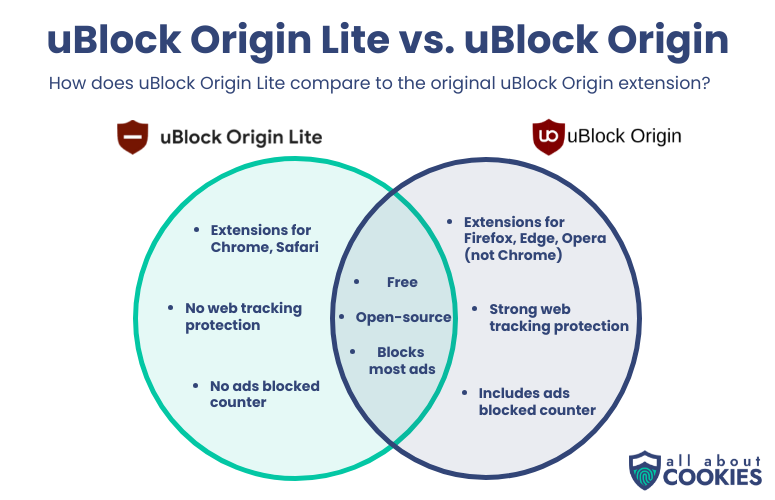
Image source: AllAboutCookies.org
Understanding the Four Filtering Modes and Which One Fits Your Needs
One of the most innovative features of uBlock Origin Lite is its tiered filtering system. This allows you to balance privacy, performance, and website compatibility. You can adjust these modes globally or on a per-site basis using the slider in the popup panel.
1. Basic Mode (The Privacy Choice)
In Basic Mode , uBOL operates without requiring the "Read and change all your data on the websites you visit" permission. It blocks network requests based on its internal rules but does not perform cosmetic filtering (hiding the empty spaces where ads used to be). This is a top-tier option for sensitive tasks like online banking where you want maximum privacy with zero extension access to your page content.
2. Optimal Mode (The Default)
Optimal Mode is widely considered the "sweet spot" for most users. It requires site access permissions to perform site-specific cosmetic filtering and scriptlet injection. This mode ensures that ads are not only blocked but that the page layout remains clean and professional. It strikes an excellent balance between blocking power and system efficiency.
3. Complete Mode
Complete Mode enables generic cosmetic filtering across all websites. While this provides the most thorough visual cleaning of a page, it can occasionally increase the resource load on very complex websites. Use this mode if you find that "Optimal" is leaving behind too many empty ad containers or "sponsored" labels.
4. No Filtering
This mode essentially whitelists the current website. It is useful for sites that refuse to function with a content blocker active or for developers who need to see a site in its raw state.
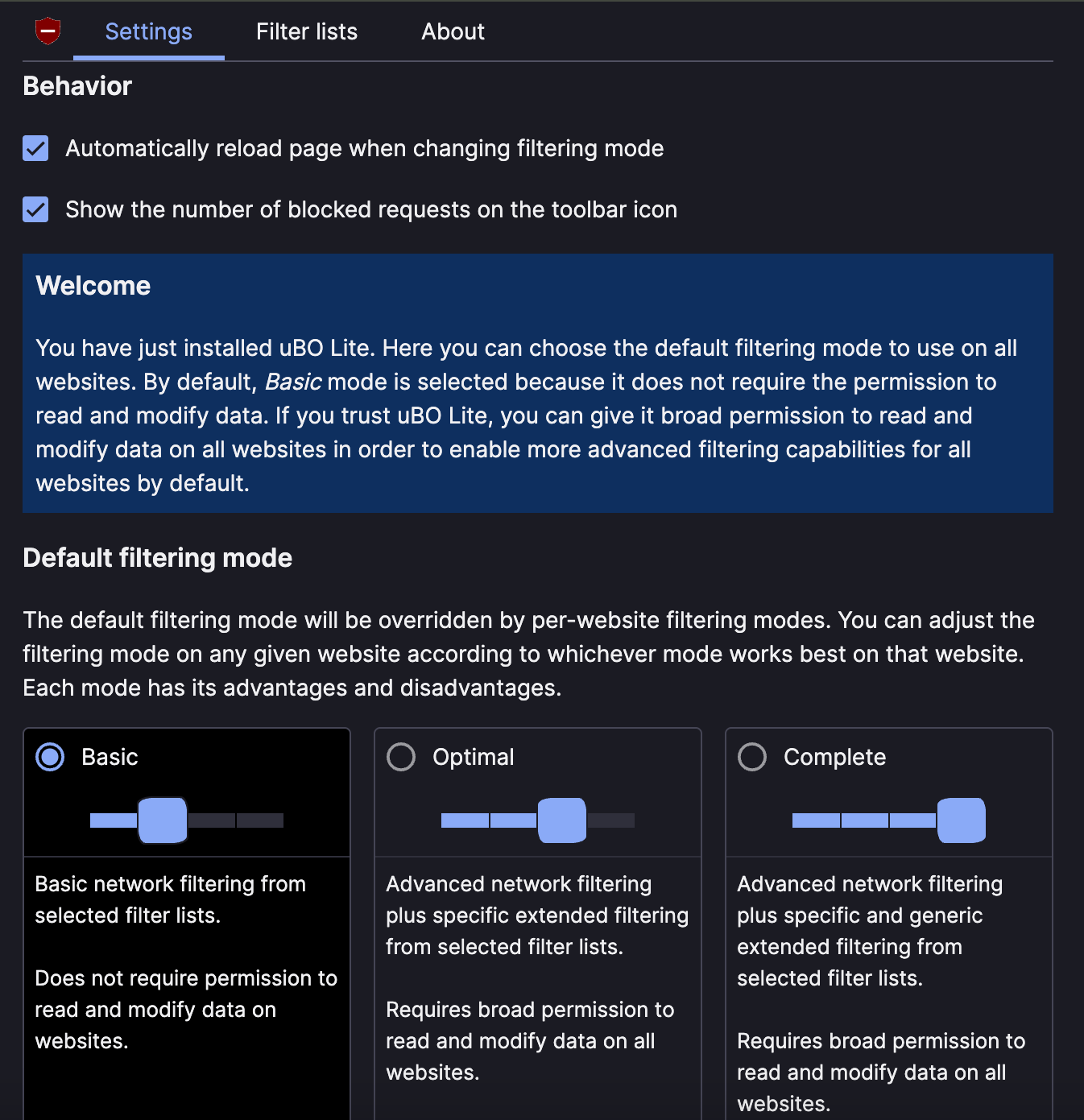
Image source: AllAboutCookies.org
How to Add Custom Filter Lists in uBlock Lite
There is a common misconception that uBlock Origin Lite does not support custom filter lists. While it is true that MV3 imposes stricter limits than its predecessor, uBOL does support external list subscriptions, provided they are compatible with the Declarative Net Request API.
To add a custom list, navigate to the uBOL Options page and look for the "Filter Lists" or "Custom" tab. From here, you can import URLs for compatible lists. It is important to note that because the browser must compile these rules, there is a limit to the total number of rules you can have active. uBOL manages this by prioritizing the most effective rulesets first.
"The 2026 reality of uBOL is that it supports user-added external subscriptions, debunking the early myth that it was a 'locked' system." — Technical Analysis of uBOL v2026.10
Keep in mind that some highly complex "procedural" filters found in the original uBlock Origin cannot be imported into uBOL. These filters require real-time JavaScript execution that MV3 intentionally restricts for security and performance reasons. However, for 95% of common ad-blocking needs, the supported DNR lists are more than sufficient.
Why Do Ads Sometimes Flash in Background Tabs?
Some users have reported a "flash" of an ad when switching to a tab that was opened in the background. This is not a bug, but rather a technical nuance of how Manifest V3 handles certain types of filters. According to
GitHub Discussion #2261
, procedural filters in uBOL are often applied during the
requestAnimationFrame
cycle.
When a tab is in the background, the browser may throttle or pause these animation frames to save power. Consequently, the filter might not trigger until the moment you click on the tab and it becomes visible. While this can be slightly jarring, it is a trade-off for the significantly improved battery life and system performance that uBOL provides. To minimize this, ensure you are using Optimal Mode , which handles most network-level blocking before the page even begins to render.
Tips for Using uBlock Lite on Safari and iOS
uBlock Origin Lite is a popular choice for Apple users due to its native integration with Safari's content blocking engine. However, there are a few platform-specific details to keep in mind:
- The 10-Second Rule: When uBOL updates its filter lists on Safari, the browser must internally convert these rules into a native format. This can cause a slight delay (typically about 10 seconds) where filtering might be inactive. If you've just updated the app, wait a moment before browsing.
- System Requirements: For the best experience in 2026, ensure you are running iOS 18.5+ or macOS 13.5+ . These versions include critical updates to the Safari Content Blocking API that uBOL relies on.
- Battery Efficiency: On iPhones and iPads, uBOL is notably effective at extending battery life during long browsing sessions because it offloads the "heavy lifting" of filtering to the OS kernel.
How to Deploy uBlock Lite for Small Businesses and Schools
For IT administrators, uBlock Origin Lite offers a streamlined way to protect a fleet of devices without compromising performance. uBOL supports Managed Storage , which allows admins to push configurations via JSON policies.
By using administrative templates in Google Admin Console or Microsoft Intune, you can enforce Basic Mode across all workstations. This ensures that the extension provides network-level protection without ever having permission to read sensitive employee or student data. This "zero-permission" deployment is a significant advantage for organizations with strict compliance requirements, such as those in healthcare or finance.
Frequently Asked Questions
Is uBlock Lite as good as the original uBlock Origin?
It depends on your definition of "good." If you value granular control and the ability to block every single script on a page, the original uBlock Origin remains the top-rated choice. However, if you want a "set-and-forget" experience that uses almost no system resources and is future-proof for Chrome and Edge, uBlock Lite ranks among the top options available today.
Does uBlock Lite work on YouTube in 2026?
Yes, uBlock Origin Lite is actively maintained to handle YouTube's evolving ad delivery methods. By using the Optimal or Complete modes, the extension can effectively manage both video ads and site-wide tracking. Because it uses the browser's native engine, it is often less likely to be detected by "anti-adblock" scripts than older extension types.
Why is Chrome telling me to disable uBlock Origin?
Google is phasing out support for Manifest V2 extensions. Since the original uBlock Origin is built on this older architecture, Chrome displays a warning suggesting you switch to a Manifest V3-compatible alternative. uBlock Origin Lite is the official MV3 successor designed to replace it seamlessly.
Can I run both uBlock Origin and uBlock Lite at the same time?
It is not recommended. Running two content blockers simultaneously can cause "race conditions" where they interfere with each other, potentially breaking website functionality or slowing down your browser. It is better to choose one based on your needs and disable the other.
Is uBlock Lite safe for online banking?
uBlock Lite is a very safe choice for banking, especially when used in Basic Mode . In this mode, the extension has no permission to read or modify the data on the page, meaning it cannot see your account numbers or passwords. It provides network-level protection against malicious trackers without any access to your private information.
The Bottom Line
uBlock Origin Lite is the necessary evolution of content blocking for the modern web. It offers a sophisticated balance of privacy and performance that few alternatives compare to in the Manifest V3 era.
- Install from official stores to ensure you are getting the verified version by Raymond Hill.
- Use Optimal Mode for the strongest balance of ad blocking and visual page cleanliness.
- Switch to Basic Mode for high-security sites where you want zero extension permissions.
- Expect near-zero resource impact , making it a top-tier choice for older hardware and mobile devices.
- Stay updated on your browser version (especially Safari) to take advantage of the latest filtering APIs.
- Don't fear the "Lite" label ; it refers to the architecture's efficiency, not a lack of effectiveness.
If you are using Chrome or Edge, now is the time to transition to uBlock Origin Lite to ensure uninterrupted privacy protection as older extensions are retired.
-
Topic: uBlock Origin Lite - Chrome Web Storehttps://chromewebstore.google.com/detail/ublock-origin-lite/ddkjiahejlhfcafbddmgiahcphecmpfh?hl=en
-
Topic: uBlock Origin - Free, open-source ad blocker extension ...https://ublockorigin.com/
-
Topic: uBlock Origin Lite - App Store - Applehttps://apps.apple.com/us/app/ublock-origin-lite/id6745342698

How to Install and Optimize Adblock Plus for Firefox on Desktop and Mobile
Learn how to install Adblock Plus on Firefox, compare it with uBlock Origin, and fix adblock detection issues on YouTube and Android in 2026.


How to Block a Website on Chrome on Desktop, Android, and iPhone
Learn how to block websites on Chrome using extensions, system files, or mobile settings. Fix the incognito loophole and boost your productivity.


Ungoogled Chromium Still Supports Manifest V2 Extensions via a Custom Patch
Learn how Ungoogled Chromium supports Manifest V2 extensions via custom patches and how to install uBlock Origin without the Chrome Web Store.