How to Turn Off AMBER Alerts and Emergency Notifications on Your iPhone
To disable AMBER alerts on your iPhone, navigate to Settings > Notifications . Scroll to the absolute bottom of the screen to find the Government Alerts section. Toggle the switch next to AMBER Alerts to the "Off" position. This method works for iOS 17, iOS 18, and older versions, though regional restrictions may apply in countries like Canada or Japan.
For many iPhone users, the sudden, high-pitched wail of an AMBER alert can be a jarring experience, especially when it occurs in the middle of the night or during a critical meeting. While these notifications serve a vital public safety role, there are numerous legitimate reasons why you might need to manage how and when they appear on your device. Whether you are looking to silence the siren or disable the alerts entirely, Apple provides specific controls within the iOS ecosystem to help you customize your notification experience.
Navigating to the Government Alerts Section in Your Settings
The most common hurdle users face when trying to manage emergency notifications is simply finding the menu. Unlike standard app notifications, which are listed alphabetically, government alerts are tucked away at the very bottom of the Notifications menu. This design choice by Apple ensures that these critical settings aren't accidentally toggled while managing everyday apps like Messages or Instagram.
To reach this section, you must perform what many tech enthusiasts call the "long scroll." After opening the Settings app and tapping Notifications , you will see a list of every app installed on your phone. You must scroll past all of them—sometimes 50 to 100 apps—until you reach the footer of the page. It is here that the "Government Alerts" sub-section resides.
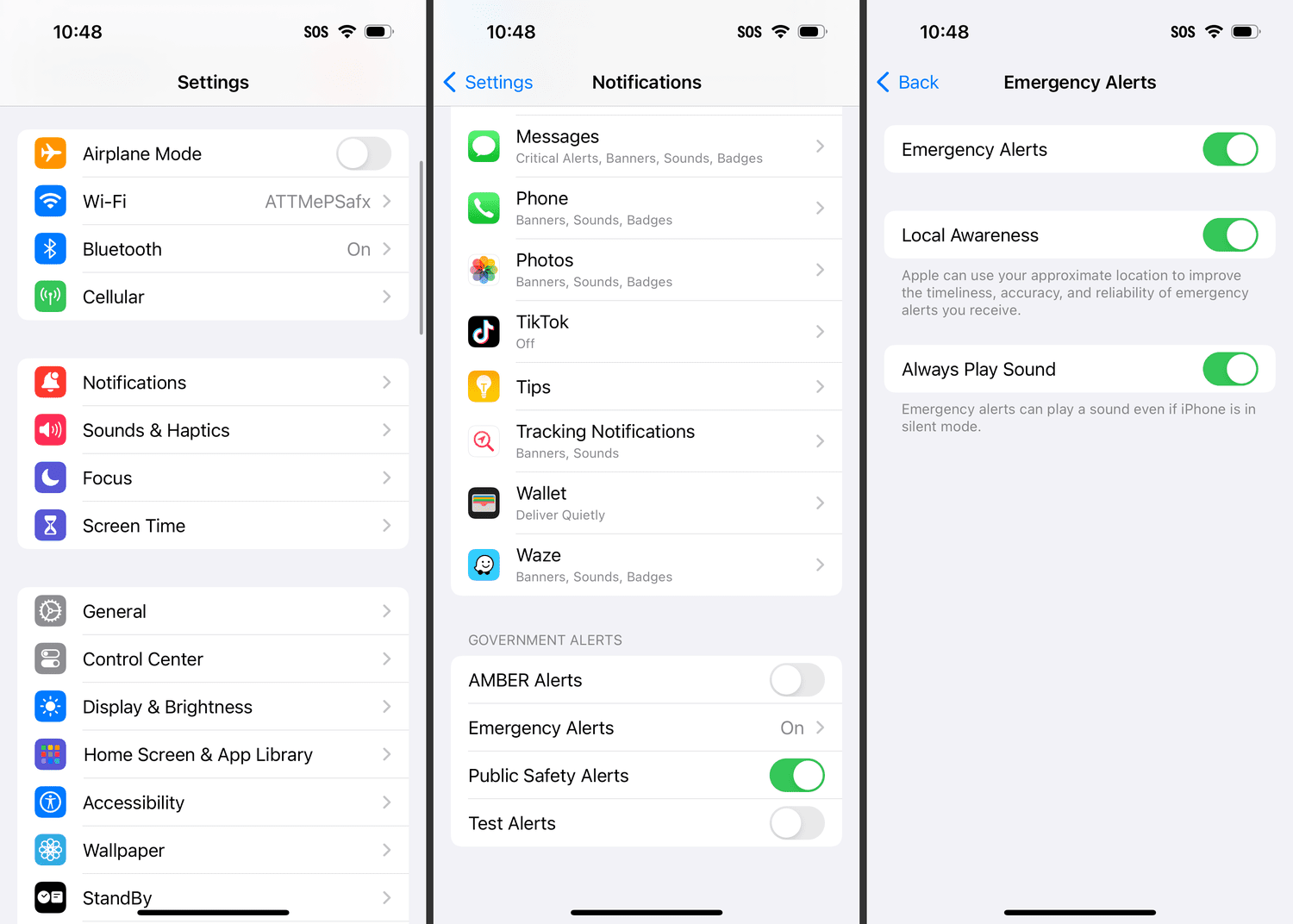
Image source: Lifewire
According to Apple Support , these alerts are enabled by default on all new devices to ensure maximum public safety coverage. However, the interface remains consistent across most modern versions of iOS, making it a reliable path for users regardless of their specific iPhone model.
Step-by-Step Guide for Managing Alerts on iOS 17 and iOS 18
With the release of iOS 18, Apple introduced subtle UI changes, including a more "card-style" layout for settings. Despite these aesthetic updates, the functional path to disabling alerts remains largely the same. Follow these steps to manage your preferences:
- 1 Open Settings: Locate the gear icon on your Home Screen or App Library.
- 2 Tap Notifications: This menu controls the behavior of all incoming pings and banners.
- 3 Scroll to the Bottom: Swipe past your list of third-party applications.
- 4 Locate Government Alerts: You will see three primary toggles: AMBER Alerts, Emergency Alerts, and Public Safety Alerts.
- 5 Toggle Off: Tap the green switch next to AMBER Alerts to turn it gray.
It is important to distinguish between the three types of alerts available in this menu. AMBER Alerts specifically refer to child abduction cases. Emergency Alerts typically involve extreme weather events or immediate threats to life and property. Public Safety Alerts are often used by local municipalities to provide instructions during non-life-threatening but significant events, such as water main breaks or road closures.
Troubleshooting Missing Government Alert Toggles in Specific Regions
A frequent point of frustration for users is discovering that the "Government Alerts" section is either partially or entirely missing from their settings. This is not a bug, but rather a result of regional regulations and carrier-specific configurations. In certain countries and under specific mobile carriers, the ability to opt-out of emergency broadcasts is legally restricted.
Canada
Users on major Canadian carriers like Telus, Rogers, and Bell often find the toggle missing. Under CRTC regulations, Wireless Public Alerting (WPA) is mandatory, and many carriers hard-code these alerts into the device profile so they cannot be disabled by the user.
Japan
In Japan, where earthquake and tsunami warnings are a matter of national survival, the government alerts are deeply integrated into the cellular infrastructure. Depending on your carrier profile, you may find that these alerts are un-mutable at the OS level.
United States
While most US users have full control, some older SIM cards or specific MVNO (Mobile Virtual Network Operator) profiles may hide these settings. Updating your carrier settings (Settings > General > About) can sometimes resolve this.
As noted in community discussions on Reddit , if the toggle is missing, the only way to ensure silence during critical times is to power the device down completely or use Airplane Mode, though the latter may not always block certain high-priority broadcasts depending on the network architecture.
Understanding the Limitations of Silencing Alert Sounds
One of the most common questions users ask is: "Can I keep the notification but turn off the loud siren?" Unfortunately, on the iPhone, the answer is currently no. Government alerts are designed to be "binary"—they are either entirely on (with the sound) or entirely off.
These alerts are engineered to bypass the physical Mute switch on the side of your iPhone. They also ignore Focus Modes, including "Do Not Disturb" and "Sleep" mode. This is a deliberate safety feature intended to wake users during life-threatening emergencies. Unlike standard app notifications where you can select "Deliver Quietly," government alerts use a unique audio frequency and maximum volume setting that is hard-coded into the system.
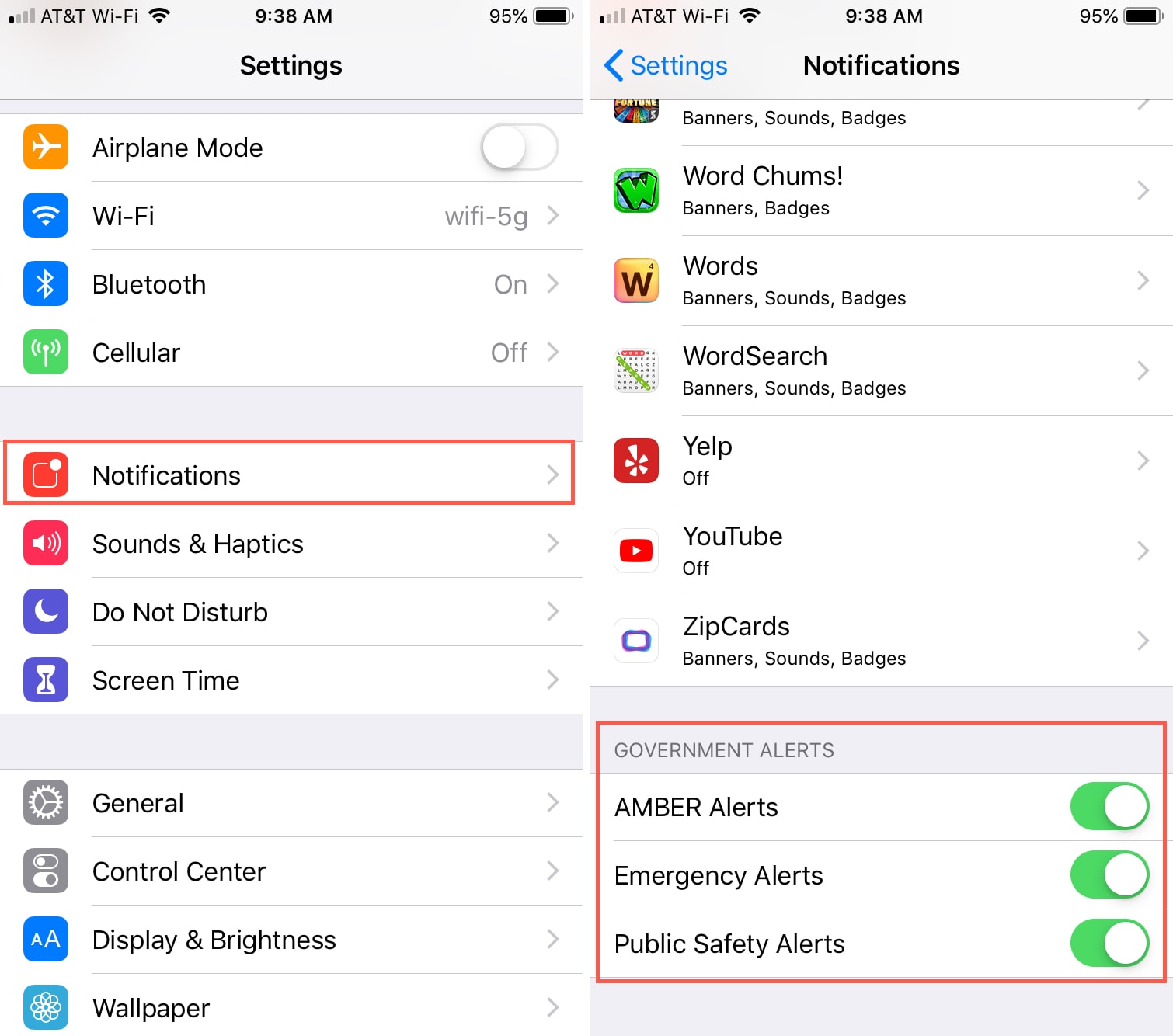
Image source: iDownloadBlog
For users who find the sound particularly distressing, the only viable workaround is to disable the specific alert category entirely. This highlights a significant difference between iOS and some Android implementations, where granular volume control for emergency broadcasts is sometimes available. On iPhone, the system prioritizes the "eyes and ears" of the public over individual acoustic preferences.
Managing Hidden Emergency Test Alerts with Dialer Codes
Beyond the standard AMBER and Emergency alerts, there is a hidden category known as "Test Alerts." These are used by local and federal agencies to verify that the communication infrastructure is functioning correctly. While these are usually turned off by default for the general public, they can sometimes be triggered during system-wide audits.
In the United States, you can manage these test alerts using specific codes entered into the Phone app's dialer. This is a "power-user" technique that is rarely found in standard settings menus.
- To Enable Test Alerts:
-
Open the Phone app, dial
*5005*25371#, and press the Call button. You will see a confirmation message stating "Test alerts enabled." - To Disable Test Alerts:
-
Open the Phone app, dial
*5005*25370#, and press the Call button. You will see a message stating "Test alerts disabled."
This method, confirmed by Apple's technical documentation , is particularly useful for developers or emergency management personnel who need to verify their device's connectivity to the Wireless Emergency Alert (WEA) system without waiting for a real emergency to occur.
Exploring Enhanced Safety Alerts for Natural Disasters
Starting with iOS 16.2, Apple introduced a new category called Enhanced Safety Alerts . This feature is currently available in limited regions, including the United States and Taiwan, and is specifically designed for high-stakes natural disasters like earthquakes and tsunamis.
Enhanced Safety Alerts differ from standard carrier-based alerts in how they are delivered. They often utilize a combination of cellular data and Wi-Fi to ensure the fastest possible delivery. In many cases, these alerts can reach a device several seconds faster than traditional broadcasts—a critical window when dealing with seismic activity.
Within Settings > Notifications > Emergency Alerts , you may see an option for "Improve Alert Delivery." Enabling this allows Apple to use your approximate location to send more relevant and timely safety information. While some users may have privacy concerns, this feature is widely regarded as a significant advancement in mobile safety technology, providing a more localized and responsive warning system than the broad-stroke cellular tower broadcasts used for AMBER alerts.
Retrieving Dismissed Alerts from Your Notification History
It is a common reaction: an AMBER alert goes off, the sound is deafening, and you instinctively swipe it away just to stop the noise. Seconds later, you realize you didn't actually read the description of the missing child or the vehicle license plate number. Because these alerts are "ephemeral," they can be difficult to find once dismissed.
To find a dismissed alert, you must access your Notification Center . On an iPhone with Face ID, swipe down from the top-left or top-center of the screen. On older models with a Home button, swipe down from the very top. If the alert was sent recently, it should still be visible in your history list.
However, there is a catch. Once you clear an alert from the Notification Center or restart your device, the text of that specific government broadcast is generally unrecoverable from the OS. In such cases, the most reliable way to find the information is to check the official social media accounts of your local state police or the National Center for Missing & Exploited Children (NCMEC).
Evaluating the Civic Role of the AMBER Alert System
While the technical process of disabling alerts is straightforward, it is worth considering the broader impact of that decision. The AMBER (America's Missing: Broadcast Emergency Response) alert system has been a cornerstone of child recovery efforts since its inception in 1996. According to data cited by Asurion , the system has contributed to the successful recovery of over 1,000 children.
The effectiveness of the system relies on the "eyes and ears" of the public. When an alert is broadcast to millions of devices, it creates an instant, massive search party. Disabling the alert on your device effectively removes you from that collective effort. For many, the minor inconvenience of a loud noise is a small price to pay for the potential of saving a life. However, for those in high-stress environments—such as surgeons, performers, or heavy machinery operators—the ability to manage these notifications is a necessary feature of modern mobile technology.
Comparing Different Types of iPhone Government Notifications
To help you decide which alerts to keep active, refer to the table below which breaks down the characteristics of each notification type.
| Alert Type | Primary Purpose | Sound Behavior | Can Be Disabled? |
|---|---|---|---|
| AMBER Alert | Child abduction cases | High-volume siren | Yes (Region dependent) |
| Emergency Alert | Severe weather/Life threats | High-volume siren | Yes (Region dependent) |
| Public Safety | Local safety instructions | Standard or Siren | Yes |
| Test Alerts | System functionality checks | High-volume siren | Yes (Via dialer code) |
| Enhanced Safety | Earthquakes/Tsunamis | Critical Alert sound | Yes (In specific regions) |
Key Takeaways for Managing Your iPhone Emergency Settings
- Location: Always find these settings at the absolute bottom of the Settings > Notifications menu.
- iOS 18 Updates: The path remains the same in the latest software, though the visual layout is more card-centric.
- Regional Locks: If you are in Canada or Japan, your carrier may have removed the option to disable these alerts.
- All-or-Nothing Sound: You cannot currently silence the siren while keeping the text notification on iPhone.
-
Test Alerts:
Use the dialer code
*5005*25370#to opt-out of non-emergency system tests in the US. - History: If you swipe an alert away too fast, check your Notification Center immediately before it disappears.
- Safety Balance: Consider disabling AMBER alerts while keeping Emergency Alerts active for natural disaster protection.
Take a moment today to review your notification settings and ensure your iPhone is configured to balance your personal peace with your local safety needs.
Frequently Asked Questions
Why did my iPhone make a loud noise even though it was on silent?
Government alerts are designed to bypass the physical silent switch and Focus Modes (like Do Not Disturb). This is a safety feature intended to ensure that users are alerted to immediate threats regardless of their device settings. The only way to prevent this sound is to disable the alerts entirely in the Notifications menu or power off the device.
Do AMBER alerts work without cell service?
Standard AMBER alerts are delivered via cellular broadcast technology, which does not require a data plan but does require a connection to a cell tower. However, newer "Enhanced Safety Alerts" can utilize Wi-Fi connections to deliver warnings, making them a reliable option in areas with poor cellular reception.
Can I turn off the sound but keep the vibration?
No, iOS does not currently offer granular control over the audio or haptic feedback for government alerts. They are hard-coded to play a specific siren sound at high volume. If the alert is enabled, the sound will play; if it is disabled, you will receive no notification at all.
Why did I get an alert for a city hundreds of miles away?
AMBER alerts are broadcast from cellular towers over a wide geographic area. If the authorities believe a suspect is traveling, they may trigger alerts across entire states or neighboring regions. Your phone receives the signal because it is connected to a tower within the broadcast zone, even if the incident is not in your immediate vicinity.
Does turning off AMBER alerts affect my weather app notifications?
No. Standard weather apps (like Apple Weather, AccuWeather, or The Weather Channel) use standard push notifications. Disabling government alerts only affects the official broadcasts sent by state and federal agencies. You will still receive any weather warnings you have configured within your specific apps.
What should I do if the Government Alerts section is missing?
If the section is missing, it is likely due to your carrier or country's regulations. First, try updating your carrier settings by going to Settings > General > About. If it still doesn't appear, contact your service provider to see if they have made these alerts mandatory for your specific plan or region.
Are these alerts free, or do they use my data plan?
Government alerts are free and do not count against your data limit or text messaging quota. They use a dedicated broadcast channel that is separate from standard cellular traffic, ensuring they can be delivered even during periods of heavy network congestion.
Can I set a different sound for AMBER alerts?
Currently, Apple does not allow users to change the sound assigned to government alerts. The "siren" is a standardized tone used across the industry to ensure it is immediately recognizable as an emergency broadcast rather than a standard text or email notification.
-
Topic: Government, Emergency, and Enhanced Safety Alerts on ...https://support.apple.com/en-us/102516
-
Topic: How to turn off AMBER alerts on iPhone and Androidhttps://www.asurion.com/connect/tech-tips/turn-off-amber-alerts/
-
Topic: How to disable amber alerts on iPhone?https://www.reddit.com/r/iphone/comments/1f2icmp/how_to_disable_amber_alerts_on_iphone/

How to Silence Unknown Callers on iPhone and Stop Spam for Good
Stop spam calls on iPhone. Learn to silence unknown numbers, fix Mac ringing, and use iOS 18 shortcuts to stay productive.


How to Use Saving Battery Mode on iPhone and Android to Extend Your Phone Life
Learn how to enable saving battery mode on iPhone and Android, fix notification delays, and use the overheating hack to extend your phone's life.


How to Power Off Your iPhone and Fix a Frozen Screen
Learn how to shut down your iPhone using buttons, Siri, or iOS 18 settings. Fix frozen screens with a force restart and explore power-user tips.