How to Use the inurl: Search Operator for SEO Audits and Site Security
The inurl: search operator is a specialized command that instructs Google to filter results to only those pages containing a specific word or string within their URL path. It is widely regarded as a top-tier tool for SEO professionals to audit indexed content, identify security vulnerabilities, and analyze competitor site structures. Unlike many other operators, it can function as a standalone query, making it exceptionally strong for broad discovery tasks.
What the inurl: Search Operator Does and How It Functions
In the landscape of advanced search, the
inurl:
operator serves as a precision filter. When you enter a query like
inurl:existing
, Google scans its massive index to find every document where the string "existing" appears specifically in the URL. This differs from a standard search, which primarily looks for keywords in the page title or body text.
According to technical documentation from Marketing Miner , the operator is designed to scan the entire URL path, including the domain, subdirectories, and even file names. This makes it a leading choice for finding specific types of content that might be buried deep within a website's architecture.
The Standalone Advantage
One of the most significant features of
inurl:
is its ability to work without a primary keyword. While the
site:
operator is often paired with a search term,
inurl:
can be used by itself to find every page on the internet that uses a specific directory name. For example, searching for
inurl:/wp-content/
provides a window into how WordPress sites are structured globally.
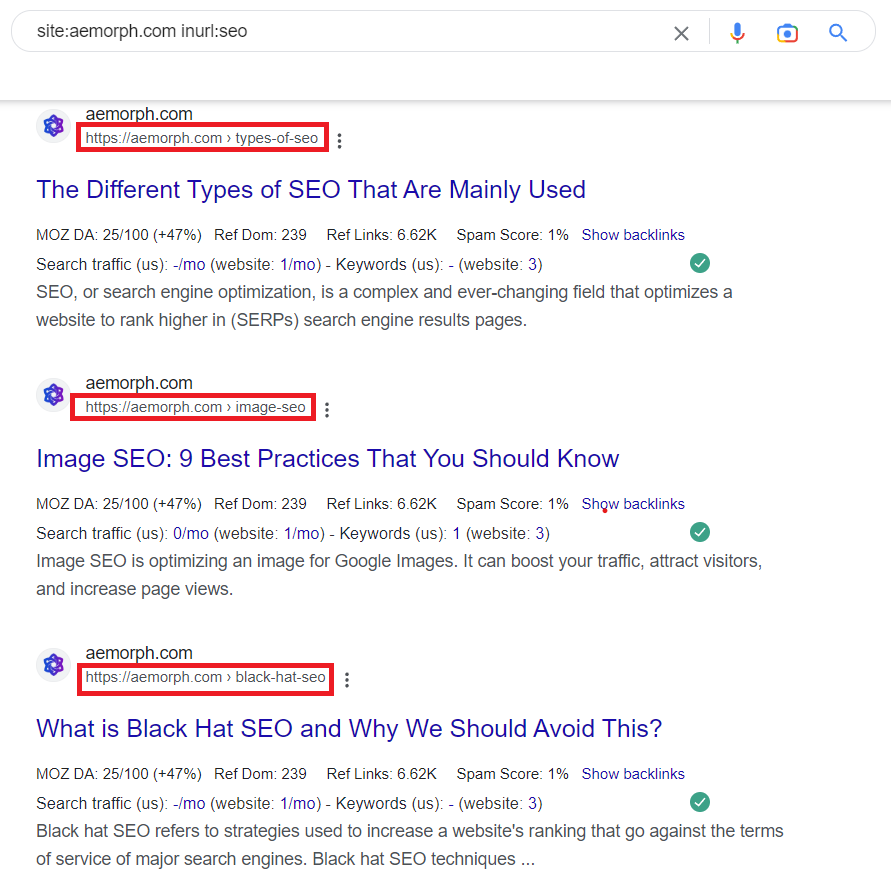
Image source: Marketing Miner
This functionality is particularly useful when you are not looking for a specific topic, but rather a specific type of page. If you are searching for "existing" documentation or legacy files, the URL often contains clues that the page content itself might not explicitly state.
Correct Syntax Rules for URL Searches
Mastering the
inurl:
operator requires strict adherence to syntax. Even a minor error, such as an extra space, can cause the command to fail or return standard search results instead of filtered ones.
inurl:keyword
, never
inurl: keyword
.
The Protocol Pitfall
Many users attempt to search for full URLs by including the protocol, such as
inurl:https://example.com
. However, historical search data suggests that including
http://
or
https://
often leads to zero results. Google’s indexer treats the protocol as a separate entity from the searchable URL string in many contexts. For the most reliable results, start your query with the domain name or a specific subdirectory path.
Case Sensitivity and Special Characters
Google search is generally case-insensitive, meaning
inurl:Blog
and
inurl:blog
will yield the same results. However, special characters like hyphens and underscores are treated as separators. If you are looking for a specific slug like "existing-content," searching for
inurl:existing-content
is a highly effective way to isolate that exact phrase within the URL structure.
Why Your inurl: Search Might Return Zero Results
It can be frustrating to run a search and see "Your search did not match any documents," especially when you know the page exists. This "Zero Results" mystery is a frequent topic of debate in the SEO community. There are several technical reasons why this happens in the modern search era.
Canonicalization and Indexing Issues
Google does not index every version of a page. If a website has multiple URLs pointing to the same content (e.g., a tracking URL and a clean URL), Google selects one as the "canonical" version. If the string you are searching for is only present in the non-canonical URL, the
inurl:
operator will not find it. This is a common issue when searching for "existing" parameters or session IDs that Google has intentionally filtered out to prevent duplicate content issues.
The Reliability Gap in 2026
As of 2026, Google’s "Helpful Content" and spam-prevention systems have become more aggressive. Some technical pages, while technically indexed, may be hidden from standard search results if Google deems them of low value to the general public. This has led to rumors that the operator is "dead," but as noted by experts on Stack Exchange , the operator remains functional; it is simply subject to more stringent quality filters than in previous years.
Advanced SEO Workflows for Finding Existing Content
For SEO professionals,
inurl:
is more than a filter; it is a diagnostic tool. By combining it with other operators, you can uncover insights that standard SEO software might miss.
The Content Refresh Strategy
One of the most practical applications is finding outdated content on your own domain. By searching
site:yourdomain.com inurl:2023
or
site:yourdomain.com inurl:2024
, you can quickly identify "existing" articles that may need a 2026 update. This is a significant step forward for maintaining site authority and ensuring that users are not landing on stale information.
The Ghost Page Finder
Staging sites and subdomains often accidentally end up in Google's index. To find these "ghost pages," use the string
site:yourdomain.com -inurl:www
. This command tells Google to show all indexed pages for your domain
except
those on the main "www" subdomain. It is a top choice for identifying security leaks or duplicate content issues before they impact your rankings.
The TLD Workaround for International Research
While the
site:.edu
operator is popular for finding academic sources, it is limited to US-based institutions. To find international academic resources, you can use
inurl:univ
or
inurl:ac
. This allows you to find "existing" research from universities in the UK, France, and beyond, where the URL structure often includes these abbreviations even if the TLD is different.
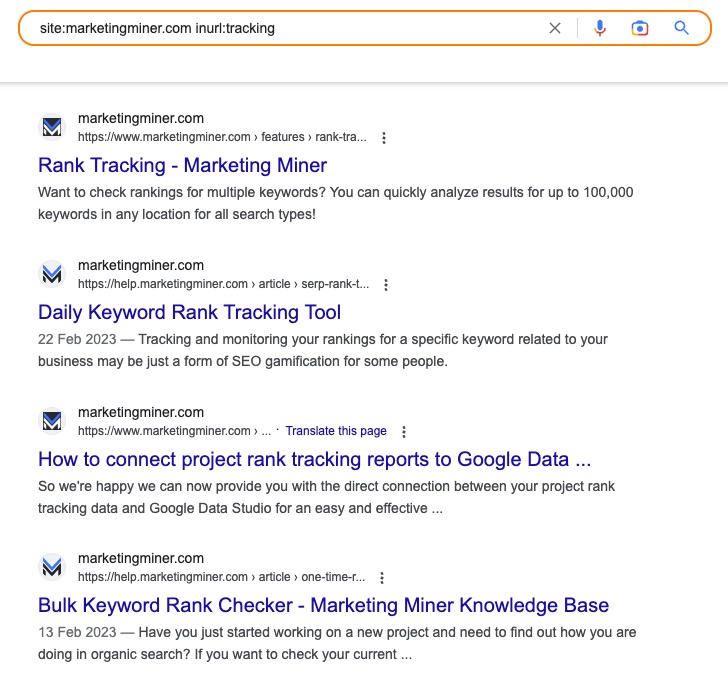
Image source: Marketing Miner
How to Perform a Security Audit Using Google Dorks
The term "Google Dorking" refers to using advanced operators to find sensitive information that was never meant to be public. While this can be used maliciously, it is a vital skill for webmasters to defend their own sites.
Checking for Exposed Uploads
Many CMS platforms do not properly protect the uploads folder. By running
site:yourdomain.com inurl:/wp-content/uploads/
, you can see if your private images, PDFs, or spreadsheets are being indexed by Google. If they are, you may need to adjust your
robots.txt
file or X-Robots-Tag headers.
Finding Sensitive Logs and Backups
Server logs and database backups are goldmines for attackers. Use these strings to ensure your "existing" sensitive data is not exposed:
-
inurl:logorinurl:error_log: Finds exposed server error messages. -
inurl:sqlorinurl:backup: Identifies potentially exposed database dumps. -
inurl:configorinurl:env: Searches for configuration files containing API keys or passwords.
Differences Between inurl: and the allinurl: Operator
A common point of confusion is when to use
inurl:
versus
allinurl:
. While they seem similar, their logic for handling multiple keywords is fundamentally different.
The
inurl:
operator is optimized for a single keyword. If you include multiple words, Google only requires the first word to be in the URL; the subsequent words can appear anywhere on the page. Conversely,
allinurl:
mandates that
every
keyword following the colon must appear within the URL string.
| Feature | inurl: | allinurl: |
|---|---|---|
| Primary Use | Single keyword or string | Multiple keywords in URL |
| Flexibility | High (can combine with other operators) | Low (must be the only operator) |
| Logic | First word in URL, others on page | All words must be in URL |
| SEO Audit Value | Excellent for broad directory checks | Best for finding specific long-tail slugs |
Automating Discovery with Cross-Tool Workflows
Manually running searches is fine for small sites, but enterprise SEO requires scale. Tools like SpyFu and SerpApi allow you to automate these queries across thousands of keywords.
Internal Link Hunting
In complex CMS environments like Joomla or Drupal, pages often exist without being linked in the main navigation. By using
inurl:
in an automated script, you can find these "existing" orphaned pages and integrate them back into your site's architecture to improve crawl equity and user experience.
Frequently Asked Questions
Why is inurl: not working for my specific website?
This usually happens because Google has not indexed the specific URL string you are searching for, or it has selected a different canonical version of the page. Additionally, if the word is part of a very long, dynamic parameter string, Google's indexer might ignore it to save resources. Ensure the page is actually indexed by using the
site:
operator first.
Can I use multiple inurl: commands in one search?
Yes, you can combine them using the OR logic. For example,
inurl:blog OR inurl:news
will return pages that have either "blog" or "news" in the URL. This is a highly effective way to audit multiple content sections simultaneously.
What is the difference between inurl: and intext:?
The
inurl:
operator looks specifically at the website's address (the URL), while
intext:
ignores the URL and title, looking only at the body content of the page. They are often used together to find pages that discuss a topic but don't have the keyword in the URL.
Does inurl: work on mobile search?
Yes,
inurl:
is a backend search command processed by Google's servers, so it works identically on desktop, mobile, and tablet devices. However, the way URLs are displayed in mobile SERPs might make it harder to visually verify the results at a glance.
How do I exclude a specific word from the URL?
You can use the minus sign (-) directly before the operator. For example,
site:example.com -inurl:tag
will show all indexed pages on a site except for those that contain the word "tag" in the URL, which is a popular choice for filtering out low-value WordPress tag pages.
Key Takeaways for Mastering URL Searches
The
inurl:
operator remains a foundational tool for anyone serious about technical SEO or web security. By understanding its nuances, you can uncover hidden data and optimize your site's visibility with precision.
- Remove protocols like https:// from your queries to ensure Google returns the most comprehensive results.
- Avoid spaces after the colon to prevent the command from breaking and reverting to a standard search.
- Use -inurl:www to quickly identify staging sites or subdomains that should not be indexed.
- Combine with site: to perform deep-path audits on specific domains that standard tools might overlook.
- Monitor for security by regularly searching for exposed /uploads/ or /config/ directories on your own properties.
- Differentiate from allinurl: when you need to find specific, multi-word slugs in a URL path.
- Account for canonicalization when troubleshooting why certain "existing" pages don't appear in results.
Start your next site audit by running a few
inurl:
queries to see exactly what Google has discovered in your site's architecture.
-
Topic: Google Hacks - inurl: Versus sitehttps://www.oreilly.com/library/view/google-hacks/0596004478/ch01s20.html
-
Topic: Understanding the Power of the Google inURL: Search ...https://www.marketingminer.com/en/blog/inurl-search-operator
-
Topic: Why did Google disable the inurl operator?https://www.quora.com/Why-did-Google-disable-the-inurl-operator

How to Use the Google inurl Search Operator to Find Specific Pages and Subdirectories
Learn how to use the inurl: operator for SEO audits, link building, and finding subdirectories. Fix common errors and master advanced syntax rules.


How to Use the inurl:modified Operator and Manage URL Modifications Effectively
Learn how to use inurl:modified for OSINT, pre-populate forms, and fix URL errors in WhatsApp, NetSuite, and ArcGIS. Expert guide for developers.


How to Use the inurl: Search Operator to Find Competitor Insights and Hidden Content
Learn how to use the inurl: search operator to find competitor comparison pages, subdomains, and hidden content footprints for better SEO strategy.