How to Use the inurl: Search Operator to Find Competitor Insights and Hidden Content
The
inurl:
search operator is a command used to filter Google results to only show pages where a specific keyword appears in the URL string. For SEOs, using
inurl:comp
or
inurl:compare
ranks among the top methods for uncovering competitor comparison pages, pricing tables, and hidden subdirectories. By combining this with the
site:
operator, you can map a competitor's entire site architecture and identify content gaps in seconds.
In the evolving landscape of search engine optimization, the ability to filter through billions of pages to find specific data points is a critical skill. While most users rely on standard keyword searches, power users and SEO professionals utilize "Google Dorking"—the practice of using advanced search operators to refine queries. Among these, the
inurl:
operator stands out as a top-tier tool for competitor intelligence and technical site audits.
Whether you are trying to find where a competitor has hidden their sales battlecards or you are looking for specific software components across the web, mastering the
inurl:
syntax provides a significant advantage. This guide explores the technical nuances of the operator, how to leverage the specific
inurl:comp
query, and how to avoid common pitfalls that lead to empty search results.
What Is the inurl: Search Operator and How Does It Work?
The
inurl:
operator is a directive that tells Google's algorithm to restrict the search results to documents containing the specified term within their URL. Unlike a standard search, which looks for keywords in the title, body text, and metadata,
inurl:
focuses exclusively on the address bar of the webpage.
The Technical Logic of URL Filtering
When you execute a query like
inurl:seo
, Google scans its index for any page where the string "seo" appears between the protocol (https://) and the end of the URL. This includes the domain name, subdomains, folders, and file names. According to
Marketing Miner
, this operator is particularly useful for verifying indexation and identifying specific types of content that follow a standard naming convention.
inurl:marketing
will work perfectly, but
inurl: marketing
will likely fail or return standard search results because Google treats the space as a separator.
Case Sensitivity and Character Handling
Google’s search engine is generally not case-sensitive. Searching for
inurl:Blog
will yield the same results as
inurl:blog
. However, the way Google handles special characters is vital. Hyphens and underscores are often treated as separators. If you are looking for a specific multi-word URL string, you may need to use quotes or search for the most unique part of the string. For instance, searching for
inurl:guest-post
is a common way to find contribution pages, as many CMS platforms automatically generate URLs using the title of the page.
How to Use the inurl:comp Command for Competitor Analysis
The specific query
inurl:comp
is a favorite among market researchers. The string "comp" is frequently used as a shorthand in URL structures for "comparison," "competitor," or "components." By targeting this specific footprint, you can uncover assets that are often excluded from a site's main navigation menu.
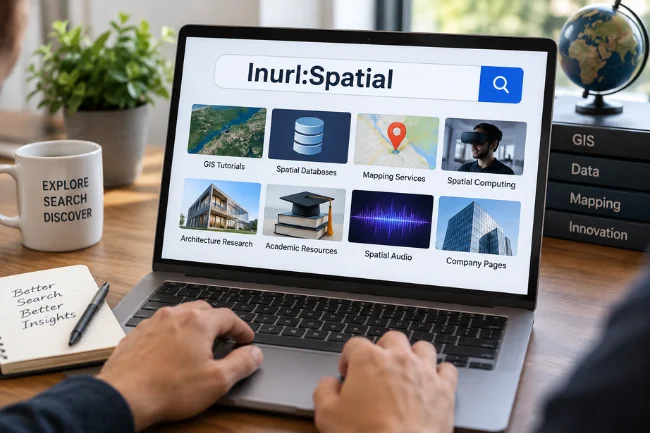
Image source: Shiva Lord
Finding Comparison and "VS" Pages
Most SaaS companies and service providers create "Alternative To" or "Comparison" pages to capture traffic from users who are considering a switch. These pages often use URLs like
/compare/brand-a-vs-brand-b
or
/comp/competitor-name
. By searching
inurl:compare [Your Brand]
, you can see every indexed page where a competitor is positioning themselves against you. This is a highly impactful way to monitor competitor messaging and identify which features they are highlighting as your weaknesses.
Uncovering Hidden Competitor Folders
Sometimes, companies store internal sales collateral, battlecards, or PDF comparisons in specific directories like
/competitors/
or
/comp/
. These might not be linked in the footer, but if they are indexed,
inurl:
will find them. For example, a search for
site:competitor.com inurl:comp
might reveal a directory of comparison sheets that give you a direct look at their sales strategy.
Software Component Research
For technical SEOs and developers,
inurl:comp
can also refer to "components." If you are researching how a specific software stack is implemented across different sites, searching for
inurl:components
alongside a technology name (e.g.,
inurl:components react
) can help you find documentation, library files, or public-facing code repositories that use that specific naming convention.
What Is the Difference Between inurl: and allinurl:?
A common point of confusion for those new to advanced search is the distinction between
inurl:
and
allinurl:
. While they appear similar, they function differently when multiple keywords are involved.
| Operator | Function | Best Use Case |
|---|---|---|
| inurl: | Looks for the first keyword in the URL; subsequent keywords can be anywhere on the page. | Finding a specific folder while searching for content topics. |
| allinurl: | Requires every keyword in the query to appear somewhere in the URL. | Finding very specific, multi-word URL strings. |
| intitle: | Looks for keywords in the page title rather than the URL. | Identifying the primary topic of a page. |
According to
SerpApi
, the results for these two operators often start off very different but tend to converge as you add more specific keywords. If you search for
inurl:apple fruit
, Google looks for "apple" in the URL and "fruit" anywhere on the page. If you search for
allinurl:apple fruit
, both "apple" and "fruit" must be present in the URL string (e.g.,
example.com/apple-fruit-benefits
).
How to Combine inurl: With Other Advanced Search Operators
The true power of
inurl:
is realized when it is paired with other operators. This "combination dorking" allows you to perform deep-tissue audits of any website on the internet.
-
The Subdomain Discovery Combo:
Use
site:example.com -inurl:www. By telling Google to show results for a site but exclude the "www" prefix, you can quickly identify blogs, staging sites, help centers, and other subdomains that might be leaking SEO value or sensitive information. Moz refers to this as a "Killer Combo" for mapping a site's footprint. -
The Content Audit Combo:
Use
site:competitor.com inurl:blog "keyword". This allows you to see every single blog post a competitor has published on a specific topic. It is an excellent choice for identifying content gaps in your own strategy. -
The Link Building Footprint:
Use
inurl:guest-post "marketing". This is a popular choice for SEOs looking for backlink opportunities. It filters the web for pages that specifically mention guest posting in their URL, which usually indicates a "Write for Us" page. -
The Filetype Filter:
Use
inurl:whitepaper filetype:pdf. This helps you find high-value lead magnets and research papers that competitors are using to capture emails.
Why Is My inurl: Search Returning Zero Results?
It can be frustrating to run a search and see "Your search did not match any documents," especially when you know the content exists. There are several technical reasons why this happens with the
inurl:
operator.
The Quoted String Trap
A notable quirk in Google's current algorithm involves how it handles quoted strings within operators. As noted in
Google Search Central discussions
, searching for
inurl:"brandname"
(with quotes) often returns zero results, whereas
inurl:brandname
(without quotes) works perfectly. This is because Google sometimes treats quoted strings in operators as a request for an exact, literal match that bypasses certain algorithmic "fuzziness" that usually helps find results.
Google’s Handling of Brand Names
Google occasionally restricts the use of high-authority brand names within search operators to prevent automated scraping or "dorking" of sensitive corporate data. If you are searching for a major brand like "Google" or "Microsoft" inside an
inurl:
command, the search engine may trigger a CAPTCHA or return a limited set of results to protect the integrity of those domains.
Common Formatting Errors
Before assuming the content isn't there, check for these common mistakes:
-
Multiple Colons:
Ensure you haven't accidentally typed
inurl::keyword. -
Unsupported Characters:
Avoid using symbols like
@,#, or$inside the operator unless they are literally part of the URL string you are hunting. -
Operator Overload:
If you combine too many operators (e.g.,
site:,inurl:,intitle:, andintext:), the search may become too narrow for Google to find a match.
How to Find AI-Generated Content Footprints Using URL Searches
As of 2026, the proliferation of AI-generated content has created new footprints that SEOs can track. Many programmatic SEO sites and automated blogs use specific URL structures that give away their AI origins.
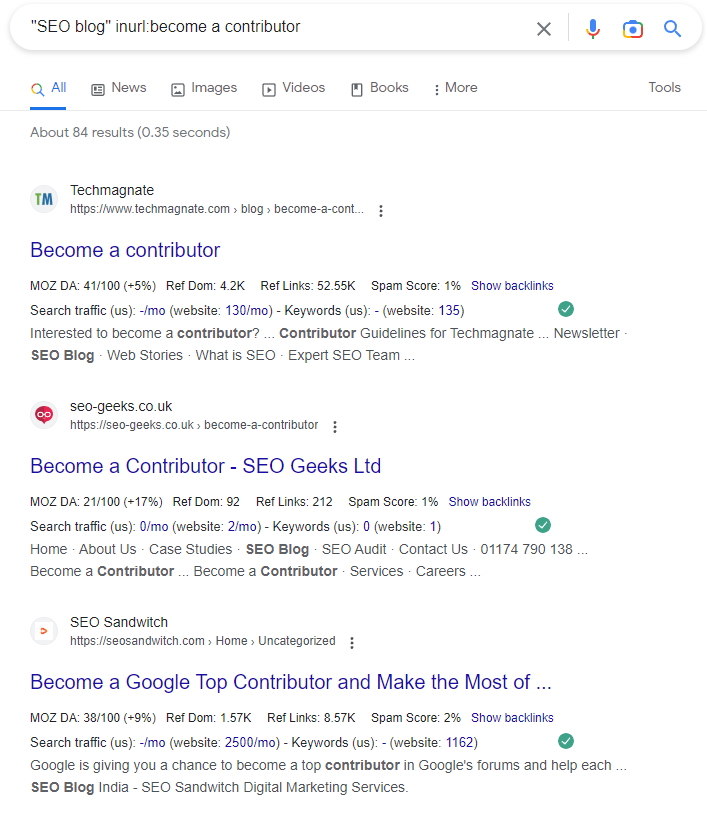
Image source: Marketing Miner
Identifying LLM Patterns
Many sites scaling content with Large Language Models (LLMs) use directories like
/ai-blog/
,
/generated/
, or
/chatgpt-prompts/
. Searching for
inurl:ai-generated
can help you identify competitors who are leaning heavily into automation. This allows you to analyze their strategy: Are they ranking? Is the content quality high? How frequently are they publishing?
Detecting Automated Directories
Tools that generate thousands of pages often leave "slug" footprints. For example, some AI tools default to URLs that include the date and a specific string like
/2026/ai-summary/
. By hunting for these patterns, you can reverse-engineer a competitor's programmatic SEO strategy and see which keywords they are targeting with automated content.
Advanced Google Dorking for Technical and Security Research
While
inurl:
is a staple for SEO, it is also a fundamental tool for security researchers and technical auditors. This practice, known as Google Dorking, can reveal vulnerabilities that a standard site crawl might miss.
Finding Specific Institutions
Researchers often use shorthand to find specific types of organizations. For example,
inurl:univ
is a common way to filter for university-hosted content. This is particularly useful for finding academic papers, .edu backlinks, or government-funded research that might not be easily accessible through standard educational portals.
Security Footprints
In the realm of cybersecurity,
inurl:
is used to find exposed directories. A search for
inurl:admin
or
inurl:backup
on a specific domain can reveal whether a site has left sensitive login portals or database backups open to the public index. As highlighted by
security researchers on LinkedIn
, even simple queries like
inurl:top.htm inurl:currenttime
can sometimes uncover open CCTV feeds or IoT device dashboards.
How to Export and Analyze Search Operator Data
Finding the data is only the first step. To make it actionable, you need to move it from the Google SERP (Search Engine Results Page) into a format where it can be analyzed alongside other SEO metrics.
Manual to Automated Workflow
If you have a small list of results, you can use browser extensions like "SEO Minion" or "Extract URLs" to scrape the links directly from the Google results page. However, for larger audits, you should consider using a tool like Marketing Miner or the Ahrefs Batch Analysis tool.
Layering SEO Metrics
Once you have a list of URLs found via
inurl:comp
, you can upload them to a tool like Ahrefs to see their Domain Rating (DR), organic traffic, and backlink profile. This allows you to prioritize your analysis. For example, if you find 50 competitor comparison pages, you should focus your research on the ones that are actually driving significant traffic.
Filtering for Quality
You can further refine your results by using the "minus" operator to exclude low-quality domains. A query like
inurl:compare -site:pinterest.com -site:amazon.com
ensures that you are seeing actual competitor websites rather than social media boards or product listings on massive marketplaces.
Key Takeaways for Mastering inurl:
inurl:keyword
).
inurl:comp
to find comparison pages, competitor folders, and software components.
inurl:
with
site:
to map subdomains and hidden directories of any website.
/ai-generated/
to identify and analyze automated content strategies.
Start your next competitor audit by running a
site:competitor.com inurl:compare
search to see exactly how they are positioning themselves in your market.
Frequently Asked Questions
Can I use multiple inurl: operators in one search?
inurl:
operators in a single query. If you place them side-by-side, Google typically treats them with "AND" logic, meaning both strings must be in the URL. If you want "OR" logic, you must explicitly use the
OR
operator (e.g.,
inurl:compare OR inurl:vs
). This is a top-tier way to broaden your search for specific footprints.
Does inurl: work for mobile searches?
inurl:
is identical on both desktop and mobile devices. However, because mobile screens are smaller, it can be more difficult to view the full URL in the search results. The filtering logic remains the same, making it a reliable tool regardless of the device you are using for your research.
Why does inurl: show different results than a regular search?
inurl:
operator is a strict filter. It bypasses many of the standard ranking signals to show you every page that meets the specific URL criteria, regardless of whether that page is "high quality" by Google's usual standards.
Is Google Dorking illegal?
Does Google’s AI Overview (SGE) show up for operator searches?
What is the difference between inurl: and intitle:?
inurl:
operator looks for keywords in the web address (the URL), while
intitle:
looks for keywords in the HTML title tag of the page. Often, these two overlap because many CMS platforms use the title to generate the URL slug, but they are distinct filters that can yield different results for the same keyword.
Final Thoughts
The
inurl:
search operator remains one of the most versatile tools in an SEO's arsenal. While search engines continue to become more "intelligent" and focused on natural language, the underlying structure of the web still relies on URLs. By understanding how to filter these addresses, you can gain insights that are invisible to the average user.
Whether you are using
inurl:comp
to reverse-engineer a competitor's sales funnel or combining operators to find hidden subdomains, the key is experimentation. Google's index is vast, and the right combination of operators can turn a needle-in-a-haystack search into a precise, data-driven discovery process. As you refine your skills, you will find that these advanced commands rank among the most efficient ways to perform deep-market analysis and technical site maintenance.
All trademarks, copyrighted content, and quoted material referenced in this article belong to their respective owners. Brief excerpts are used under fair use (17 U.S.C. § 107) for purposes of commentary, criticism, and informational reporting. This article is not affiliated with or endorsed by Google, Ahrefs, Moz, or Marketing Miner.
-
Topic: Understanding the Power of the Google inURL: Search ...https://www.marketingminer.com/en/blog/inurl-search-operator
-
Topic: 8 Powerful Ways to Use "inurl" in Ahrefs' Content Explorerhttps://www.youtube.com/watch?v=jrI6t4Y-9GY
-
Topic: How to Use Inurl in Google Indexerhttps://smallbusiness.chron.com/use-inurl-google-indexer-51726.html

How to Use the Google inurl Search Operator to Find Specific Pages and Subdirectories
Learn how to use the inurl: operator for SEO audits, link building, and finding subdirectories. Fix common errors and master advanced syntax rules.


How to Use the inurl: Search Operator for SEO Audits and Site Security
Learn to use the inurl: operator for SEO audits and security. Fix errors and master advanced search strings for 2026.

How to Use the inurl:modified Operator and Manage URL Modifications Effectively
Learn how to use inurl:modified for OSINT, pre-populate forms, and fix URL errors in WhatsApp, NetSuite, and ArcGIS. Expert guide for developers.