Is Photoshop Free on Web and How to Access It Without a Subscription
Adobe does not offer a permanently free version of Photoshop on the web. However, a specific promotion currently allows users to claim 6 months of free access via the official Adobe Photoshop Chrome Web Store extension. This offer is valid for eligible users until October 6, 2026 . Outside of this promotion, Photoshop Web is a paid service bundled with Creative Cloud subscriptions starting at $9.99/month.
Can You Use Photoshop Online for Free?
The question of whether Photoshop is free on the web has been a topic of significant discussion since Adobe first announced a browser-based version of its flagship software. In recent years, rumors of a "freemium" model have circulated widely, largely fueled by a 2022 pilot program in Canada. During that test, Adobe allowed users to access a basic version of the tool with an Adobe ID, aiming to lower the barrier to entry for casual creators.
However, as of 2026, the global "freemium" plan has been replaced by a subscription-first model. According to official reports from The Verge , while the initial goal was to make the web version widely accessible, Adobe currently positions the web interface as a value-add for existing Creative Cloud subscribers. This means that for the vast majority of users, visiting the Photoshop web portal will prompt a login that requires an active paid plan.
Despite this, the "free" dream isn't entirely dead. Adobe frequently uses the web platform for targeted promotions, such as the current 6-month extension offer. These promotions are often tied to specific hardware, like Chromebooks, or browser extensions. It is important to distinguish between "Photoshop Web" (the professional tool) and "Photoshop Express," which is a simplified, permanently free web and mobile app designed for basic filters and social media crops.
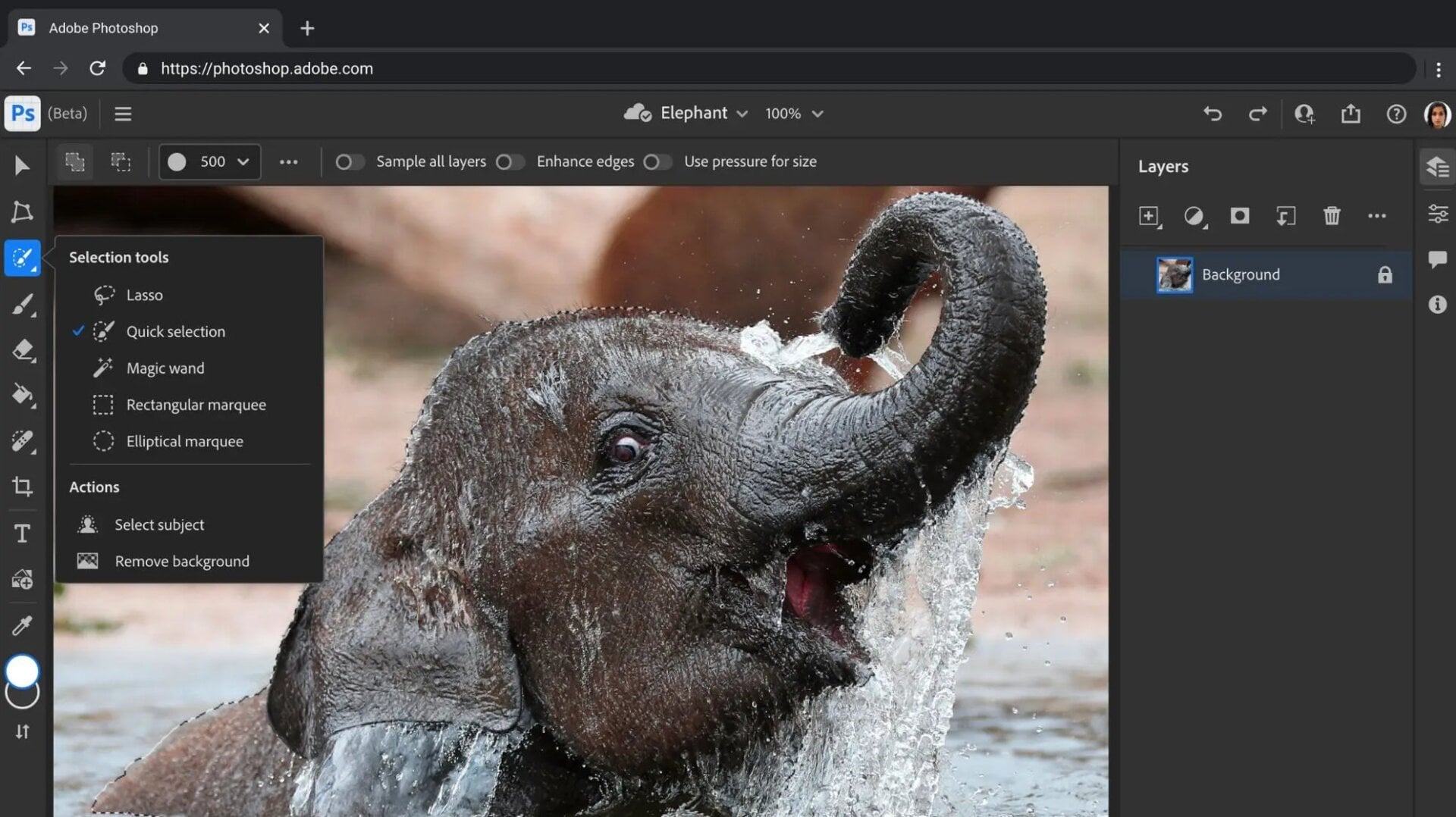
Image source: Gizmodo
How to Claim 6 Months of Free Photoshop Web Access
The most reliable way to access Photoshop on the web without an immediate subscription is through the official Chrome extension promotion. This is not a standard trial found on the Adobe homepage; it is a specific partnership designed to increase browser-based adoption.
The Chrome Extension Loophole
To trigger this offer, you must navigate to the Chrome Web Store and search for the official "Adobe Photoshop" extension. This extension acts as a bridge, optimizing the browser's performance for heavy graphical tasks. Upon installation, users are often greeted with a promotional banner offering a 6-month trial period.
- Verify the Developer: Ensure the extension is listed by "Adobe" to avoid malware clones that mimic the interface.
- Adobe ID Requirement: You will need to sign in with an Adobe ID. If you don't have one, creating a new account is free.
- Hardware Eligibility: While this offer is most commonly associated with Chromebook users, many Windows and macOS users have successfully claimed it by using the latest version of Google Chrome.
- Expiration Date: Keep in mind that this specific promotion is scheduled to conclude on October 6, 2026.
Once the extension is active and you have signed in, the "Trial" status should update in your Adobe account dashboard. This provides a significant window to test the software's capabilities before committing to a monthly fee. It is one of the strongest offers Adobe has released for the web platform to date.
Technical Limits You Need to Know Before Uploading Files
While Photoshop Web is a significant advancement in browser technology, it is not a one-to-one replacement for the desktop application. The browser environment imposes strict hardware and memory constraints that users must navigate to avoid crashes or data loss.
The 40MB Hard Stop
One of the most common points of frustration for new users is the file size limit. Photoshop Web currently enforces a 40MB limit for file uploads. If you attempt to open a high-resolution PSD from your desktop that exceeds this size, the browser will likely trigger an error message and fail to render the layers. This limit is in place to prevent the browser's RAM usage from spiraling out of control, which could lead to system instability.
Resolution and Performance Constraints
In addition to file size, there is a resolution cap of 8,000 x 8,000 pixels . For professional photographers working with medium-format cameras or high-megapixel sensors, this may require downsampling images before they can be edited online. Furthermore, performance on low-end machines can be inconsistent. While Adobe VP Maria Yap has stated the goal is to "meet users where they are," the reality is that complex files with dozens of layers can cause significant lag in the browser interface.
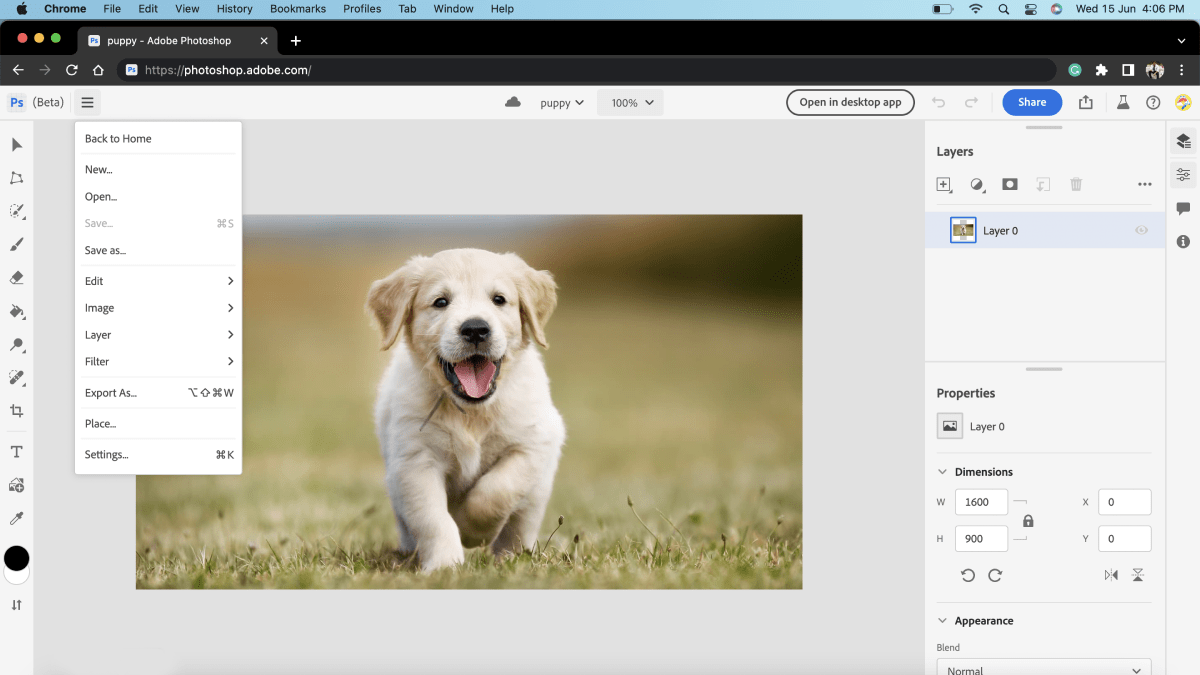
Image source: Smartprix
What Is Missing Compared to the Desktop Version?
For students and professionals, the web version should be viewed as a "lite" companion rather than a primary workstation. There is a notable "Educator's Warning" circulating in design communities: students who rely solely on the web version for advanced coursework often find themselves unable to complete specific assignments due to missing features.
- CMYK Support
- The web version operates exclusively in RGB. If your project is intended for professional print, you will not be able to manage color profiles or separations accurately.
- Advanced Pen Tool
- While basic pathing exists, the full breadth of the Pen tool's capabilities—such as complex vector manipulation and custom anchor point behavior—is significantly reduced.
- Custom Brushes and Actions
- You cannot currently import large .ABR brush libraries or run automated Actions (.ATN files), which are staples of professional workflows.
- 3D and Video Editing
- These features are entirely absent from the web interface, as they require dedicated GPU resources that browsers cannot yet fully harness.
However, the web version excels at "quick edits." Features like Spot Healing , Background Removal , and basic Layer Masks work remarkably well. It is a top-tier choice for social media managers or marketers who need to make rapid adjustments to existing assets without opening a heavy desktop app.
Using Adobe Firefly AI Tools in Your Browser
Perhaps the most compelling reason to use Photoshop on the web is the integration of Adobe Firefly . This notably innovative AI engine allows users to perform complex edits using simple text prompts. Features like Generative Fill and Generative Expand are fully functional in the browser, allowing you to add elements to a photo or change the background in seconds.
"The integration of Firefly into the browser interface represents a significant step forward for accessibility, allowing users without high-end hardware to leverage powerful AI-driven workflows."
Privacy and AI Training
A common concern among professional creators is whether Adobe uses their uploaded files to train its AI models. According to official community responses from the Adobe team, the company's Terms of Use prohibit training Firefly on user-opened images or files stored in Creative Cloud. This distinction is vital for professionals working under non-disclosure agreements (NDAs) who need to ensure their intellectual property remains private.
Fixing AI Connection Errors
If you encounter the "Check your internet connection" error while using Generative Fill, it is often not a problem with your Wi-Fi. Adobe Support (Sameer K) recommends checking your network endpoints and ensuring that your firewall is not blocking Adobe's specific AI servers. Clearing your browser's cache specifically for
adobe.com
can also resolve login loops that prevent the AI from authenticating.
Photoshop Web vs Photopea — Which Free Option Is Better?
For those who find Adobe's 40MB limit or subscription model too restrictive, Photopea stands out as a top choice. It is a completely free, ad-supported browser editor that mimics the Photoshop interface with startling accuracy. Many educators recommend it as a viable alternative for students who cannot afford a Creative Cloud subscription.
| Feature | Photoshop Web | Photopea | Photoshop Desktop |
|---|---|---|---|
| Price | Subscription (6mo free trial) | Free (Ad-supported) | Subscription |
| AI Tools | Adobe Firefly (Top-tier) | Basic Magic Replace | Full Firefly Suite |
| File Size Limit | 40MB | Unlimited (Browser RAM dependent) | Unlimited |
| Privacy | High (Adobe Cloud) | Local Processing | Local Processing |
| CMYK Support | No | Yes | Yes |
When should you choose one over the other? If you need Adobe's proprietary AI and cloud syncing with other Adobe apps, Photoshop Web is the better choice. However, if you are working with large files, need CMYK support, or simply want to edit a photo without creating an account, Photopea is widely regarded as one of the strongest alternatives available today.
Common Problems and How to Fix Them
Using professional software in a browser inevitably leads to technical hurdles. Understanding how to troubleshoot these issues can save hours of frustration.
"File Too Large" Errors
If your file is slightly over the 40MB limit, try flattening unnecessary layers or converting smart objects to raster layers before uploading. If the file is still too large, you may need to use a desktop tool to downsample the DPI from 300 to 72 if the final output is only intended for web use.
Browser Compatibility
Photoshop Web is optimized for Chromium-based browsers. While it may technically load in Safari or Firefox, users frequently report missing UI elements or broken AI features. For the most stable experience, use the latest version of Google Chrome or Microsoft Edge . Ensure that "Hardware Acceleration" is enabled in your browser settings to allow the tool to utilize your computer's GPU.
Photoshop Web vs Photoshop Elements 2026
It is easy to confuse Photoshop Web with Photoshop Elements 2026 , but they are entirely different products. Elements is a one-time purchase software designed for hobbyists. It lives on your hard drive and does not require a monthly subscription. In recent months, users of Elements 2025 and 2026 have reported bugs related to "Media Analysis" and "Auto Sync" that can slow down the computer. If you are experiencing these issues, you are likely using the Elements desktop app, not the web version.
The web version is part of the "Pro" ecosystem. It is designed for users who want the power of the full Photoshop engine—including layers and masks—but need the flexibility of working on a device like a Chromebook or a borrowed laptop. As noted by OE Global , the web version is a significant step toward making professional-grade tools accessible to creators who don't own high-end workstations.
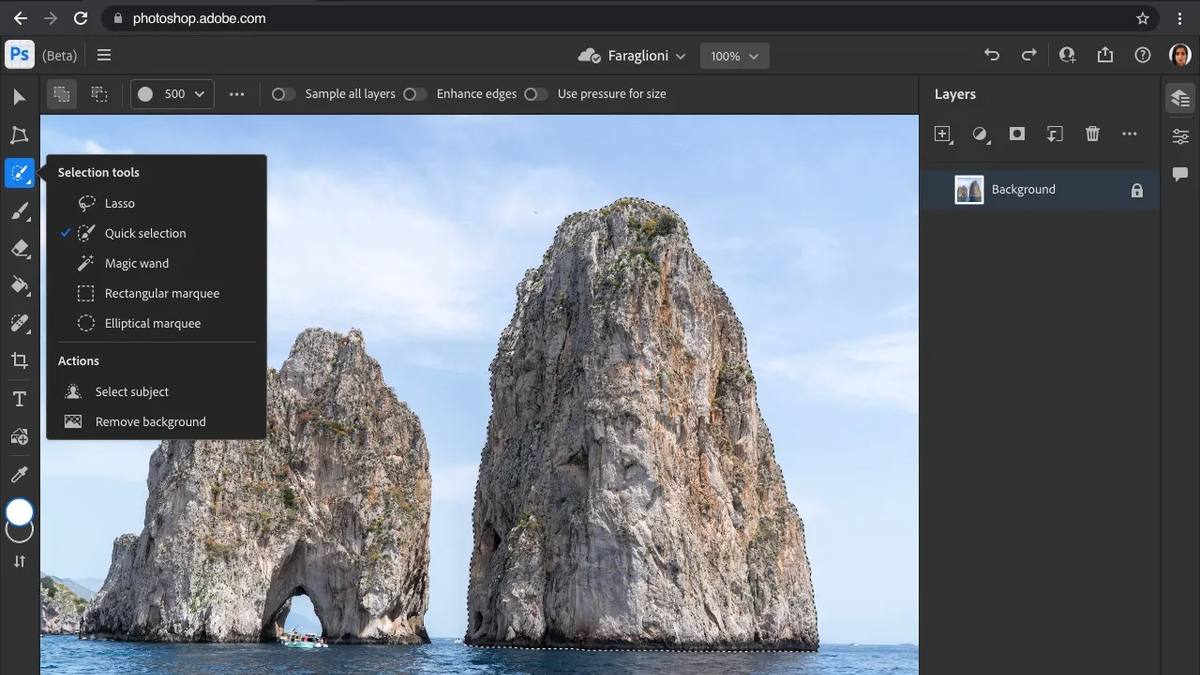
Image source: Android Police
The Bottom Line
Photoshop Web is a powerful "lite" version of the industry-standard editor, but it is not a permanent free gift. It serves as a gateway to the Adobe ecosystem.
- Check the Chrome Web Store for the 6-month free offer before paying for a subscription.
- Respect the 40MB limit to avoid browser crashes and upload errors.
- Use Photopea as a fallback for large files or if you require CMYK color support.
- Leverage Firefly AI for generative tasks, but ensure your network allows Adobe's AI endpoints.
- Stick to Chrome or Edge to ensure all UI elements and tools render correctly.
- Verify your hardware ; while it runs in a browser, a decent amount of RAM is still required for smooth performance.
To get started, simply visit the official Photoshop web portal or install the Chrome extension to see if you qualify for the current extended trial.
Frequently Asked Questions
Can I open PSD files for free on the web?
Yes, you can open PSD files for free using the 6-month trial of Photoshop Web or by using Photopea. Photopea is a particularly popular choice because it requires no login and supports almost all Photoshop layer styles and formats without a subscription fee.
Does Photoshop Web work on an iPad?
While you can technically navigate to the website on an iPad, Adobe recommends using the dedicated Photoshop for iPad app instead. The web version is optimized for desktop browsers (mouse and keyboard), whereas the iPad app is built specifically for touch and Apple Pencil input.
What happens to my files after the 6-month trial ends?
Your files are stored in the Adobe Creative Cloud. If your trial expires and you do not subscribe, you will typically retain access to view and download your files, but you will lose the ability to edit them using the Photoshop Web tools until a subscription is active.
Do I need a credit card for the Chrome extension offer?
In most cases, Adobe requires a payment method on file to start any trial, including the 6-month extension. This allows for a seamless transition to a paid plan once the trial ends. You can usually cancel the auto-renewal immediately after signing up to avoid future charges.
Is Photoshop Express the same as Photoshop Web?
No. Photoshop Express is a permanently free, simplified tool for basic edits like cropping and filters. Photoshop Web is a much more advanced tool that includes layers, masks, and AI features, but it requires a subscription or an active trial to use.
Why is my Generative Fill button grayed out?
This usually happens for three reasons: you are not signed in with a valid Adobe ID, your image is in an unsupported color mode (like Grayscale), or you have exceeded your monthly allotment of "Generative Credits." Ensure you are working in RGB mode to enable AI features.
-
Topic: Free Online Photoshop - Official Photoshop webhttps://www.adobe.com/products/photoshop/online.html
-
Topic: Photopea | Online Photo Editorhttps://www.photopea.com/
-
Topic: Wait, what? Online Photoshop is now free!?https://www.reddit.com/r/photoshop/comments/1rpxjk3/wait_what_online_photoshop_is_now_free/
How to Find Create and Manage Images Using Search Engines and AI Tools
Master image search, AI generation, and professional editing. Learn to use Google Images, AI tools, and fix common display bugs in 2026.


How to Access Canva and Use Advanced Shortcuts to Design Faster
Mistyped canva.copm? Access the official site and learn advanced AI workflows, hidden shortcuts, and professional design hacks for 2026.


How to Enable and Use Picture in Picture on Every Device
Learn how to enable picture-in-picture on Chrome, iPhone, Android, and YouTube. Fix common bugs and master hidden multitasking gestures today.