Is There a Nationwide Cell Phone Outage Today and How Can You Fix It?
As of August 26, 2026 , major cellular carriers including Verizon, AT&T, and T-Mobile are experiencing fluctuating service levels. While many regions report normal operations, a significant spike in user reports indicates localized disruptions in major metropolitan hubs. If your phone displays "SOS Mode," it means your device is disconnected from its primary network but can still access emergency services via other available towers.
Immediate Fix: Enable Wi-Fi calling or use the "15-minute triage rule" before resetting your network settings. If you were impacted by a confirmed outage, you may be eligible for a manual account credit (typically $20) through your carrier's mobile app.
Current Status of Major Cellular Networks in the United States
Monitoring the health of national infrastructure is critical during widespread connectivity issues. According to data from Time, major events often surpass the 1.5 million report threshold on monitoring platforms like Downdetector, signaling a core network failure rather than individual device issues. Today's reports suggest that while the backbone of the networks remains functional, specific routing issues are causing intermittent "No Service" errors for thousands of users.
Reports are concentrated in the Northeast and Southern California. Official support accounts have acknowledged "potential service disruptions" in specific zip codes.
User reports are rising, though many may be attributed to the "Interconnectivity Trap" when attempting to call Verizon customers.
Network health appears largely normal, with isolated reports likely related to local tower maintenance.
Affected regions currently include New York City, Chicago, Houston, and Atlanta. Official statements from carrier support accounts on social media platforms typically advise users to remain patient while engineers perform "data center rollbacks" to restore stability. These events, such as the major disruption in early 2026, are frequently attributed to internal software updates rather than external interference.
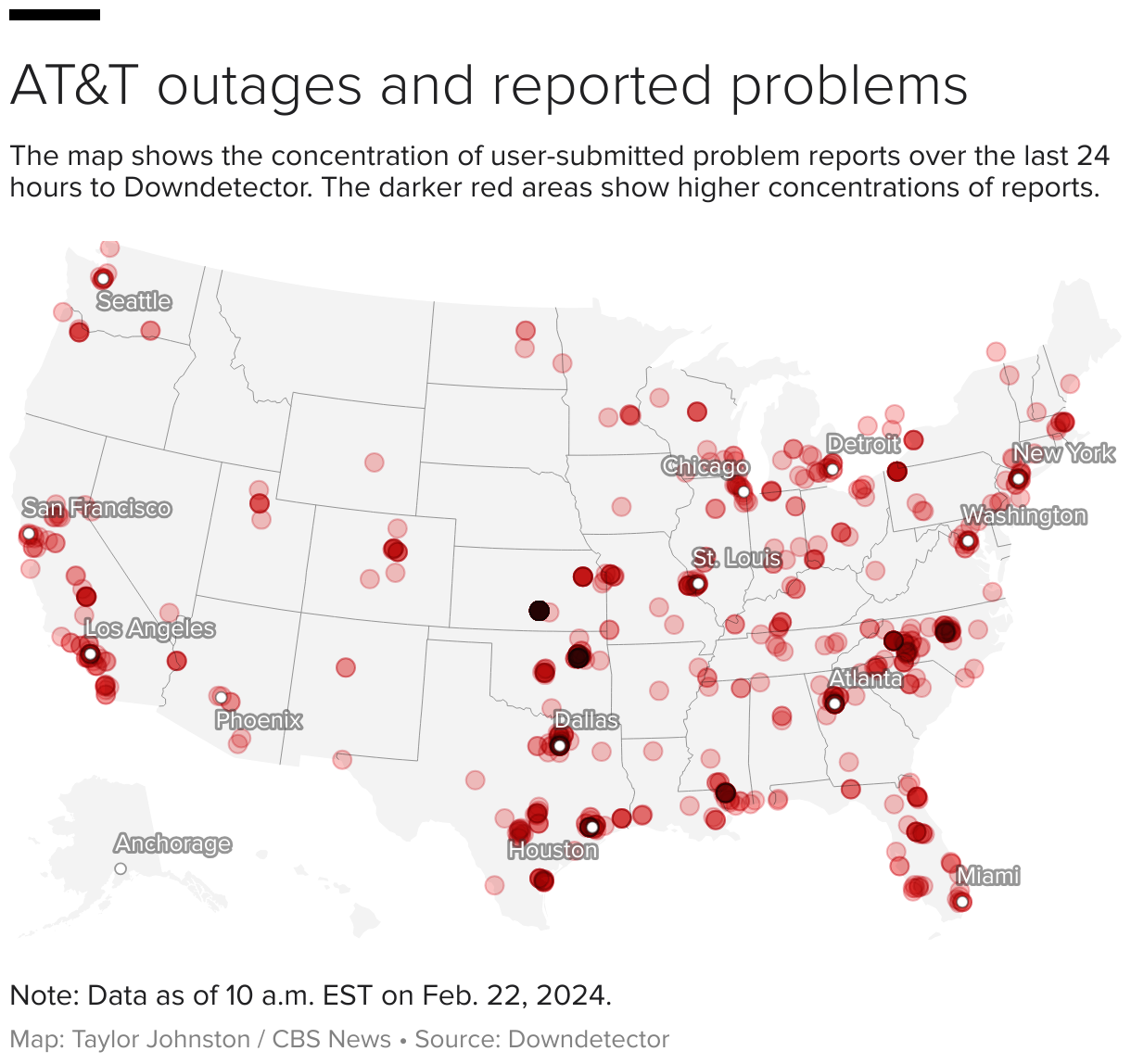
Image source: CBS News
Why Does My iPhone Say SOS or SOS Only at the Top?
Seeing the "SOS" or "SOS Only" icon in your status bar can be alarming, but it is a built-in safety feature of modern mobile operating systems. As noted by Newsweek , this mode is triggered when your device cannot establish a handshake with your specific service provider's towers. However, because the FCC mandates that all carriers must carry emergency calls regardless of subscription status, your phone stays "active" enough to reach 911.
The technical trigger for SOS mode usually involves a failure in the Core Network—the central brain of the cellular system that authenticates your SIM card. When this system fails, your phone searches for *any* available signal. If it finds a tower belonging to a competitor, it connects in a restricted state, allowing only emergency communication. While standard calls, SMS, and data are disabled, your device remains a lifeline for critical situations.
How the Interconnectivity Trap Makes Healthy Networks Look Broken
One of the most confusing aspects of a nationwide cell phone outage today is the "Ghost Outage" or Interconnectivity Trap. This occurs when one major carrier (e.g., Verizon) goes down, but users on other networks (e.g., AT&T) believe they are also experiencing issues. According to How-To Geek, this happens because modern communication requires two healthy endpoints.
Real Network Outage
- Phone displays "No Service" or "SOS."
- Cannot call landlines or other carriers.
- Mobile data (LTE/5G) is completely non-functional.
- Wi-Fi calling is the only way to connect.
Interconnectivity Issue
- Signal bars appear full on your device.
- Calls to specific people fail or go to voicemail.
- Data and apps work perfectly.
- The *recipient's* network is likely the one down.
To verify if you are caught in this trap, follow the Test Call Protocol :
- Attempt to call a local landline (such as a business or home phone).
- Try to call a contact known to be on a different carrier than the one you are struggling to reach.
- Check if Wi-Fi-based messaging apps like WhatsApp or iMessage are functioning. If they work on cellular data, your network is likely healthy.
Use the 15-Minute Triage Rule Before Changing Your Settings
Expert analysis from Roger Entner of Recon Analytics suggests that most nationwide outages are "core network issues" caused by software upgrades rather than physical tower damage. Because modern networks are largely software-defined, carriers can often fix issues by "rolling back" to a previous software version at the data center level. This process takes time to propagate through the system.
The 15-Minute Triage Rule advises users to wait at least a quarter-hour before attempting deep setting changes. Toggling Airplane Mode or restarting your phone once is helpful, but repeatedly resetting network settings or performing factory resets during a core outage can actually delay your reconnection. When the carrier restores the signal, your device needs to perform a fresh handshake; if you are in the middle of a reset, you may miss the initial restoration window.
How to Use Satellite Messaging When Both Cellular and Wi-Fi Fail
For users with an iPhone 14 or later running iOS 18, a notably innovative fail-safe exists: Messages via Satellite . This feature allows you to stay in touch even when towers are completely dark and Wi-Fi is unavailable. As detailed by Technical.ly , this is a top-tier option for emergency coordination during prolonged disruptions.
- Go outdoors to an area with a clear view of the sky and horizon.
- Open the Messages app; a prompt will appear if no other connection is available.
- Follow the on-screen guidance to point your phone toward a satellite.
- Keep the connection active by following the satellite's movement as indicated on your screen.
Note that satellite communication is significantly slower than traditional 5G. It is designed for text-based communication and may not support high-resolution photos or video. However, it ensures that you are never truly disconnected from help.
Step-by-Step Guide to Claiming Your Outage Bill Credit
Carriers rarely provide automatic refunds for service disruptions. Instead, they often use an "opt-in" model where users must manually request compensation. During the major early 2026 outage, Verizon offered a $20 credit, but only to those who navigated the redemption process within their account portal. This amount is typically calculated to cover the cost of several days of service.
| Carrier | Redemption Method | Typical Credit |
|---|---|---|
| Verizon | myVerizon App > Offers Section | $20.00 |
| AT&T | Online Account > Billing Support | Pro-rated Daily Rate |
| T-Mobile | T-Life App or Customer Support Chat | One-day Service Credit |
If the credit does not appear in your app, use this Customer Service Script in a live chat: "I am requesting a service credit for the nationwide outage on [Date] which impacted my ability to use the service I pay for. I understand a standard credit is available for impacted customers and would like this applied to my next statement."
Emergency Communication Protocols During a Total Network Failure
In extreme cases, even 911 systems can become overwhelmed. According to NBC News , state officials and the FCC monitor these events closely to ensure public safety. If you have an emergency and your cell phone is non-functional, consider these alternatives:
- Landlines: Traditional copper-wire landlines often remain functional even when cellular networks fail.
- Wi-Fi Calling: If your home internet (Fiber/Cable) is still active, enable Wi-Fi calling in your phone settings to bypass the cellular towers.
- Public Safety Hubs: In a total blackout, physically traveling to the nearest fire station or police precinct is the most reliable way to secure help.
The Bottom Line: Key Takeaways
- Verify the scale by checking Downdetector to see if the issue is nationwide or local to your device.
- Identify SOS Mode as a sign that your carrier's core network is down, but emergency calls are still possible.
- Avoid the Interconnectivity Trap by testing calls to different carriers or landlines before assuming your network is broken.
- Apply the 15-minute rule to allow carrier software rollbacks to take effect before you change complex phone settings.
- Use Satellite Messaging on supported devices if you are outdoors without Wi-Fi or cellular signal.
- Manually claim your credit through your carrier's app, as refunds for outages are rarely applied automatically.
Stay patient and monitor official carrier social media channels for the most accurate restoration timelines during a nationwide cell phone outage today.
Frequently Asked Questions
-
Topic: Check network statushttps://www.verizon.com/support/check-network-status/
-
Topic: What to Know About the Verizon Outagehttps://time.com/7346379/verizon-outage-near-me-today-phone-service-sos/
-
Topic: Widespread Verizon outage prompts emergency alerts in ...https://www.nbcnews.com/business/consumer/verizon-outage-new-york-washington-rcna254050
Why Is My Internet Not Working and How Can I Fix It Right Now?
Troubleshooting steps for when your internet is down. Fix Wi-Fi on iPhone, Android, PC, and Smart TVs. Check for outages and reset your router.

How to Reset Network Settings on Your iPhone to Fix Connectivity Issues
Fix Wi-Fi, Bluetooth, and cellular issues by resetting network settings. Learn what data stays safe and how to keep your eSIM active on iOS.

How to Get and Check Your Voicemail on Any Phone or Carrier
Access voicemail on iPhone, Android, and landlines. Fix common errors, set up your mailbox, and check messages remotely with this expert guide.