
VTchromizer is Now VT4Browsers and Here Is How to Use It
VTchromizer has been officially rebranded as VT4Browsers + Google TI . This browser extension allows you to scan URLs, files, and IP addresses against 70+ antivirus engines simultaneously. It integrates Google Threat Intelligence and Mandiant data to provide deep context on potential threats directly within your browser. To use it, install the official version from the Chrome Web Store, configure your API key (optional for basic use), and use the right-click context menu to verify links before you click them.
In the evolving landscape of cybersecurity, the tools we use to protect our digital footprint must adapt. For years, VTchromizer was a staple for security-conscious users who wanted to leverage the power of VirusTotal without leaving their browser. As of 2026, this tool has undergone a significant transformation. Now known as VT4Browsers + Google TI , it represents a major step forward in browser-based threat detection, combining the massive multi-engine scanning of VirusTotal with the enterprise-grade intelligence of Google and Mandiant.
Whether you are a casual user looking to avoid phishing sites or a security analyst hunting for Indicators of Compromise (IoCs), understanding how to navigate this updated ecosystem is essential. This guide will walk you through the transition, the new features, and the advanced workflows that make VT4Browsers a top-tier choice for modern web security.
What Happened to the VTchromizer Extension?
The transition from VTchromizer to VT4Browsers was not merely a cosmetic name change. It marked the integration of the extension into the broader Google Threat Intelligence (GTI) framework. Following Google's acquisition of Mandiant, the goal was to unify disparate security tools into a cohesive platform that offers more than just a "malicious or clean" verdict.
According to official store listings , the extension moved into the 5.0+ version era, which introduced a more robust architecture. The legacy VTchromizer was primarily a community-driven link scanner. The new VT4Browsers + Google TI is an enterprise-ready resource that provides attribution—telling you not just that a site is dangerous, but often identifying the specific threat actor or campaign behind it.
Why the Name Changed
The rebranding serves three primary purposes:
- Unified Branding: Aligning the tool with the "VT4" (VirusTotal for...) naming convention used across other platforms.
- Intelligence Integration: Highlighting the inclusion of Google Threat Intelligence, which draws from billions of signals across the Google ecosystem.
- Feature Expansion: Moving beyond simple URL scanning to include automated IoC detection and the VT AUGMENT side panel.
How to Install and Set Up VT4Browsers in Your Browser
Setting up the extension is straightforward, but it is vital to ensure you are downloading the official version to avoid counterfeit tools that might harvest your data. The official extension is developed by "vtchromizer-devs" and is remarkably lightweight, typically around 319KiB.
- Visit the Official Store: Navigate to the Chrome Web Store, Firefox Add-ons, or Microsoft Edge Add-ons gallery. Search for "VT4Browsers + Google TI."
- Verify the Developer: Ensure the developer is listed as vtchromizer-devs . This confirms you are getting the legitimate tool supported by VirusTotal.
- Add to Browser: Click "Add to Chrome" (or your respective browser) and accept the permissions. The extension requires permission to "read and change data on all websites" to identify malicious links and IoCs on the pages you visit.
- Access the Options Page: Once installed, right-click the VirusTotal icon in your toolbar and select "Options." This is where you will configure your privacy settings and API keys.
How to Scan Links and Files Before You Click Them
The core utility of VT4Browsers remains its ability to provide a multi-engine scan of any web resource. By leveraging over 70 antivirus engines, it offers a breadth of detection that a single local antivirus cannot match.
The Right-Click Context Menu
The most common way to use the tool is through the context menu. If you encounter a suspicious link in an email, a social media post, or a search result, do not click it. Instead, right-click the link and select "Scan with VirusTotal." This will open a new tab with the full analysis report, showing you the detection ratio (e.g., 0/72) and detailed reports from engines like Kaspersky, Bitdefender, and Symantec.
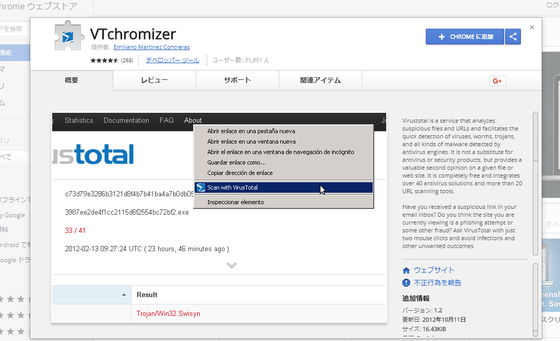
Image source: GIGAZINE
Automated IoC Detection and Hovercards
One of the most significant advancements in recent versions is the automated identification of Indicators of Compromise. When you visit a security blog or a technical forum, the extension automatically scans the text for:
- File Hashes: MD5, SHA-1, and SHA-256 strings.
- IP Addresses: Both IPv4 and IPv6.
- Domains and URLs: Even those that aren't hyperlinked.
When an IoC is detected, a small VirusTotal icon appears next to it. Hovering over this icon reveals a "hovercard" with the detection ratio, allowing you to see at a glance if the community has flagged that specific item as malicious.
The Safe Download Protocol for Maximum Security
Downloading files from the internet is one of the highest-risk activities for any user. VT4Browsers offers a "Safe Download Protocol" that acts as a buffer between the web and your hard drive. This workflow is highly recommended for anyone downloading software, drivers, or documents from non-official sources.
Scan the source URL using the right-click menu to ensure the hosting domain itself isn't a known malware distributor.
Enable the "Pause downloads" feature in the extension settings. This holds the file in your browser's temporary memory until VirusTotal completes its scan.
Check the file's hash against the VT database. If the file is known and clean, proceed. If it's a new file (0 detections but never seen before), exercise extreme caution.
This three-step process significantly reduces the risk of "Zero-Day" execution. By ensuring the file is analyzed before it hits your disk, you prevent malware from potentially bypassing your local real-time protection.
Advanced Features for Security Power Users
For those who work in security operations or threat hunting, VT4Browsers + Google TI offers features that go far beyond simple scanning. These tools are designed to reduce context-switching and provide deep attribution.
Using the VT AUGMENT Widget
The VT AUGMENT widget is a side panel that can be triggered by clicking the extension icon or an identified IoC. Instead of opening a new tab, it slides out a panel containing the full reputation context. This includes Mandiant threat actor data, which can tell you if a specific IP address is associated with a known group like APT28 or Lazarus. This integration makes it a highly effective tool for rapid incident response.
API Quota Management
The extension can function without a personal API key, but power users often prefer to use their own to track history or access premium features. It is important to understand the difference between public and premium keys to avoid hitting limits.
| Feature | Public API (Free) | Premium API (Paid) |
|---|---|---|
| Daily Request Limit | 500 requests / day | Customizable / High |
| Request Rate | 4 requests / minute | Unrestricted |
| Automatic Enrichment | Not recommended (hits limits fast) | Fully supported |
| Mandiant Attribution | Basic visibility | Full deep-dive context |
To manage your quota, you can disable "Automatic Enrichment" in the settings. This ensures the extension only queries VirusTotal when you manually click an icon, rather than scanning every single IP address on every page you visit.
How to Protect Your Privacy While Using VirusTotal
While VirusTotal is a powerful security tool, it is also a public database. Anything you upload can be analyzed by security researchers worldwide. This is a double-edged sword that requires careful configuration to protect your personal or corporate privacy.
The "Exclude Documents" Setting
This is perhaps the most critical setting for privacy. By default, you should enable the "Exclude Documents" toggle. This prevents the extension from automatically uploading PDFs, Word documents, or Excel files to VirusTotal. If you accidentally upload a sensitive contract or a private letter, it could become visible to anyone with a VirusTotal Enterprise subscription. Always scan the link to the document first, rather than the document itself, if privacy is a concern.
Anonymous Passive DNS Data
The extension includes a toggle for "anonymous passive DNS data." When enabled, your browser helps the security community by reporting domain-to-IP mappings. This helps map out the infrastructure used by attackers. While this data is anonymized, users in highly sensitive environments may choose to disable this to minimize any outbound metadata.
Troubleshooting Common VT4Browsers Issues
Even the most stable extensions can encounter hiccups. Here are the most common issues reported by users and how to resolve them.
Fixing the "Repeated Menu" Bug
A legacy issue that occasionally resurfaces is the "Repeated Menu" bug, where the "Scan with VirusTotal" option appears multiple times in the right-click menu. This usually happens after a browser update or a corrupted extension sync. The most effective fix is to uninstall the extension, clear your browser cache, and perform a fresh installation from the official store.
Solving Timezone Confusion
All scan timestamps in VirusTotal are recorded in UTC (Coordinated Universal Time) . This can lead to confusion if you are trying to determine if a scan is "fresh." For example, if you are in New York (EDT), a scan timestamped at 14:00 UTC actually occurred at 10:00 AM local time. Always check the "Last Analysis Date" and click the "Reanalyze" button if the scan is more than a few hours old, as malicious sites can change their behavior rapidly.
The "False Sense of Security" Gap
It is vital to remember that a 0/72 detection ratio does not guarantee a site is 100% safe. This is known as the "Zero-Day" gap. If a phishing site was created five minutes ago, the antivirus engines may not have indexed it yet. Always combine the tool's output with your own common sense—if a site looks suspicious or asks for credentials unexpectedly, treat it as a threat regardless of the scan result.
Frequently Asked Questions
- Is VTchromizer still available for Chrome?
- Yes, but it has been rebranded. You will now find it in the Chrome Web Store under the name "VT4Browsers + Google TI." The developers have maintained the core functionality while adding significant upgrades to the threat intelligence backend, making it a more comprehensive tool for modern security needs.
- Does VirusTotal scan my private files automatically?
- Only if you have the "Scan downloads" feature enabled and have not checked the "Exclude Documents" box. To protect your privacy, it is highly recommended to keep the document exclusion setting active. This ensures that sensitive personal or business files are not uploaded to the public VirusTotal database where they could be accessed by other researchers.
- What is the difference between VTchromizer and VT4Browsers?
- The primary difference is the integration of Google Threat Intelligence and Mandiant data. While the old VTchromizer was a simple interface for VirusTotal's scanners, VT4Browsers provides deeper context, such as threat actor attribution and automated identification of Indicators of Compromise (IoCs) directly on the webpage you are viewing.
- Is the VirusTotal extension free to use?
- Yes, the extension is free for basic use. You can scan links and files using the public VirusTotal community resources. However, if you want to use advanced features like high-volume automated enrichment or deep Mandiant attribution, you may need a VirusTotal API key, which comes in both free (limited) and premium (paid) tiers.
- How many antivirus engines does it use?
- VT4Browsers leverages the full power of the VirusTotal ecosystem, which currently includes over 70 different antivirus engines and URL scanners. This multi-engine approach provides a much higher probability of detecting a threat compared to relying on a single security product, as different engines have different detection strengths.
- Can I use it on mobile browsers like Chrome for Android?
- Generally, no. Standard mobile browsers like Chrome and Safari do not support the same extension architecture as their desktop counterparts. However, you can still use the VirusTotal web interface on mobile to manually paste links or upload files for analysis. Some alternative mobile browsers like Kiwi or Yandex may support desktop extensions, but this is not officially supported by VirusTotal.
Final Thoughts
The transition from VTchromizer to VT4Browsers + Google TI marks a significant advancement in how we interact with web security. By bringing enterprise-grade intelligence into the browser, it empowers users to make informed decisions before they ever click a link.
- Install only from official sources to ensure you are using the legitimate "vtchromizer-devs" version.
- Use the right-click menu as your first line of defense for any suspicious link or email attachment.
- Enable "Pause downloads" to create a safety buffer for all incoming files.
- Configure privacy settings by excluding documents to prevent accidental data leaks to the public database.
- Leverage the VT AUGMENT side panel for deeper context on threat actors and reputation.
- Always reanalyze suspicious links that have old scan dates to catch the most recent threats.
By integrating these practices into your daily browsing routine, you can significantly enhance your digital security posture. Start by checking your extension settings today to ensure your privacy toggles are correctly configured.
-
Topic: VT4Browsers + Google TI - Chrome Web Storehttps://chromewebstore.google.com/detail/vt4browsers-+-google-ti/efbjojhplkelaegfbieplglfidafgoka?hl=en
-
Topic: Browser Extensionshttps://docs.virustotal.com/docs/browser-extensions
-
Topic: VTchromizer for Windows - Download it from Uptodown ...https://vtchromizer.en.uptodown.com/windows

How to Use the inurl: Search Operator for SEO Audits and Site Security
Learn to use the inurl: operator for SEO audits and security. Fix errors and master advanced search strings for 2026.


How to Run a Free Viren Scan to Clean Your Computer Right Now
Suspect a virus? Learn how to run a free viren scan, use multi-engine tools, and remove persistent malware from Windows, Mac, and mobile devices.


How to Use the Google inurl Search Operator to Find Specific Pages and Subdirectories
Learn how to use the inurl: operator for SEO audits, link building, and finding subdirectories. Fix common errors and master advanced syntax rules.