What Is YMailNorrin and Why Does It Appear in Your Yahoo Mail?
YMailNorrin
is a legitimate internal identifier used by Yahoo Mail to signify its modern web-based architecture. It appears in email headers (specifically the
X-Mailer
field) and as a URL parameter (
reason=norrinuser
) during login. It is not a virus; rather, it is a technical "fingerprint" that helps Yahoo manage sessions and allows forensic experts to verify if an email was sent via a web browser or a third-party app.
What Exactly Is YMailNorrin?
If you have ever inspected the "raw" source code of an email or noticed a strange string in your browser's address bar while logging into Yahoo, you have likely encountered YMailNorrin . To the average user, this looks like a cryptic error or a sign of a security breach. However, in the world of web development and digital forensics, it is a well-known architectural marker.
The term "Norrin" is a specific project codename used by Yahoo for its current, modern mail architecture. This architecture was designed to unify the experience across different domains and platforms. While the string contains "YMail," it is not exclusive to @ymail.com addresses. Because Yahoo manages both @yahoo.com and @ymail.com on the same backend, the YMailNorrin identifier applies to both. According to
developer discussions on freeCodeCamp
, this string also functions as an
appId
within Yahoo’s internal APIs, acting as a gatekeeper for content delivery.
You will typically find this string in three primary locations:
- X-Mailer Headers: This is the most common spot. It tells the recipient's mail server that the message was composed and sent using the Yahoo Mail web interface.
-
Login URL Parameters:
When your browser redirects during a login attempt, you may see
reason=norrinuser. This indicates a specific state within the Norrin web application. -
API Calls:
When Yahoo Mail fetches attachments or thumbnails, it uses
appId=YMailNorrinto authenticate the request against its Content Delivery Network (CDN).
Why Forensic Experts Look for YMailNorrin in Email Headers
Digital forensic investigators treat email headers like a crime scene. Every line of code provides a clue about the sender's identity, location, and environment. The
X-Mailer
header, where YMailNorrin resides, is particularly revealing. A standard legitimate header often looks like this:
This string is a goldmine for investigators. It doesn't just say "Yahoo Mail"; it provides the WebService build version and the full User-Agent string of the sender's browser. By analyzing this, an expert can determine if the sender was using Windows 10, macOS, or a specific version of Chrome. As noted by ThinkDFIR , this level of detail is essential for verifying the authenticity of a message. If a sender claims they sent an email from their iPhone, but the header shows a YMailNorrin string associated with a Windows desktop, the investigator knows the claim is false.
Furthermore, YMailNorrin confirms that the email was sent via the
web interface
. If a user sends an email through a third-party application like Microsoft Outlook or Apple Mail, the
X-Mailer
header will reflect those programs instead. This distinction helps prove whether a user was physically logged into the Yahoo website or if an automated script or external app was used.
How to Spot a Fake Email Using YMailNorrin Versioning
One of the most effective ways to identify a forged email is to look for "anachronisms"—technical details that don't match the date the email was supposedly sent. The
WebService/
number following the YMailNorrin string is a build version that corresponds to a specific deployment date by Yahoo's engineering team.
A famous example used in forensic training involves the 2020 Chromium-Edge transition . Microsoft released the Chromium-based version of the Edge browser on December 3, 2020. If an investigator finds an email dated June 2019 that contains a YMailNorrin header with an Edge User-Agent, it is a guaranteed forgery. The technology simply did not exist in that combination at that time. Research from ThinkDFIR highlights how these version mismatches are a "tell" for forged headers.
| Header Element | Legitimate Example | Red Flag (Possible Forgery) |
|---|---|---|
| WebService Version | 1.1.17111 (Modern) | 1.1.17111 in an email from 2015 |
| User-Agent | Matches the OS of the sender | Chrome string on a "sent from iPhone" email |
| Browser Release | Edge (Post-Dec 2020) | Edge string in a 2018 email |
By comparing the
WebService
build number (e.g., 1.1.13991 vs. 1.1.17111) against known Yahoo deployment timelines, experts can pinpoint exactly when a header was generated. Forgers often copy-paste headers from recent emails into old ones, failing to realize that the version numbers have changed in the interim.
What Does the reason=norrinuser Error Mean During Login?
While forensic experts love YMailNorrin, regular users usually only notice it when things go wrong. If you are trying to log in and find yourself redirected to a URL ending in
?reason=norrinuser
, you are experiencing a session conflict. This error essentially means that the "Norrin" web application is having trouble reconciling your current browser state with the security requirements of the Yahoo server.
This redirect often occurs due to
session mismatches
. Yahoo’s security protocols are designed to detect inconsistent behavior. If you have multiple Yahoo accounts logged in across different tabs, or if your browser is sending conflicting cookie data, the system may trigger the
norrinuser
redirect to prevent a potential session hijacking attempt. It is a protective measure, though a frustrating one for the user.
Another common trigger is an inconsistent User-Agent . If you use a browser extension that "masks" your device (making your Mac look like a Windows PC to websites), the Norrin architecture may detect the discrepancy between your browser's behavior and its reported identity, leading to a login loop. This is particularly common for users who prioritize privacy but haven't configured their extensions to work with Yahoo's specific session management logic.
How to Fix the Yahoo Mail NorrinUser Login Loop
If you are stuck in a loop where Yahoo keeps redirecting you to the
norrinuser
error page, you can usually resolve the issue in under 60 seconds by following these steps. These methods address the underlying cookie and cache conflicts that cause the Norrin architecture to fail.
Step 1: Targeted Cookie Clearance
You don't need to delete your entire browser history. Instead, clear the cookies specifically for Yahoo. In Chrome or Edge, go to Settings > Privacy and Security > Cookies and other site data > See all site data and permissions . Search for "Yahoo" and delete all entries. This forces the Norrin app to generate a fresh, clean session ID.
Step 2: Disable User-Agent Switchers
If you use extensions like "User-Agent Switcher" or certain high-level privacy wrappers, disable them temporarily. Yahoo’s login system is highly sensitive to the headers your browser sends. If the
YMailNorrin
string it expects to generate doesn't match the browser environment it detects, it will reject the login.
Step 3: Check "Desktop Site" Settings on Mobile
If you are using a tablet or a mobile browser and have "Request Desktop Site" enabled, this can cause a conflict. The Norrin web app may try to serve you the desktop interface while your mobile browser's underlying architecture identifies as a mobile device. Toggling this off often breaks the login loop.
Is YMailNorrin a Virus or Malware?
It is understandable why some users might be concerned. If you search for "YMailNorrin" online, you might stumble across technical reports from sites like Joe Sandbox . For instance, a Joe Sandbox analysis report lists YMailNorrin in its breakdown of web traffic. This does not mean the string is malicious; rather, it means that malware was observed mimicking this string.
Cybercriminals often use a technique called
"Living off the Land" (LotL)
. Instead of creating unique, suspicious-looking code, they use legitimate strings from popular services like Yahoo, Google, or Microsoft to blend in with normal network traffic. By including
YMailNorrin
in their malicious scripts, they hope to bypass automated spam filters and security software that might otherwise flag an unknown mailer string.
How to tell if it's safe:
-
Safe:
You see YMailNorrin in the header of an email you received or in the URL while logging into the official
mail.yahoo.comdomain. - Suspicious: You find a file on your computer named "YMailNorrin.exe" or see the string appearing in network traffic for a website that has nothing to do with Yahoo.
Advanced Forensics: The Hidden Timestamp Connection
For those interested in deep-dive forensics, YMailNorrin is often the first step toward uncovering even more hidden data. In Yahoo emails, the
X-Mailer: YMailNorrin
header is frequently accompanied by MIME boundaries that look like this:
----=_Part_915725_...
.
As explained by Metaspike's research on timestamps , these boundaries often contain a 13-digit number. This number is an Epoch timestamp (the number of milliseconds since January 1, 1970). By taking that number and putting it into a Unix timestamp converter, you can find the exact millisecond the email was processed by the Yahoo server.
Forensic experts compare this "hidden" timestamp with the visible
Date:
header and the
YMailNorrin
version number. If the Epoch time in the MIME boundary says the email was sent in 2026, but the
Date:
header says 2022, the investigator has definitive proof of tampering. This cross-referencing makes YMailNorrin a foundational component of modern email authentication and verification.
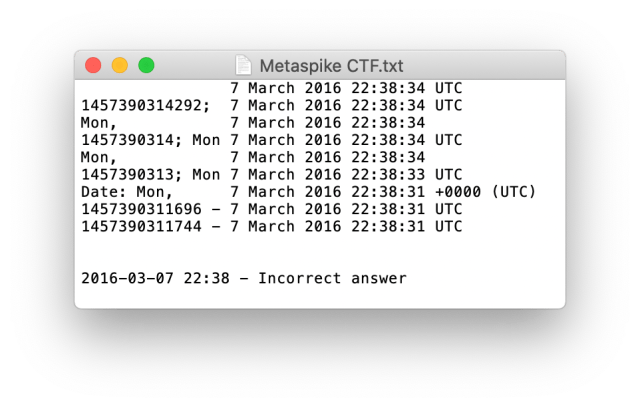
Image source: ThinkDFIR
Frequently Asked Questions
This is a redirect code used by Yahoo's modern "Norrin" architecture. It typically appears when there is a session conflict, such as having multiple accounts open or having corrupted browser cookies. It is a signal for the server to re-verify your login state.
No, you cannot manually change this string. It is automatically generated by Yahoo's servers based on the browser and operating system you use to access the web interface. If you want a different
X-Mailer
header, you would need to use a third-party app like Outlook or Thunderbird.
Technically, no. Ymail was a secondary domain launched by Yahoo in 2008 to offer more username availability. Both @yahoo.com and @ymail.com use the exact same "Norrin" backend and infrastructure, which is why the YMailNorrin identifier appears for both.
Usually, it does not. The official Yahoo Mail app for iOS and Android uses its own identifiers, such as
YahooMobile/1.0
. YMailNorrin is specifically tied to the web-based interface accessed through browsers like Chrome, Safari, or Firefox.
This is often due to the
appId=YMailNorrin
parameter. Yahoo uses this ID to protect its content. If you try to "hotlink" an image from your inbox to an external site, the request will fail because the YMailNorrin gatekeeper requires an active, authenticated session that the external site doesn't have.
The Bottom Line on YMailNorrin
YMailNorrin is a core component of the modern Yahoo Mail experience. While it may look suspicious at first glance, it is a vital tool for both system stability and security verification. Here are the key takeaways:
- It is a legitimate identifier for Yahoo’s modern web-app architecture, known internally as "Norrin."
- It is not a virus , though malware may sometimes mimic the string to hide its activity.
- It is a powerful forensic tool used to verify the authenticity of emails by checking browser and version consistency.
- Login errors involving "norrinuser" are almost always caused by cookie conflicts and can be fixed by clearing your browser data.
-
Version numbers matter
; the
WebServicebuild version can prove if an email header was forged or is genuine. - It acts as a gatekeeper for Yahoo's API and CDN, ensuring that only authorized users can access attachments and images.
If you encounter a login loop, your first step should always be to clear your Yahoo-specific cookies and disable any browser extensions that might be masking your identity.
-
Topic: Automated Malware Analysis Report for https://mobile.mail. ...https://www.joesandbox.com/analysis/794989/0/html?download=1
-
Topic: https://mail.yahoo.com/d/folders/1?reason=norrinuserhttps://mail.yahoo.com/d/folders/1?reason=norrinuser
-
Topic: Metaspike CTF – Week 1 – “It's legit, honest!”https://thinkdfir.com/2020/12/21/metaspike-ctf-week-1-its-legit-honest/

How to Access Your AOL Mail Inbox and Fix Common Login Problems
Access your AOL Mail inbox, fix login errors, and set up IMAP settings. Learn how to use Passkeys and recover old accounts without a phone number.


How to Use the inurl: Search Operator for SEO Audits and Site Security
Learn to use the inurl: operator for SEO audits and security. Fix errors and master advanced search strings for 2026.


How to Sign In to Your MSN Email Account and Fix Common Login Problems
Access your @msn.com email. Fix login loops, recover old accounts, and manage Microsoft storage with this troubleshooting guide.